Regular lorry-sim players with small desks
You mainly drive simulated lorries or other heavy vehicles and want to check whether a truck-style wheel position can be mounted securely, then removed when you need the desk for something else.


For lorry simulation at a small desk, check the mounting edge and gaming platform before choosing a wheel. A Thrustmaster SimTask pack offers an adjustable, flatter wheel position and spinner knob if its 15–50 mm clamp range fits your desk; a Logitech G wheel is an alternative for mixed driving games and an optional shifter, while the appropriate MOZA R3 version suits players who prioritise direct-drive feedback over a truck-style mount.
You mainly drive simulated lorries or other heavy vehicles and want to check whether a truck-style wheel position can be mounted securely, then removed when you need the desk for something else.
You want one compatible wheel for different driving games and may want room to add a separately mounted H-pattern shifter.
You give greater priority to a compact direct-drive setup and pedal placement than to a dedicated truck-style wheel mount, provided the clamp and controls fit your space.
Start with the clear mounting space on your desk, then match the exact wheel version to your platform. Once those conditions are met, decide whether a truck-style steering position, an optional shifter or direct-drive feedback matters most to you.
| Concern | What to check | Who this matters to |
|---|---|---|
| Desk fit and storage | Measure the unobstructed edge where the clamp will sit. Thrustmaster specifies a 15–50 mm desk-thickness range for the SimTask Steering Kit. | If I need the desk for other tasks, the wheel must mount securely and come off without leaving the workspace unusable. Around 31% of consumers put desk fit and storage first. |
| Truck-style steering | Check the available steering range and whether the mount offers the wheel angle you want. Thrustmaster specifies 270°–900° rotation for the T128 and an adjustable, flatter position for the SimTask kit. | For repeated low-speed manoeuvres, I want a wheel position and controls that suit how I drive simulated lorries. Roughly 25% of consumers make truck-style control their primary concern. |
| Platform and controls | Match the exact PC, Xbox or PlayStation variant, then check support for your simulator and any intended accessory. | A wheel that fits my desk is little use if its console version or planned shifter will not work with my setup. About 25% of consumers put compatibility first. |
| Feedback and upgrades | Decide whether direct drive matters more than a truck-style mount, and check the supplied pedal configuration before planning additions. | If steering feedback is my priority, I can consider a more general-purpose wheel while allowing space for the controls I may add later. Around 19% of consumers put feedback and upgrades first. |
A drawer, frame or cable tray can obstruct a mounting point even when the desktop itself is within a clamp's stated thickness range. Thrustmaster specifies 15–50 mm for its SimTask Steering Kit.
Measure the exposed edge and the clearance beneath it at the position where you intend to drive. Check the chosen clamp's requirements rather than forcing it onto an obstructed edge.
Logitech G29 and G920 target different console platforms. Thrustmaster's two SimTask pack versions and MOZA's PC and Xbox/PC R3 bundles also need to be distinguished.
Check the full variant name against your platform, intended simulator and any accessory you plan to use.
MOZA specifies a 3.9 Nm direct-drive base for the R3, but its supplied GT-style wheel and two-pedal bundle answer a different need from the flatter mount and spinner knob in Thrustmaster's SimTask packs.
Choose according to whether steering feedback or heavy-vehicle wheel position matters more to you.
A different rim or clutch control would mean accommodating additional compatible hardware.
A table-clamped shifter needs its own clear, stable location alongside the wheel. Logitech G describes built-in clamps for its Driving Force Shifter.
Before adding one, lay out where the wheel, shifter, keyboard and mouse will go on the desk.
Its T128 SimTask packs address desk-mounted lorry simulation with a heavy-vehicle-oriented steering position. The Xbox/PC and PlayStation/PC packs are different platform versions.
The G29 and G920 are conventional wheel-and-pedal options for players who also drive in racing games.
The R3 is a compact direct-drive route for PC, with a separate Xbox/PC bundle for Xbox players.
These choices include a truck-oriented Xbox/PC pack, a Windows truck-control system and conventional wheel-and-pedal sets. Compare each one with your desk edge, platform and preferred controls rather than treating the different layouts as interchangeable.
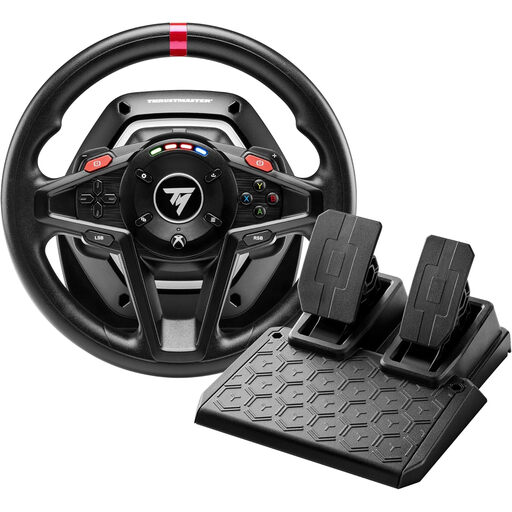 Image unavailable
Consider this pack if lorry simulation is your main use and you want an adjustable, flatter wheel position. It combines the T128 wheel, SimTask mount and T2PM pedals; Thrustmaster specifies a 15–50 mm desk-thickness range for the mount. Measure the clear mounting edge and check support for your simulator.
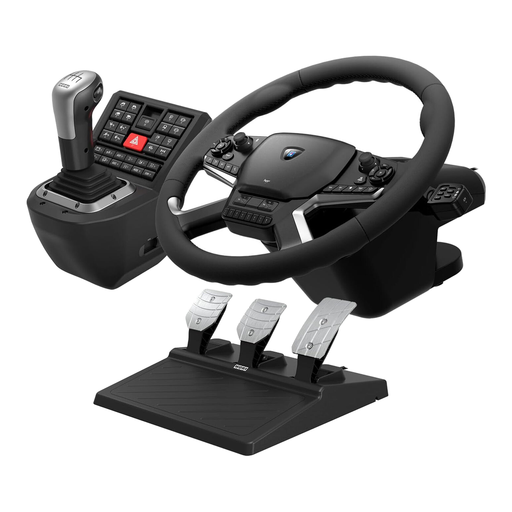 Image unavailable
This Windows truck-control option is worth considering if a separate shifter is part of your planned desk layout. Before choosing it, check the space needed for each control, the clamp fit and compatibility with your particular simulator.
 Image unavailable
This conventional wheel-and-pedal set may suit Xbox or PC players who also want to use the wheel for racing games. Check your lorry simulator's device support and the clamp's fit at your intended desk position before ordering.
 Image unavailable
Consider this conventional T128 set if you use PlayStation or PC and do not need a SimTask pack's truck-style mount. Thrustmaster specifies 270°–900° rotation for the T128; check the mounting hardware, desk fit and support for your simulator before choosing this set.
It is specified for desk or table edges 15–50 mm thick, but thickness alone does not establish fit. Measure the exposed edge where the clamp will sit and check for a drawer, frame or cable tray beneath it.
Thrustmaster lists the T128 SimTask Pack for PC, Xbox Series X|S and Xbox One, and the T128-P SimTask Pack for PC, PS5 and PS4. Check the exact pack name and your simulator's device support before ordering.
Not necessarily: choose controls according to the gear-selection options in your simulator and what you want to use. If you plan to add Logitech G's Driving Force Shifter to a compatible wheel, allow a second secure mounting point on the desk.