For quiet live-album listening, choose around the detail you care about most: adjustable tonal balance, a left/right stereo presentation or control over the room’s effect on sound. A compact active pair simplifies the system, room-calibrated monitors need more setup, and passive speakers with a loudness-equipped amplifier let you adjust the balance at soft levels. Check the source connections and space each route requires before choosing.
Who is this for?
Quiet-hour live-album listeners
If you listen late at night or share your space, you may want more control over bass and treble without raising the volume. Yamaha describes the A-S501 amplifier’s variable loudness control as a way to adjust that balance at soft levels; this route also requires passive speakers.
Listeners who value stereo placement
If instrument positions and crowd ambience are central to the recording for you, allow room for two speakers placed apart. KEF describes the separated speakers of its LSX II system as producing a true stereo soundstage.
Listeners dealing with a difficult room
If you listen at a desk or in a small room where the space affects what you hear, room adjustment may matter more than a simpler wireless setup. Genelec describes GLM calibration for its 8320A monitor as a means of compensating for room influences; the calibration kit is sold separately.
What should you check?
Start with the problem you notice at your usual quiet volume, then decide how much space and setup you can give the system. An amplifier’s loudness control, a separated stereo pair and room tuning address different needs; none removes the need to check your music-source connections.
| Concern |
What to check |
Who this matters to |
| Tonal balance at low volume |
Try the system at your normal listening level. Check whether loudness or EQ can be adjusted, and remember that an amplifier needs compatible passive speakers. |
If bass lines or cymbals seem less distinct when I turn a live album down, I want to adjust the balance without simply increasing the volume. Around 42% of consumers put quiet-level tonal balance first. |
| Stereo stage and crowd ambience |
Check that you are buying two speakers, or that a second matching speaker can form a stereo pair, and that you can place them apart. |
I want to follow where instruments and audience sounds sit in a concert recording, and I have space for left and right speakers. For around 33% of consumers, that stereo presentation is the primary need. |
| Room and setup control |
Check what room tuning requires and whether its kit is included. Confirm that your music source can use the system’s inputs. |
At my desk or in an awkward room, I would rather address the space’s effect on playback than keep changing speaker positions without a plan. Room and setup control comes first for around 25% of consumers. |
Buying pitfalls
-
Choosing by maximum power alone
A power figure does not tell you whether you will like the tonal balance at the volume you actually use. Yamaha identifies variable loudness control, rather than maximum output, as the A-S501 feature intended for soft-level listening.
Listen at your usual quiet volume where possible. If tonal adjustment is important, check how the control works and use it with restraint on different recordings.
-
Expecting one compact speaker to provide separated stereo
One cabinet does not put the left and right speakers in different positions. If the placement of instruments and audience sounds is your priority, that distinction matters more than convenience alone.
Make space for a pair and consider where each speaker will stand before ordering. KEF describes the LSX II’s soundstage in terms of its two cabinets being positioned apart.
-
Overlooking connections and accessories
The speaker itself may not complete the system you have in mind. Sonos specifies separate line-in accessories for the Era 300, while Genelec sells the 8320A as one monitor and its GLM Calibration Kit separately.
List the sources you will connect, then check inputs, speaker quantity, volume control and required accessories for the exact configuration you plan to buy.
A stereo monitor setup also means making room for a second unit and arranging a suitable source and level control.
Brands to consider for these setups
KEF
The LSX II is a compact active pair to consider if you can separate two speakers and want streaming plus TV or desktop connections without a separate amplifier.
- KEF lists AirPlay 2, Google Cast, Bluetooth 5.0, USB-C, HDMI ARC and a subwoofer output for the LSX II.
- Its full network setup requires home Wi-Fi and the KEF Connect app; the two cabinets still need suitable positions.
Sonos
The Era 300 suits a setup centred on wireless streaming and app-based room tuning. Choose a matching pair if separated stereo playback is the aim.
- Sonos lists Wi-Fi, Bluetooth, line-in capability and Trueplay tuning for the Era 300.
- One Era 300 is not a separated stereo pair. Its analogue line-in requires a separately sold adapter and auxiliary cable.
Genelec
The 8320A is a compact active monitor for listeners willing to plan a more studio-oriented system around room calibration.
- Genelec specifies GLM room calibration and an XLR analogue input for the 8320A.
- It is sold as one monitor. Stereo listening needs two, a suitable source and volume control; calibration also requires a separately sold GLM Calibration Kit.
Yamaha
The A-S501 is an integrated amplifier to consider if you want to select passive stereo speakers and adjust tonal balance manually at quiet levels.
- Yamaha specifies continuously variable loudness control, speaker terminals, and optical and coaxial digital inputs for the A-S501.
- It is not a complete speaker system: passive speakers, cabling and a suitable music source must be planned separately.
Joybuy products for desktop stereo listening
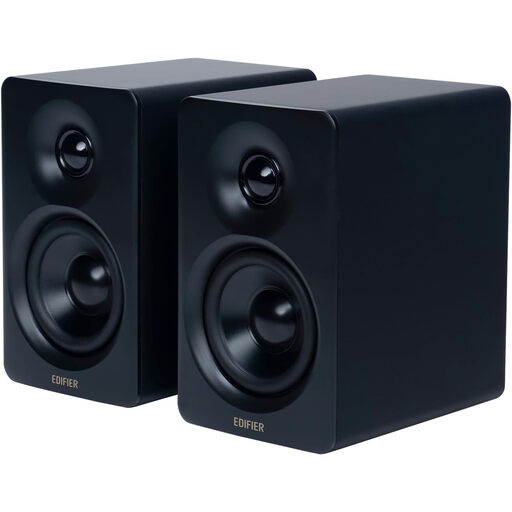
The Edifier M60 is a compact desktop speaker option with left and right channels and several source connections. If quiet-level tonal adjustment is essential to you, check its available controls before choosing it.
 No image available
Edifier M60 desktop speakers, Bluetooth 5.3, 66W RMS
Consider this desktop speaker system if you want left and right channels and a choice of wireless or wired sources for live albums.
The product name specifies Bluetooth 5.3, USB-C and AUX inputs, LDAC, 66W RMS, a 3-inch mid-bass driver and a 1-inch tweeter. Confirm whether its tonal controls offer the adjustment you want at low volume.
Joybuy
Frequently asked questions
Do I need two speakers for live concert albums?
Choose two speakers placed apart if left/right instrument positions and crowd ambience are priorities. One wireless speaker can be convenient for less focused listening, but it does not provide the same physical separation; KEF describes that separation as central to the LSX II’s true stereo soundstage.
How can I adjust a live album for quiet listening?
Try a modest loudness or EQ adjustment at your usual listening level rather than turning the volume up. Yamaha says the A-S501’s loudness control adjusts low- and high-frequency balance at soft levels; compare settings across recordings so the adjustment still sounds natural to you.
What do I need to connect an analogue source to a Sonos Era 300?
Sonos specifies its separately sold Line-In Adapter and a 3.5 mm auxiliary cable for Era 300 line-in. If the source is a turntable, also check whether the signal chain includes an appropriate phono preamp.
Is one Genelec 8320A enough for stereo listening and calibration?
No: Genelec sells the 8320A as one monitor, so a stereo system needs two. GLM calibration requires the separately sold GLM Calibration Kit; also check that your source can feed the monitors’ XLR analogue inputs with practical volume control.


