
24/7 Customer Support

Free returns

Same-day & Next-day Delivery

Quality Guaranteed

Unlock Your Welcome Offers: FREE Delivery | Up to 80% OFF | Free 30-day JoyPlus trial
Download the APP
Juggling a laptop bag, a separate lunch container and your personal items on a busy commute can be a daily struggle. The promise of a single, integrated lunch backpack is appealing, offering a streamlined solution for professionals and students alike. However, the market is filled with options that often over-promise and under-deliver, leading to disappointment and wasted money.
As a Joybuy Product Recommendation Officer, my role is to help you navigate these choices by highlighting what truly matters. Before you buy, it's crucial to understand the common design flaws that can render a bag impractical within months.
Many bags look the part online, but fail in daily use. Here are the three most frequent issues we see and how to spot them:
backpack with lunch compartment typically offers a more modest 2-4 hours of temperature maintenance. This is perfectly adequate for the morning commute to the office or university, but it's important to have realistic expectations. The thickness and density of the foam insulation are the real indicators of performance.insulated laptop backpack must have substantial, dedicated padding around the computer compartment.To ensure you invest in a bag that serves you well, focus on these three core parameters. They are the non-negotiable elements that separate a durable, functional bag from a short-lived one.
The effectiveness of the cooler section hinges on more than just a shiny interior. Look for descriptions that specify the materials used. A quality cooler backpack for work will feature a liner made from PEVA or food-grade aluminium foil, which is easy to clean and helps prevent odours. Crucially, this should be paired with a layer of high-density foam insulation (often 5-8mm thick). This combination is what provides meaningful temperature retention for your lunch and ensures the compartment is robust enough for daily use.
Your laptop is likely the most valuable item in your bag. Do not settle for a simple fabric divider. A well-designed backpack will feature a separate, padded laptop compartment. Check for these features:
A bag designed for daily carry must be comfortable and practical. For the UK commuter, a water-resistant exterior fabric (like high-density polyester or Oxford cloth) is essential for protection against unexpected showers. Other features that significantly improve usability include:
Backpack with USB Port: This allows you to connect a power bank inside the bag to an external port, offering a convenient way to charge your phone on the move.Based on these practical criteria, we've matched several products to different user needs. Instead of a one-size-fits-all approach, consider which of these profiles best describes your daily routine.
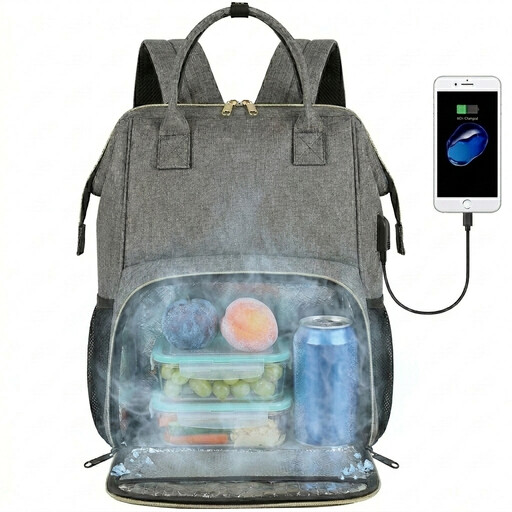
Why This Fits Their Persona: This is an ideal all-rounder for the office worker, teacher or student. It balances a professional, unisex look with the practical features needed for a 9-to-5 day, including a dedicated laptop sleeve and a reasonably sized cooler section.
It avoids unrealistic expectations by stating a 2-4 hour insulation time, which is practical for a daily commute. The insulated compartment is also described as leak-proof and made with a cleanable aluminium foil liner.
Features a built-in USB port for on-the-go charging and a hidden anti-theft pocket on the back, adding security for valuables on public transport.
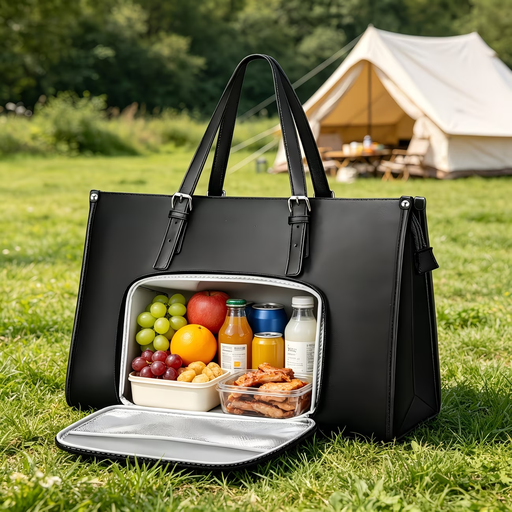
Why This Fits Their Persona: For those who prefer a more formal look than a rucksack, this tote bag offers a sophisticated alternative. Its PU leather construction provides a professional appearance suitable for corporate environments, while still integrating a discreet insulated lunch pocket.
It avoids compromising on device safety by including a separate, padded laptop sleeve within its multi-compartment design, ensuring the laptop is protected from both impacts and the contents of the lunch section.
The convertible design with an adjustable handle allows it to be carried as a shoulder bag or a handbag. The waterproof PU leather is also easy to wipe clean, maintaining its smart appearance.
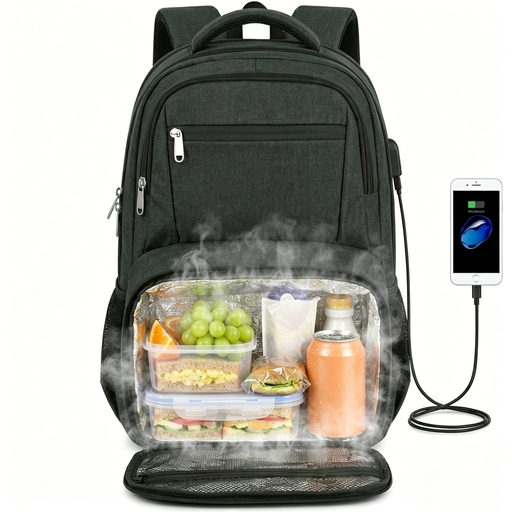
Why This Fits Their Persona: This bag is built for those who carry more. With a compartment that fits up to a 17.3-inch laptop and a large, 10-can capacity insulated section, it's suited for users with larger tech, bigger appetites or those who need to pack for a long day.
It addresses the issue of compromised space by featuring a collapsible lunch compartment. When not in use, it can be compressed to maximise the main storage area, offering true versatility rather than a fixed, bulky design.
This is a travel-ready men's or women's work bag. Its TSA-friendly design allows the bag to open 180 degrees for easier airport security checks, and it includes a luggage strap and anti-theft pocket.
We have compiled a complete, real-time list of products that fully satisfy these strict selection criteria and UK safety regulations.
For most bags with a PEVA or aluminium foil liner, cleaning is straightforward. After emptying the compartment, simply wipe the interior with a damp cloth and a small amount of mild washing-up liquid. Wipe again with a clean, damp cloth to remove any soap residue and leave it open to air dry completely before closing to prevent odours. Avoid using harsh chemicals or abrasive scrubbers, and never submerge the entire backpack in water.
This depends on the bag's insulation quality, the initial temperature of the food, and the ambient temperature. Most integrated lunch backpacks will maintain a warm temperature for 2-4 hours. For best results, heat your food until it is piping hot just before you leave, and place it in a pre-warmed insulated food flask before putting it in the backpack. This will significantly extend the time it stays warm.
Yes, these are designed with safety in mind. The USB port on the exterior is simply a pass-through connector; the actual power bank is stored safely inside the bag. The external port itself is generally water-resistant and often covered by a small flap for protection. As long as the backpack's main fabric is water-resistant, your power bank and other electronics inside will remain dry during a typical British downpour. However, it is not advisable to use the charging port during very heavy, prolonged rain.