
24/7 Customer Support

Free returns

Same-day & Next-day Delivery

Quality Guaranteed

Unlock Your Welcome Offers: FREE Delivery | Up to 80% OFF | Free 30-day JoyPlus trial
Download the APP
Navigating the world of premium laptops can be a challenge. With the arrival of the MacBook Air 2026 lineup, it's easy to get drawn in by impressive specifications and sleek designs. However, making the right choice requires looking beyond the marketing and understanding what you truly need. Many buyers fall into common traps, leading to regret and wasted money. This guide is designed to help you sidestep those pitfalls and select a machine that genuinely fits your life in the UK.
As a Joybuy Product Recommendation Officer, my role is to cut through the clutter and provide clear, practical advice. Let's break down the key decisions you'll face.
Before looking at models, it's crucial to be aware of the most frequent purchasing errors.
To make an informed decision, focus on the specifications that will have the biggest impact on your day-to-day experience.
The 2026 lineup introduces two distinct chips. Understanding their purpose is key.
Your choice between a 13-inch and 15-inch screen directly influences how and where you can work.
These two specifications are where many people overspend.
To help you find the right fit, we've matched specific models to common user profiles in the UK.

Why This Fits Their Persona: This model is ideal for students and professionals whose work revolves around documents, presentations and web browsing. Its A18 Pro chip is highly efficient, and the lightweight 13-inch frame is perfect for carrying across campus or on the daily commute.
It directly counters the "more is more" fallacy by providing exactly the performance needed for everyday tasks without the added cost of the M5 chip, which would be underutilised.
Excellent portability and a lower entry price point make it a smart, practical choice for budget-conscious buyers who still want a premium Apple experience.
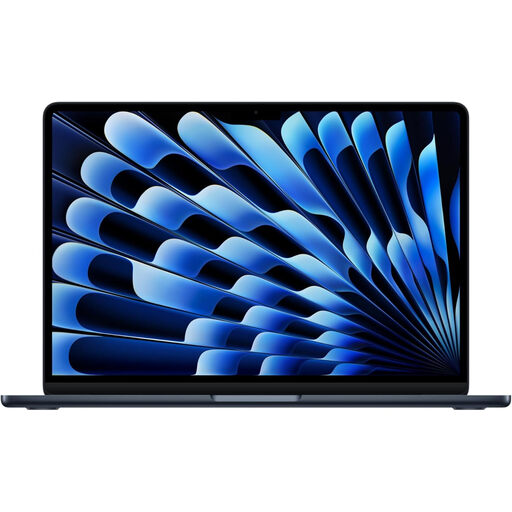
Why This Fits Their Persona: For the professional who needs to balance performance with portability, this configuration is a strong contender. The M5 chip and 16GB of memory handle demanding business applications and heavy multitasking, while the 13-inch size remains easy to manage on the go.
It avoids the trap of choosing the wrong screen size. It provides M5-level power in a compact form, acknowledging that for a mobile professional, portability is just as important as performance.
The combination of the MacBook Air M5 chip and 16GB of memory delivers a significant performance uplift for intensive work, all within the classic, highly portable 13-inch design.
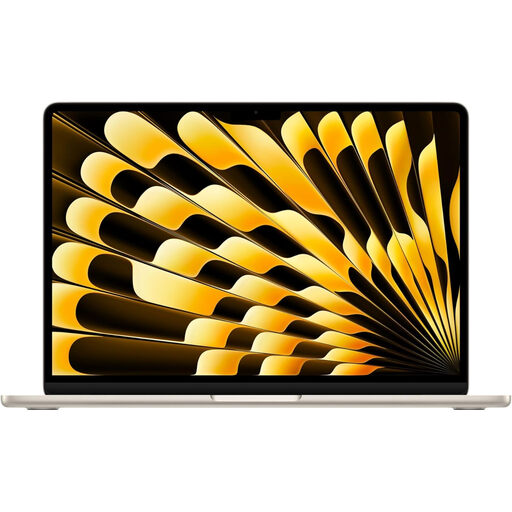
Why This Fits Their Persona: Creatives and power users need screen space and storage. This 15-inch model provides a large Liquid Retina display for detailed work, while the M5 chip handles demanding software. The 1TB SSD offers ample room for large project files, photos and video clips.
This choice directly prevents the buyer's remorse of selecting a smaller screen that hampers productivity. It correctly identifies that for certain workflows, a larger display is a non-negotiable feature.
The spacious 15-inch Liquid Retina display is the main draw, providing a comfortable and immersive workspace. Paired with a large 1TB SSD, it's a capable machine for creative projects.
We have compiled a complete, real-time list of products that fully satisfy these strict selection criteria and UK safety regulations.
For most people, 512GB is the new sweet spot. It provides enough space for the operating system, a healthy number of applications and your most important files without forcing you to constantly manage storage. If you heavily rely on cloud services like iCloud or Google Drive and stream most of your media, you can comfortably use a 256GB model. Only consider 1TB or more if you are a creative professional who works with large video files or extensive photo catalogues locally.
While it is larger, the MacBook Air design remains impressively thin and light. For many, the improved productivity from the larger screen is worth the slightly bigger footprint. If your commute involves crowded public transport where space is at a premium, the 13-inch model remains the more practical choice. We recommend considering your typical journey and workspace before deciding.
Think of it as a difference in purpose. The MacBook Air with the M5 chip is built for performance, aimed at users who need to run more demanding applications and multitask heavily. The MacBook Neo with the A18 Pro chip is built for efficiency, perfect for everyday tasks like email, browsing and office applications, where long battery life and portability are the main priorities.