
24/7 Customer Support

Free returns

Same-day & Next-day Delivery

Quality Guaranteed

Unlock Your Welcome Offers: FREE Delivery | Up to 80% OFF | Free 30-day JoyPlus trial
Download the APP
Choosing an Apple MacBook is rarely as simple as selecting the newest chip or the largest storage option. UK shoppers also need to consider screen size, memory, charging requirements, portability and the type of software they use every day.
Marketing can make every model sound suitable for every task. In practice, a lightweight MacBook Air may be a sensible choice for study and office work, while a MacBook Pro is designed around more demanding workloads. The right purchase depends on matching specifications to how you actually work.
A MacBook Pro with an M5 Pro or M5 Max chip can be suitable for professional video editing, 3D work, software development and other sustained workloads. However, web browsing, Microsoft 365, video calls and streaming do not normally require that level of hardware.
For many students, remote workers and everyday users, a MacBook Air M5 with 16GB memory provides a more practical balance of portability and capability.
A 512GB SSD may be sufficient for documents, coursework and cloud-based files. It can become restrictive if you keep large photo libraries, downloaded films, music projects or video footage locally.
A MacBook with 1TB SSD gives more working space, but storage upgrades can add considerably to the purchase price. Check your current laptop or cloud account before deciding.
Thin laptops often prioritise portability over connection variety. MacBook Air models include Thunderbolt ports and MagSafe charging, but users with SD cards, HDMI monitors or several USB devices may need a hub.
MacBook Pro models offer a broader selection, including Thunderbolt 5, HDMI and an SDXC card reader. Also check the box contents: some MacBook Pro listings include a USB-C to MagSafe 3 cable but require a separate USB-C power adapter.
The Apple MacBook Air M5 range uses a 10-core CPU, with configurations offering an 8-core or 10-core GPU. This is suitable for office applications, research, multitasking, everyday creative work and entertainment.
The Apple MacBook Neo uses an A18 Pro chip with a 6-core CPU and 5-core GPU. Its 8GB memory and compact 13-inch format make it more appropriate for everyday computing rather than demanding professional applications.
For heavier workloads, the Apple MacBook Pro M5 Pro and Apple MacBook Pro M5 Max provide higher CPU and GPU configurations, more unified memory options and support for multiple external displays. These specifications matter if you regularly edit high-resolution media, compile large projects or work with advanced graphics applications.
Memory affects how comfortably your MacBook handles several applications at once. A MacBook with 16GB RAM is a sensible starting point for students, professionals and remote workers who use browsers, office software, video calls and creative applications together.
The 24GB option can provide more headroom for larger files and demanding multitasking. By contrast, 8GB may suit lighter workloads but offers less flexibility for future software requirements.
A 13-inch MacBook Air is easier to carry between university, home, cafés and the office. Its 13.6-inch Liquid Retina display provides a useful working area while keeping the overall design compact.
A 15-inch MacBook Air offers more room for spreadsheets, split-screen documents and editing timelines without moving to the heavier MacBook Pro range. The 14-inch MacBook Pro is a useful middle ground for professional performance, while the 16-inch MacBook Pro is suited to users who prioritise a large working canvas and intensive performance over portability.

Why This Fits Their Persona: A compact option for UK students and home users focused on documents, browsing, streaming and online communication.
It avoids paying for Pro-level hardware when the intended workload is everyday productivity.
8GB memory, 512GB SSD, Touch ID and a 13-inch Liquid Retina display in a portable format.
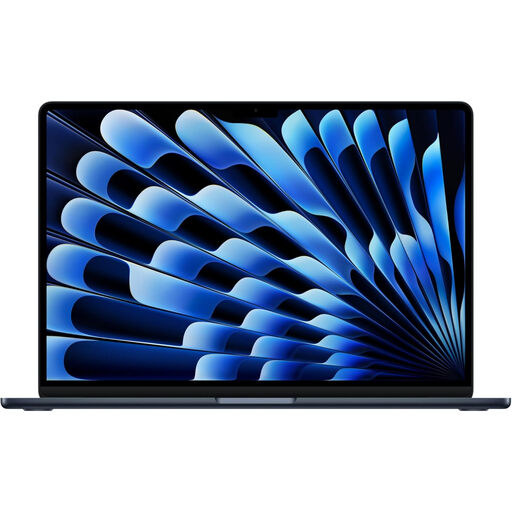
Why This Fits Their Persona: A portable premium configuration for professionals and mobile workers who want extra memory and local storage.
The 24GB memory and 1TB SSD reduce the need to compromise when multitasking or storing larger files.
10-core CPU, 10-core GPU, 24GB unified memory, 1TB SSD and a 13.6-inch Liquid Retina display.
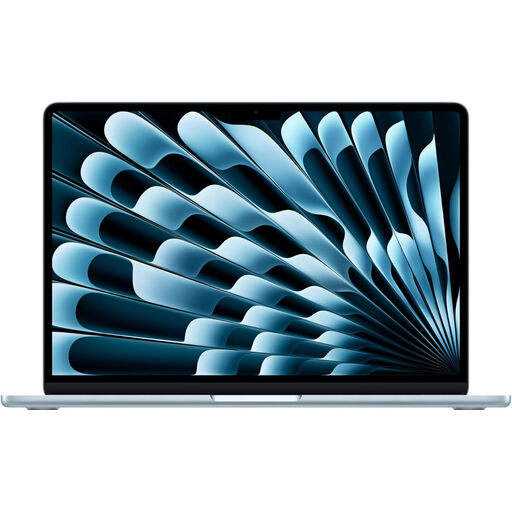
Why This Fits Their Persona: Suitable for home-office users, students and professionals who value a larger workspace for documents and split-screen tasks.
It provides a larger display without automatically moving to the heavier Pro format.
15-inch Liquid Retina display, 10-core CPU, 10-core GPU, 16GB memory and 1TB SSD.
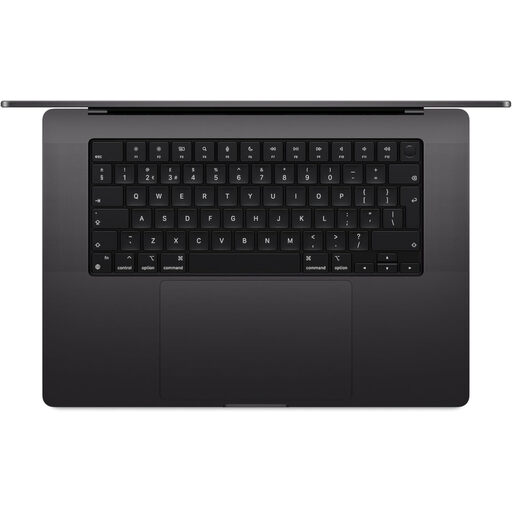
Why This Fits Their Persona: Aimed at creative professionals and technical users handling intensive projects, large assets or multiple displays.
Its higher memory, larger SSD and M5 Max configuration are aligned with demanding workloads rather than basic tasks.
18-core CPU, 32-core GPU, 36GB memory, 2TB SSD, Liquid Retina XDR display and Thunderbolt 5 connectivity.
Accessories should solve a specific limitation rather than simply increase the basket total. A privacy filter can be useful for commuters working in cafés, trains or shared offices. The HyperShield filter listed for MacBook Air 15-inch models uses magnetic attachment, a 30-degree viewing angle and an anti-reflective surface.
For charging, check the required wattage and UK plug compatibility before ordering. The MOVESPEED 140W USB-C charger provides multiple ports and up to 140W output, while a 100W USB-C GaN charger may suit MacBook Air users who also charge phones and tablets.
We have compiled a complete, real-time list of products that fully satisfy these strict selection criteria and UK safety regulations.
For many UK students, office users and remote workers, 16GB is a practical choice for browsers, documents, video calls and moderate creative work. Consider 24GB if you regularly use demanding applications or large files.
Actual lifespan depends on usage, battery condition, software support and physical care. Choosing sufficient memory and storage at purchase can help avoid an early upgrade when your workload grows.
Energy use varies with screen brightness, workload, connected accessories and charging habits. MacBook Air models are designed around efficient everyday use, while high-performance MacBook Pro configurations may draw more power during sustained intensive tasks.