
24/7 Customer Support

Free returns

Same-day & Next-day Delivery

Quality Guaranteed

Unlock Your Welcome Offers: FREE Delivery | Up to 80% OFF | Free 30-day JoyPlus trial
Download the APP
Choosing a new laptop, especially within the Apple ecosystem, can feel like navigating a minefield of marketing terms and incremental updates. The launch of the Apple MacBook Neo 13-inch for 2026 brings a fresh option to the table, but it also brings new questions. Before you decide, it is crucial to understand a few common pitfalls that can lead to buyer's remorse. Many shoppers end up overspending on features they will never use or underestimating the importance of core specifications that define the daily experience.
This guide, from your Joybuy Product Recommendation Officer, is designed to cut through the clutter. We will break down the key considerations for a lightweight Apple laptop and help you determine if the new MacBook Neo is the right fit for your needs, or if another option might serve you better.
When investing in a new device, it is easy to get swayed by impressive-sounding features. Here are three common traps to be aware of:
To make an informed decision, let's analyse the specifications that will have the most significant impact on your day-to-day use of a new 13-inch laptop for students or professionals.
The new A18 Pro chip is at the heart of the MacBook Neo 2026. This A18 Pro chip laptop features a 6-core CPU (Central Processing Unit) and a 5-core GPU (Graphics Processing Unit). In simple terms, the CPU handles general tasks and calculations, while the GPU manages graphics-intensive processes like video playback and light photo editing. For the target user, this configuration is engineered for high efficiency. It means fast, responsive performance for multitasking across applications like Safari, Pages and Microsoft Office, all while consuming less power to prolong battery life.
As a lightweight Apple laptop, the MacBook Neo's 13-inch form factor hits a sweet spot. It is large enough for comfortable productivity and media consumption on its vibrant Liquid Retina display, yet compact enough to be an effortless travel companion. This makes it an ideal choice for students moving between lectures, professionals commuting to the office or anyone who values an uncluttered workspace at home.
Beyond performance, the user experience is defined by physical interaction. The Magic Keyboard provides a comfortable and precise typing experience, essential for long essays or reports. The inclusion of Touch ID allows for secure and quick logins and payments. The new colour options, including the popular Indigo MacBook Neo, offer a chance to match your tech to your personal style.
To help you find the right fit, we have matched some options to different user profiles. This is not a definitive list, but a starting point based on common needs we see among UK shoppers.

Why This Fits Their Persona: This laptop is built for those who work and study on the move. Its combination of a lightweight chassis, efficient A18 Pro chip and long battery life makes it a reliable companion for lectures, commutes and off-site meetings.
It provides all the performance needed for daily productivity without the "Pro" price tag, directly countering the trap of overspending on unnecessary power.
Highly efficient performance for everyday tasks. Superb portability with its slim and light design. A vibrant Liquid Retina display for comfortable viewing.
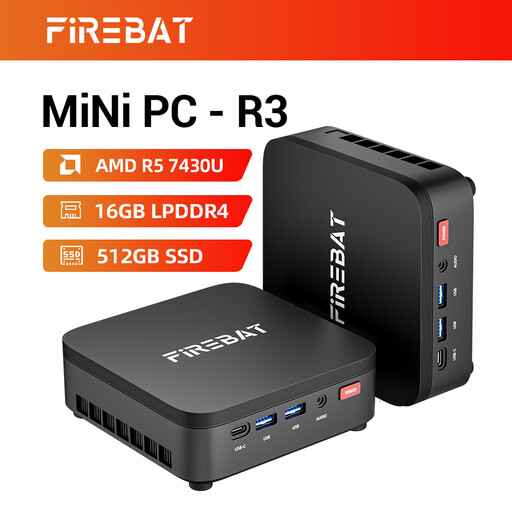
Why This Fits Their Persona: For those who primarily work from a fixed desk and already own a monitor, a mini PC offers exceptional value. It delivers powerful performance for business and study in a compact, silent package.
This option avoids paying the premium for portability that is not needed. It focuses investment on processing power for a dedicated home or office setup.
Strong performance from the AMD Ryzen 5 chip. Supports up to three 4K displays for extensive multitasking. Very compact and quiet operation.

Why This Fits Their Persona: For anyone starting a podcast, streaming or recording voice-overs, audio quality is paramount. This microphone is a significant upgrade over any laptop's built-in mic, offering professional features for a clear, rich vocal sound.
It prevents the common beginner mistake of relying on poor-quality integrated audio. Investing in a dedicated microphone is one of the most impactful upgrades for content creation.
Flexible USB and XLR connections for use with a PC or a professional mixer. Headphone jack for zero-latency audio monitoring. Handy mute button and gain controls.
We have compiled a complete, real-time list of products that fully satisfy these strict selection criteria and UK safety regulations.
For the intended user—students, mobile professionals and home users—8GB of unified memory is generally sufficient. Apple's A-series chips are highly optimised to use memory efficiently. This amount will comfortably handle web browsing with multiple tabs, video streaming, word processing and light photo editing. Users planning for heavy video editing or complex software development may want to consider models with more memory.
To get the most out of your MacBook Neo, a few accessories are highly recommended. A USB-C hub is almost essential for connecting to older USB-A devices, SD cards and external displays. A padded sleeve or case will protect your investment during transit. Finally, a good wireless mouse can provide more precision and comfort than the trackpad for long work sessions.
The Indigo MacBook Neo features a stunning matte finish. As with many dark, matte-surfaced electronics, it can be more prone to showing fingerprints and oils compared to lighter colours like silver. However, this is easily managed. A quick wipe with a clean microfibre cloth will typically remove any marks and keep the device looking pristine.