
24/7 Customer Support

Free returns

Same-day & Next-day Delivery

Quality Guaranteed

Unlock Your Welcome Offers: FREE Delivery | Up to 80% OFF | Free 30-day JoyPlus trial
Download the APP
A compact Apple laptop can be an appealing choice for university, commuting, remote work and everyday entertainment. However, the product name alone does not tell you whether a configuration will suit your workload. Before buying the Apple MacBook Neo 13-inch 2026, check the memory, storage and software requirements rather than relying on design or processor marketing.
The following guide explains the practical differences and common buying pitfalls, then matches selected laptops to different user profiles.
The Apple MacBook Neo A18 Pro chip is specified with a 6-core CPU and 5-core GPU, which is designed for everyday computing and multitasking. That makes it suitable for documents, web browsing, streaming, video calls and general administration.
However, processor branding does not automatically mean that every application will run equally well. Users working with large video projects, advanced 3D software, demanding engineering tools or intensive gaming should check the software’s macOS compatibility and hardware requirements first.
An 8GB Apple laptop can be appropriate for browser-based work, essays, presentations, email and streaming. It may feel less flexible if you regularly keep many browser tabs, creative applications and large files open together.
Memory is particularly important because buyers should not assume it can be upgraded later. If your course or job involves large datasets, virtual machines, professional editing or development environments, compare a higher-memory configuration before committing to the Neo.
The MacBook Neo 512GB SSD configuration provides considerably more room than a 256GB model for applications, coursework, photos and offline media. Still, storage can fill faster than expected once cloud-synchronised folders, downloads and creative files accumulate.
Avoid choosing storage based only on today’s needs. Check the size of your existing files and allow room for operating-system updates and future applications. External storage or cloud services can help, but they add cost and may be less convenient when travelling without reliable internet access.
The listed A18 Pro configuration combines a 6-core CPU, 5-core GPU and 8GB memory. This specification is aligned with everyday productivity: word processing, spreadsheets, web research, online communication, streaming and light creative tasks.
For students, the balance can be useful when portability matters more than workstation-level performance. Professionals should assess the applications they use daily, especially if they depend on Windows-only software or specialist plug-ins.
The 13-inch Liquid Retina display offers a compact viewing area with sharp visuals and vibrant colours, according to the supplied product details. Its size helps keep the laptop portable, but it also means less room for side-by-side documents than a 15- or 17-inch model.
For long study sessions, a larger external monitor may be worthwhile. Before purchasing, consider whether you usually work at a desk, in a library, on a train or from a café. A small screen is convenient in crowded spaces but may require more scrolling during spreadsheet and research work.
The MacBook Neo includes a Magic Keyboard with Touch ID. Touch ID can speed up device login and authentication, while the keyboard is designed for regular typing. This is useful for students moving between lectures and study areas, as well as remote workers handling frequent logins.
Remember that biometric security is a convenience feature, not a substitute for sensible account security. Use a strong account password, install system updates and avoid leaving the laptop unattended in public places.

Why This Fits Their Persona: A practical starting point for students and everyday users who want a lightweight Apple laptop with ample listed storage for coursework, browsing and streaming.
The 512GB SSD avoids the limited headroom of entry storage, while the clear 8GB specification makes the memory trade-off visible before purchase.
13-inch Liquid Retina display, 512GB SSD, Magic Keyboard and Touch ID in a portable format.
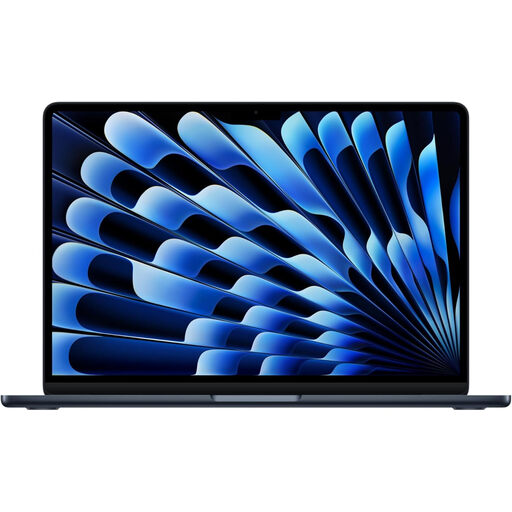
Why This Fits Their Persona: Suitable for users who want more memory for multitasking while keeping a slim 13-inch Apple design for commuting and travel.
Its listed 16GB unified memory provides more capacity than the Neo configuration for users who regularly keep several applications open.
16GB memory, 512GB SSD, Liquid Retina display, MagSafe charging and Thunderbolt 4 ports.
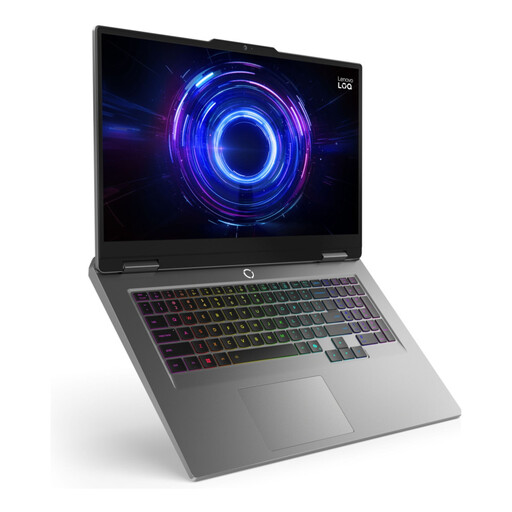
Why This Fits Their Persona: Better suited to users prioritising a large display, heavier multitasking, gaming or creative workloads over carrying convenience.
The 24GB memory and 1TB SSD make its heavy-use positioning clear, avoiding the assumption that a compact everyday laptop is suitable for demanding graphics workloads.
17.3-inch Full HD 165Hz IPS display, 24GB DDR5 memory, 1TB SSD and dedicated RTX 4050 graphics.
We have compiled a complete, real-time list of products that fully satisfy these strict selection criteria and UK safety regulations.
The Indigo MacBook Neo offers the same listed core specification as the Silver and Citrus versions, with the finish being the main visible difference. Choose colour based on preference rather than expecting a performance change. Blush, Indigo, Citrus and Silver are listed as available finishes, although availability can vary.
For a portable laptop for students or Apple laptop for everyday use, the Neo is most appropriate when your work centres on browser applications, documents, video calls, media and general organisation. If you need extensive memory, dedicated graphics or a larger screen, compare alternatives before ordering.
It can suit essays, research, presentations, online learning, email and streaming. Check whether your course requires Windows-only applications, specialist software or more than 8GB of memory.
Actual lifespan depends on battery use, software demands, storage management and physical care. Keeping macOS updated, using approved charging accessories, avoiding moisture and protecting the screen can support dependable long-term use. No fixed lifespan should be assumed.
Electricity use depends on charging frequency, workload and local energy tariffs. A compact laptop may be convenient for mobile working, but check the supplied charger, charging requirements and your expected daily usage rather than assuming a fixed running cost.