
24/7 Customer Support

Free returns

Same-day & Next-day Delivery

Quality Guaranteed

Unlock Your Welcome Offers: FREE Delivery | Up to 80% OFF | Free 30-day JoyPlus trial
Download the APP
Investing in a new MacBook Pro is a significant decision for any professional, creative or student in the UK. It’s a powerful tool designed for demanding tasks, but navigating the options can be complex. It's easy to fall into common traps, leading to unnecessary expense or a setup that doesn’t quite meet your needs. As your Joybuy Product Recommendation Officer, my role is to help you sidestep the marketing jargon and focus on what truly matters for your workflow and budget.
Before you commit, let's look at a few common pitfalls that buyers often encounter:
To make an informed choice, it helps to understand a few key parameters beyond the headline features. These are the non-negotiable details that will define your day-to-day experience with a new professional laptop.
The heart of the MacBook Pro is its M5 Pro chip. When you see specifications like "15-core CPU" or "16-core GPU," it's a measure of the chip's processing capacity.
Choosing the right balance prevents you from paying for performance you don't need.
The MacBook Pro uses unified memory, which is a single pool of high-speed memory accessible by both the CPU and GPU. This is more efficient than traditional separate RAM. For a professional workflow in 2026, 24GB is a solid baseline. It ensures smooth performance when running multiple demanding applications, editing large files or working with advanced on-device AI features without slowdowns.
A professional machine needs professional connectivity. The inclusion of Thunderbolt 5 ports, an HDMI port and an SDXC card slot on the 14 inch MacBook Pro means you can connect multiple high-resolution displays and transfer files from cameras without needing a tangle of adapters. To complete your setup, consider a reliable wireless mouse for Mac for better ergonomics. Equally important is a purpose-built laptop backpack or anti-theft rucksack to safeguard your device on the move.
Instead of a one-size-fits-all approach, we've matched specific products to different user needs. This helps ensure your choice is a practical fit for your lifestyle.
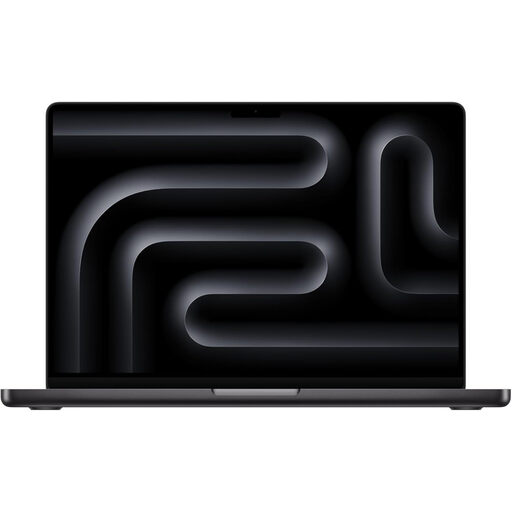
Why This Fits Their Persona: For UK-based video editors, developers and data scientists, performance is non-negotiable. This configuration is built to handle intensive workloads like 8K video rendering, complex code compilation and large-scale data analysis without compromise.
This model directly avoids the "Configuration Conundrum" by providing top-tier specifications, ensuring you won't face performance bottlenecks when deadlines are tight.
The high 18-core CPU and 20-core GPU count delivers exceptional speed for professional applications. The 2TB SSD provides ample storage for large project files.
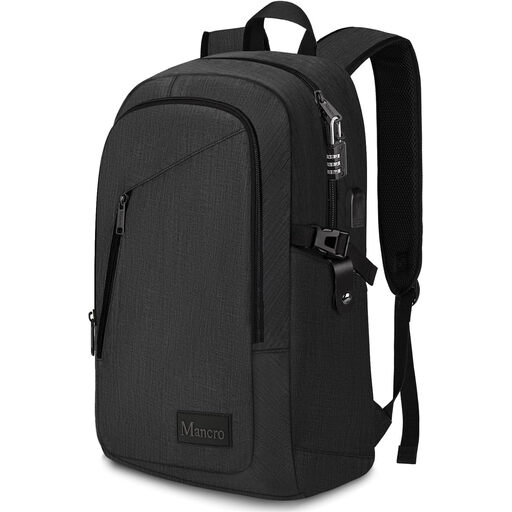
Why This Fits Their Persona: For anyone travelling on busy trains or through crowded city centres in the UK, protecting their tech is a top priority. This backpack is designed for peace of mind, with features that help secure your belongings during a daily commute or business trip.
This directly addresses the "Forgetting Protection" pitfall by offering a purpose-built solution. Its dedicated anti-theft features make it a proactive choice, not an afterthought.
Features an anti-theft lock and durable metal zippers. The padded compartment fits up to a 15.6-inch laptop, providing ample space for a 14-inch MacBook Pro and accessories.

Why This Fits Their Persona: A student moving between lectures, the library and home needs a practical, durable and lightweight bag. This backpack is designed for convenience, with easy access to a laptop and protection from unexpected rain showers.
This bag's design focuses on practicality. The dedicated side zip for laptop access means you don't have to unpack your entire bag in a crowded lecture hall, a common frustration with generic backpacks.
Crafted with 900D tear-resistant fabric and a Level 4 water-repellent finish. The dedicated compartment fits a 14" laptop perfectly, and a side zip allows for quick access.
We have compiled a complete, real-time list of products that fully satisfy these strict selection criteria and UK safety regulations.
1. Does the 2026 MacBook Pro come with a charger in the UK? No, the 14-inch MacBook Pro typically includes a USB-C to MagSafe 3 charging cable, but the power adapter is sold separately. To charge the device, you will need a USB-C power adapter capable of delivering at least 70W. For the fastest charging performance, a 96W adapter is recommended.
2. What is the practical difference between the M5 Pro CPU options? The difference lies in how many tasks the laptop can handle efficiently at once. A model with more CPU cores (e.g., 18-core) will be noticeably faster when performing parallel processes like compiling software, running virtual machines or exporting multiple files simultaneously. For users focused on single-application performance like photo editing or writing, a model with fewer cores (e.g., 15-core) is often sufficient.
3. How do I choose the right laptop bag for a 14-inch MacBook Pro? Look for a bag with a dedicated, padded laptop compartment. Check the material for durability and water resistance—a must for UK weather. For a snug fit, choose a bag designed for 14-inch laptops. However, a bag rated for 15.6 inches, like an anti-theft rucksack, can provide useful extra space for your charger, a wireless mouse for Mac and other essentials without being overly bulky. A lightweight laptop bag is ideal if portability is your main concern.