
24/7 Customer Support

Free returns

Same-day & Next-day Delivery

Quality Guaranteed

Unlock Your Welcome Offers: FREE Delivery | Up to 80% OFF | Free 30-day JoyPlus trial
Download the APP
As a content creator or vlogger using an iPhone 15 or 16 Pro, you know the power of shooting in ProRes. The quality is exceptional, but it comes at a cost: storage space. A few minutes of 4K ProRes footage can consume gigabytes, quickly filling your phone's internal memory and halting your creative flow. This is where a high-speed external drive becomes essential, and a magnetic portable SSD offers one of the most seamless solutions for mobile filmmaking.
This guide is designed to help you understand the key features to look for in an external drive for your iPhone. We will explore some practical options tailored for different needs, from direct on-the-go recording to long-term archival storage, helping you make an informed choice.
Choosing the right storage isn't just about capacity. For demanding tasks like shooting high-resolution video, several technical factors come into play.
For recording video directly from your phone, a Solid State Drive (SSD) is non-negotiable. Unlike traditional Hard Disk Drives (HDDs) with moving parts, SSDs use flash memory, enabling significantly faster read and write speeds. This is crucial for a ProRes recording external drive, which needs to handle a constant, high-bitrate data stream without dropping frames. Look for drives with a USB 3.2 Gen 2x2 interface, which can offer theoretical speeds up to 2,000MB/s, ensuring your high speed portable SSD can keep up with 4K 60fps recording and beyond.
ProRes files are large, so capacity matters. A 10-minute 4K ProRes HQ video at 30fps can be over 100GB. A 1TB portable SSD is often a practical starting point for serious mobile videographers, providing enough space for several projects before needing to offload footage. Consider your typical shooting duration and file sizes to determine if 1TB is sufficient or if you need to look at larger capacities.
While any compatible SSD can work, a magnetic portable SSD is specifically designed for the modern content creator's workflow. These drives attach securely to the back of an iPhone 15 Pro or Pro Max, creating a compact and stable rig. This eliminates the inconvenience of a dangling drive and tangled cables, making it a superior SSD for mobile filmmaking, especially for handheld shots or when using a gimbal.
Here are a few recommendations that cater to different storage needs, from direct mobile recording to large-scale data archiving.
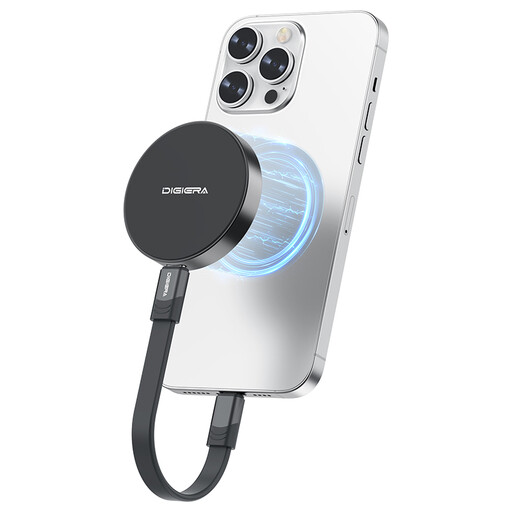
Why It Stands Out The DigiEra LPS2000M-1 is purpose-built for the exact needs of iPhone 15 and 16 Pro users. Its magnetic attachment system provides a secure, 'one-click' connection to the back of your phone, creating an integrated and stable recording setup. With a USB 3.2 Gen 2x2 interface, it delivers read speeds up to 2000MB/s, making it more than capable of handling direct 4K ProRes recording at high frame rates.
Pros
Who is it for? This drive is the ideal choice for content creators, vloggers and mobile filmmakers who need a fast, reliable and convenient way to record high-resolution video directly from their iPhone 15/16 Pro or Pro Max.

Why It Stands Out While not an SSD for direct recording, the My Passport Ultra offers a vast 4TB of storage in a slim, portable package. It’s an excellent secondary drive for offloading and backing up completed projects from your laptop or primary SSD. It connects via USB-C and includes 256-bit AES hardware encryption, providing a secure way to transport and store large volumes of data.
Pros
Who is it for? This is for users who need a high-capacity, portable solution for backing up their computer, archiving finished creative work or transporting large files between machines. It serves as a reliable data vault rather than a high-speed recording drive.
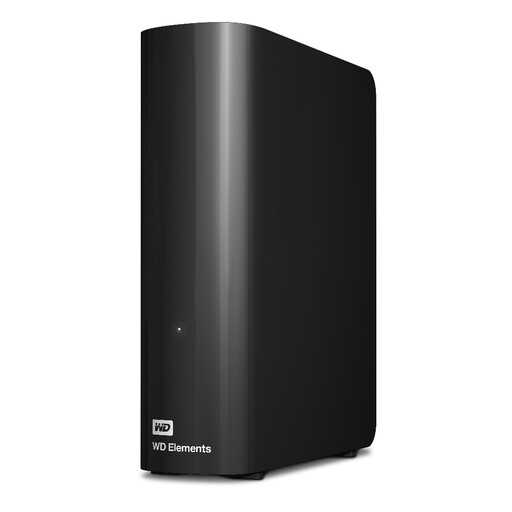
Why It Stands Out When your collection of projects grows beyond what portable drives can handle, the WD Elements Desktop offers a colossal 22TB of storage. This is a stationary, mains-powered drive designed to be the central archive for your entire digital life. It provides a simple, plug-and-play way to back up everything from your main computer, ensuring your valuable footage and files are safely stored for the long term.
Pros
Who is it for? This drive is for serious content creators, photographers and small businesses that need a vast, centralised repository for archiving massive amounts of data. It is a stationary solution for your home or office, not for on-the-go use.
Storage needs are personal, and the right solution depends entirely on your workflow. If these specific models aren't quite what you're looking for, you can explore a wider range of options on our External hard drive computer category page.
Not all SSDs are suitable for direct ProRes recording. The drive must have a sustained write speed that can keep up with the video data stream. Apple recommends speeds of at least 220MB/s. For higher quality 4K 60fps recording, a drive with significantly higher write speeds, like the DigiEra LPS2000M-1, is a more reliable choice to prevent dropped frames.
The main difference is speed. USB 3.2 Gen 2 offers speeds up to 10Gbps (around 1,250MB/s), which is what the iPhone 15 Pro's USB-C port supports. USB 3.2 Gen 2x2 doubles this to 20Gbps (up to 2,500MB/s). While an iPhone 15 Pro won't reach the full 20Gbps speed of a Gen 2x2 drive, using such a drive ensures you are maximising the phone's 10Gbps capability. You can then benefit from the full 20Gbps speed when transferring files from the drive to a compatible computer.
The primary advantage is convenience and stability. A standard external SSD will dangle from your phone via a cable, which can be awkward and puts stress on the port. A magnetic SSD attaches firmly to the back of the phone, creating a single, solid unit that is much easier to handle, especially when shooting handheld or moving around.