
24/7 Customer Support

Free returns

Same-day & Next-day Delivery

Quality Guaranteed

Unlock Your Welcome Offers: FREE Delivery | Up to 80% OFF | Free 30-day JoyPlus trial
Download the APP
As a mobile content creator, you know the frustration all too well. You’re in the middle of a shoot, capturing stunning 4K ProRes video on your iPhone, when the dreaded "iPhone Storage Full" notification appears. The creative flow is broken, and you’re left scrambling to offload files. A magnetic portable SSD is designed to solve this exact problem, offering a seamless way to expand your storage and record directly from your device.
This guide will walk you through the key considerations when choosing an external drive and present some of our top recommendations for 2026. We'll cover everything from high-speed drives for professional videography to reliable options for everyday backups, helping you find the right fit for your workflow.
Navigating the world of external storage can be complex. Here are a few practical points to consider before making a decision.
For tasks like editing 4K video or running a direct recording SSD for iPhone, transfer speed is paramount. The drive's interface determines its maximum potential speed.
Always ensure your device (laptop, phone or tablet) supports the same USB standard to take full advantage of the drive's speed.
The technology inside the drive matters just as much as the connection.
If you’re a creator who works in the field, a rugged portable SSD is a wise investment. Look for drives with stated shock and vibration resistance ratings. For iPhone videographers, a magnetic attachment system offers unmatched convenience, creating a secure, all-in-one recording rig without clumsy clamps or dangling cables.
Here are a few standout options that cater to different needs, from high-performance mobile recording to high-capacity archiving.
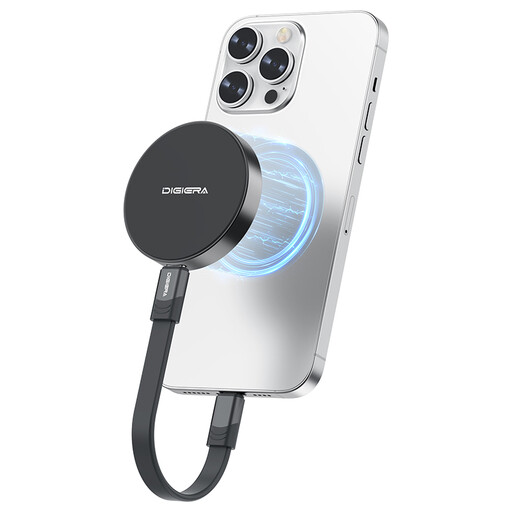
Why It Stands Out: This drive is purpose-built for the modern mobile creator. Its magnetic design snaps directly onto the back of an iPhone 15 or 16 Pro, making it the ideal portable SSD for iPhone 15 Pro users. The USB 3.2 Gen 2x2 interface delivers read and write speeds fast enough (up to 2000MB/s) to handle direct external SSD for ProRes recording at 4K 60fps without a hitch. Its lightweight aluminium alloy body also provides solid durability for fieldwork.
Pros:
Who is it for? This is the top choice for iPhone videographers, YouTubers and content creators who need a fast, reliable and incredibly convenient storage solution for shooting and editing on the move.

Why It Stands Out: While not an SSD, the My Passport drive excels in a different area: providing massive storage capacity with robust security features. With 4TB of space, you can archive years of projects, photo libraries and system backups. Its standout feature is the built-in 256-bit AES hardware encryption and password protection, ensuring your sensitive files remain private.
Pros:
Who is it for? Professionals, small business owners and anyone who needs to back up or transport large volumes of confidential data. It's the digital vault for your archives, not the high-speed tool for active recording.
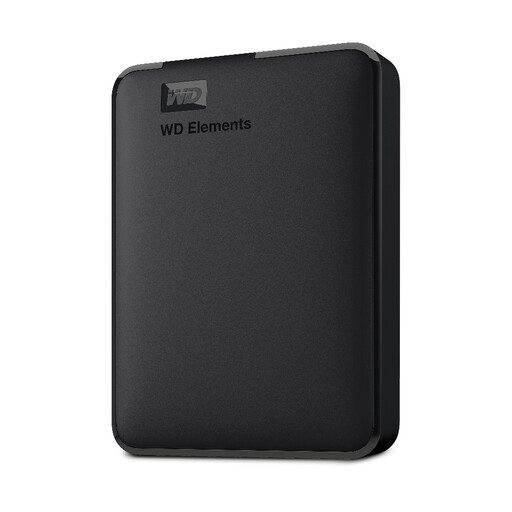
Why It Stands Out: Sometimes, you just need simple, reliable storage without extra frills. The WD Elements drive delivers exactly that. It’s a straightforward plug-and-play HDD that offers dependable performance for everyday tasks. With its USB 3.0 interface, it’s perfectly capable of backing up documents, music and photos from your laptop or desktop computer.
Pros:
Who is it for? Students, families and general users who need an inexpensive and easy-to-use drive for backing up important files and freeing up space on their primary computer.
Our recommendations cover a range of uses, but your perfect storage solution might be different. If you're looking for a specific capacity, brand or feature set, we invite you to explore our complete collection.
Explore the full range of external hard drives at Joybuy.co.uk
1. Can I record 4K ProRes video directly to any external SSD? No. To record high-bitrate video like 4K ProRes directly, the drive must have a sustained write speed of at least 220MB/s. You'll also need a phone and cable that support high-speed data transfer, such as the USB-C solid state drive connection on the iPhone 15 Pro. Always check the drive's technical specifications for write speed before purchasing for this purpose.
2. What is the main difference between an SSD and an HDD for a content creator? The key difference is speed and durability. An SSD is significantly faster, allowing you to record video directly to it and edit files without transferring them to your computer first. Its lack of moving parts also makes it a rugged portable SSD option, better suited for travel. An HDD is slower and more fragile but offers much more storage for a lower price, making it ideal for long-term archiving of finished projects.
3. Is a magnetic SSD essential for filming with an iPhone 15 Pro? While not essential—any compatible high-speed SSD will work—a magnetic portable SSD provides a major quality-of-life improvement. It attaches securely to the phone, creating a single, easy-to-handle unit. This prevents the drive from dangling and potentially disconnecting during a shoot, offering a much more stable and professional filming experience.