
24/7 Customer Support

Free returns

Same-day & Next-day Delivery

Quality Guaranteed

Unlock Your Welcome Offers: FREE Delivery | Up to 80% OFF | Free 30-day JoyPlus trial
Download the APP
A magnetic switch gaming keyboard can offer adjustable actuation and rapid trigger control, but not every product listing explains what you are actually buying. For UK PC gamers, the main challenge is separating useful specifications from attractive headline figures.
Three common pitfalls are worth checking before you place an order:
The key distinction is whether the keyboard uses magnetic or Hall effect switches rather than a traditional contact-based mechanical design. Hall effect sensing measures the position of the key stem, which can support adjustable actuation and rapid trigger functions.
An adjustable actuation keyboard lets you choose how far a key must travel before registering. A shorter setting may suit fast FPS inputs, while a deeper setting can help reduce accidental presses during typing. Rapid trigger mode changes the reset behaviour so a key can register again with very little upward movement.
Check whether these features are explicitly listed for each product. “Gaming mechanical keyboard” alone does not confirm magnetic switches, rapid trigger or adjustable actuation.
A compact mechanical keyboard can create more room for a low-sensitivity mouse, making it practical for competitive FPS players. However, consider your everyday requirements:
For a UK setup, also check the printed layout carefully. Several products in this category use a US QWERTY layout, which may place symbols differently from a UK keyboard. This is a practical issue for coding, office work and everyday typing.
A high polling rate can be relevant to competitive play, but it should not replace checking firmware support, onboard profiles and compatibility. The AULA WIN60HE and AULA Hero 68 listings specify an 8000Hz polling rate, while their product pages should be checked for the required configuration software and supported operating systems.
If you want to customise the board later, look for a hot-swappable gaming keyboard. Hot-swap sockets allow compatible switches to be changed without soldering, although magnetic switches are not automatically interchangeable with standard three-pin or five-pin mechanical switches. Confirm switch compatibility before buying replacements.
RGB is primarily an appearance and visibility feature. An RGB gaming keyboard may offer brightness and effect controls, but lighting does not indicate switch quality, input speed or durability.

Why This Fits Their Persona: A compact wired option for players who want magnetic switch functions without adding wireless charging or battery management to their setup.
Its listing identifies magnetic switches, hot-swap support, adjustable actuation, rapid trigger mode and an 8000Hz polling rate instead of relying only on generic gaming language.
60% compact layout; wired USB connection; RGB lighting; listed hot-swappable magnetic switches.
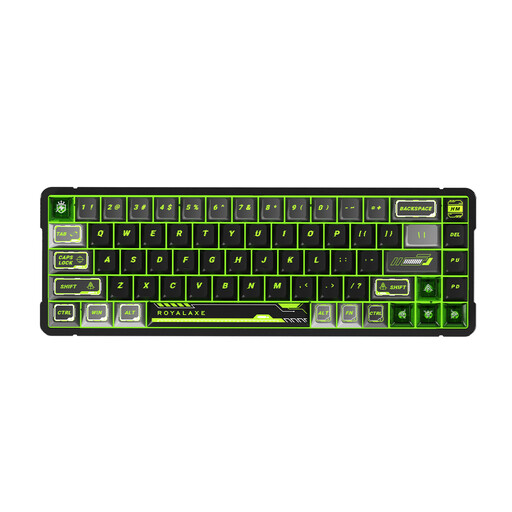
Why This Fits Their Persona: Suitable for users who want a more substantial compact board with a 68-key layout and an aluminium frame for a dedicated desktop gaming station.
The product name specifies magnetic switches and a 68-key layout, helping buyers distinguish it from similarly styled RGB boards with fixed mechanical switches.
68-key layout; full aluminium alloy frame; listed RT precision of 0.001mm.

Why This Fits Their Persona: A practical match for competitive FPS users who want magnetic input control, a compact form factor and dedicated arrow keys.
The listed specifications directly identify Hall effect magnetic switches, 0.01mm adjustable actuation, rapid trigger and an 8K polling rate.
68-key compact layout; wired connection; RGB lighting; Hall effect switch specification.
Before selecting a magnetic switch gaming keyboard, confirm the following on the product page:
Yes, provided you are comfortable with the chosen layout and actuation setting. A deeper actuation point can help reduce accidental inputs while writing, whereas an extremely sensitive setting may require more careful finger control.
Rapid trigger changes how key presses reset, which can be useful for repeated movement inputs in supported games. It does not increase your monitor refresh rate, internet connection speed or game frame rate, so its practical value depends on your setup and play style.
No. Magnetic switches require compatible sensing hardware and firmware. A standard hot-swap mechanical keyboard may accept conventional replacement switches but may not support Hall effect operation. Always match replacement parts to the keyboard’s specified switch system.