
24/7 全天候客户支持

免费退货

当日/次日达

品质保障

开启新人专享福利: 全场免邮 | 低至 2 折 | 免费试用 30 天 JoyPlus 会员
下载 Joybuy
In the world of competitive PC gaming, every millisecond counts. That's why many players are looking towards the latest keyboard technology for an edge. The magnetic switch keyboard has emerged as a popular choice, particularly for those playing fast-paced FPS titles. However, with so many new terms and technical specifications, it's easy to feel lost or, worse, invest in a keyboard that doesn't deliver on its promises.
As the Joybuy Product Recommendation Officer, my role is to help you navigate this complex market. This guide will break down the essential features of a Hall effect keyboard and highlight common pitfalls to avoid, ensuring you find a model that genuinely enhances your gaming experience.
Before diving into the technology, let's address the marketing hype and design flaws that can lead to a disappointing purchase.
To make an informed choice, you need to understand the technology that gives these keyboards their performance advantage. Here are the key specifications to look for.
This is the headline feature of any modern esports keyboard. Here’s what it means in simple terms:
When shopping, look for keyboards that offer a wide range of actuation adjustment and a high degree of precision for the Rapid Trigger setting.
The polling rate measures how many times per second the keyboard reports its status to your computer. The standard for gaming keyboards has long been 1000Hz (1000 times per second, or a 1ms response time). However, many new magnetic switch keyboards now feature an 8000Hz polling rate.
This means the keyboard sends an update every 0.125ms, which is eight times faster. While the difference may be imperceptible to some, for highly competitive players, this reduction in input latency can provide a small but tangible advantage where split-second reactions determine the outcome of a duel.
The physical design of the keyboard is just as important as its internal technology.
To help you find the right fit, we've matched some models to different player profiles. These selections are based on their objective specifications and how well they address the common pitfalls.
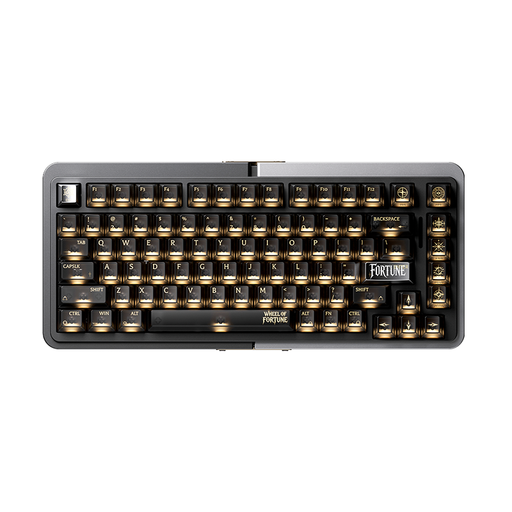
Why This Fits Their Persona: This user wants a high-performance keyboard that doesn't sacrifice everyday usability. The 75% layout provides dedicated arrow and function keys, making it versatile for both gaming and general tasks, while still saving significant desk space compared to a full-size board.
It avoids the "flimsy build" trap with its solid aluminium alloy frame, providing the rigidity needed for competitive play. The 75% layout is a deliberate choice, not a one-size-fits-all compromise.
Features magnetic switches with high-precision Rapid Trigger (RT) functionality. The 75% layout is an excellent balance between compact size and functionality.

Why This Fits Their Persona: This player is focused on one thing: performance in FPS games like Valorant keyboard and CS2. The compact 65% (68-key) layout maximises desk space for wide mouse swipes, and the feature set is tailored specifically for competitive play.
It avoids the "feature illusion" by delivering on its promises with a full suite of pro-grade specs: Hall Effect switches, adjustable actuation, Rapid Trigger and an 8000Hz polling rate, all accessible via software.
The combination of an 8000Hz polling rate and Rapid Trigger offers exceptionally low input latency. Its metal top plate adds durability without the cost of a full-metal chassis.
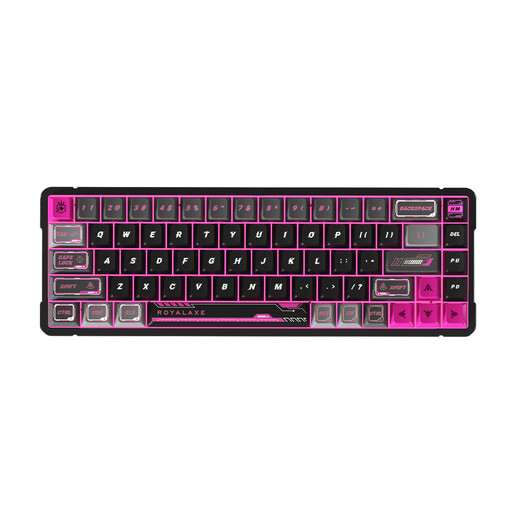
Why This Fits Their Persona: For this user, build quality is non-negotiable. They want a keyboard that feels substantial, durable and premium every time they use it. The compact 68-key layout is ideal for a clean, focused gaming setup where every component is carefully chosen.
This model directly counters the "ignoring the chassis" pitfall by featuring a full aluminium alloy chassis. This provides maximum rigidity and a hefty, premium feel that plastic or top-plate-only designs cannot match.
The full aluminium construction offers exceptional stability and a superior typing feel. It combines this robust build with essential esports features like magnetic switches and a compact form factor.
We have compiled a complete, real-time list of products that fully satisfy these strict selection criteria and UK safety regulations.
For the vast majority of gamers, a standard 1000Hz polling rate is perfectly sufficient. An 8000Hz polling rate keyboard offers a theoretical advantage by reducing input latency from 1ms to 0.125ms. This difference is most likely to be noticed by highly competitive or professional players in fast-paced shooters. If you are seeking every possible performance gain, it is a worthwhile feature, but it is not an essential requirement for enjoying the benefits of a magnetic switch keyboard.
Most magnetic switch keyboards come with dedicated software that provides a user-friendly interface for these settings. Typically, you can use a simple slider to set the actuation point for all keys or on a per-key basis. Enabling Rapid Trigger is usually a checkbox, with an additional setting to define its sensitivity. While it may take a few minutes to find the settings that feel right for you, the initial setup process is generally straightforward.
Magnetic (or Hall effect) switches have a significant advantage in terms of durability. Because they operate without any physical contact between mechanical parts to register a keystroke, there is far less wear and tear over time. This contactless design means they can often handle a much higher number of keystrokes compared to traditional mechanical switches, contributing to a longer lifespan for the keyboard. As always, overall durability also depends on the build quality of the chassis and keycaps.