Travellers packing light
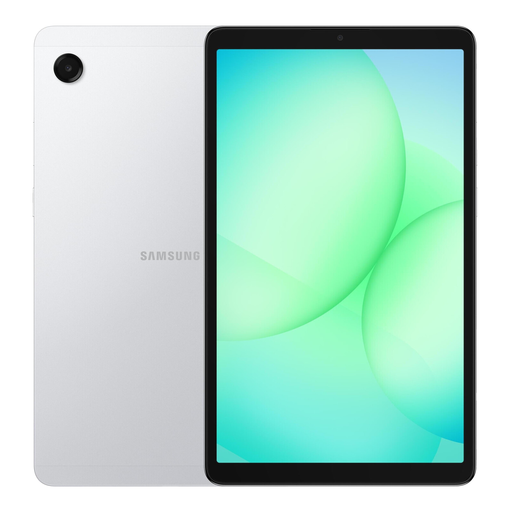
If the tablet needs to fit into a small bag and be easy to handle during a wait, a smaller screen may be an acceptable trade-off. Samsung UK documents an 8.7-inch Galaxy Tab A9.


Choose a compact Android tablet if carrying space matters most, or a larger Android tablet or iPad if you would rather have more room for tiles and menus. Before deciding, check that your exact game and account work on the platform, consider how the screen will look in the terminal and plan for the length of the wait. For a Fire tablet, confirm the game is available through Amazon’s Appstore: Amazon says Google Play is not supported on Fire tablets.
If the tablet needs to fit into a small bag and be easy to handle during a wait, a smaller screen may be an acceptable trade-off. Samsung UK documents an 8.7-inch Galaxy Tab A9.
If you want more room for the game board and also expect to browse or stream, consider an 11-inch model. Lenovo UK lists an anti-glare display for the Tab M11, while Apple UK lists a 500-nit display for the iPad (A16).
If you have a favourite title, saved progress or in-app purchases, check the game’s store listing and sign-in requirements before choosing a platform. This matters particularly for Fire tablets: Amazon says they do not support Google Play, although its UK Appstore supports Fire tablets.
Check access to your exact game before comparing devices. Then weigh screen comfort against carrying space and make a charging plan for the wait.
| Concern | What to check | Who this matters to |
|---|---|---|
| Screen usability | Compare screen size and the published brightness or anti-glare specification, especially if the waiting area has window glare. Apple UK lists an 11-inch, 500-nit iPad (A16) display; Lenovo UK lists an 11-inch, 400-nit anti-glare Tab M11 display. | I want tiles and menus that feel comfortable to see and tap during the wait, even if that means carrying a larger tablet. Roughly 42% of consumers weighing these needs would put screen usability first. |
| Game compatibility | Check the exact game’s store listing, sign-in method and access to saved purchases on the intended platform. Amazon says Fire tablets do not support Google Play. | If I already play a particular game, keeping access to it matters more than a tablet’s display specification. Around 33% of consumers would make game and account compatibility their primary concern. |
| Carrying and charging | Compare the exact model’s size and weight, then check charging accessories and download needs before travelling. Treat manufacturers’ battery figures as claims, not guaranteed gaming time. | I need to manage the tablet alongside my bags and keep playing through the wait without relying on a free charging point. For approximately 25% of consumers, carrying and uninterrupted use would come first. |
Amazon says Google Play is not supported on Fire tablets. A game’s availability on another Android tablet therefore does not establish that its Fire version, sign-in method or existing purchases will work.
Check the exact title in Amazon’s UK Appstore and confirm its account requirements before choosing a Fire tablet.
Amazon’s Fire HD 10 listing claims up to 13 hours of battery life, but that is not a promise of the same runtime in your game. The cited configuration also excludes a power adaptor.
Charge before travelling and check the exact listing’s box contents and compatible charging requirements.
A compatible power adaptor may need to be obtained separately.
An 11-inch tablet gives tiles and menus more space but takes up more room than an 8.7-inch model when you are standing or carrying bags.
Compare the handling of a compact model with a larger one if possible, and choose a size on which you can comfortably read and tap your game.
An iPadOS option for players who want an 11-inch tablet and have confirmed their game is available on iPad.
Android options spanning the compact Galaxy Tab A9 and larger A9+.
An 11-inch Android option for players who prioritise screen space.
A Fire tablet route when the exact game and account work through Amazon’s UK Appstore.
These Android tablet choices cover compact screens for easier packing and larger screens for more room to play. Check your exact game and account before settling on a model.
 No image available
Consider this 8.7-inch model if fitting the tablet into a small bag matters more than having a larger game board.
The listed configuration has Wi-Fi, 4GB RAM and 64GB storage. Check your game’s compatibility and the screen’s suitability for your usual lighting.
 No image available
Consider this option if display space is a priority rather than choosing solely for compact packing.
The title lists 12GB RAM and 512GB storage. Confirm the exact game and account requirements before ordering.
 No image available
Consider this larger-screen Galaxy Tab A11+ if you prefer more space for tiles and menus over the compact A11 option.
The listed Wi-Fi configuration has 8GB RAM and 256GB storage. Check the exact game and account requirements before buying.
 No image available
This is another larger-screen option for players who would rather have an 11-inch board than a compact tablet.
Its title states Android 15, an FHD+ 90Hz display and an 8800mAh battery. Memory and storage appear as options, so confirm the selected configuration and your game’s compatibility.
 No image available
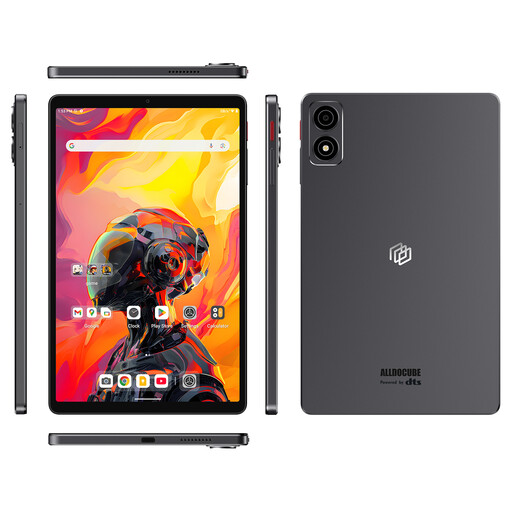
Consider the 8.8-inch screen if a smaller tablet fits your travel plans better than an 11-inch model.
The title lists Android 14 and a 7300mAh battery. A charger is not included; check your game’s compatibility and arrange a compatible charger if needed.
Not necessarily: a Wi-Fi-only tablet may suit you if you install the game, download updates and sign in while you have a reliable connection. Check whether your particular game needs connectivity during play for account checks, cloud saves or other functions before relying on offline use.
Do not assume it will. Amazon says Fire tablets do not support Google Play, although its UK Appstore supports Fire tablets. Check the precise game listing and whether your sign-in method and existing purchases work there.
Choose the smaller size if carrying and handling matter more to you; Samsung UK documents an 8.7-inch Galaxy Tab A9. An 11-inch model gives you more screen space, with options documented by Lenovo UK and Apple UK. If possible, try tapping and reading a game on a similarly sized screen before deciding.
Check the seller’s cancellation information before ordering. GOV.UK guidance on online and distance selling says sellers must tell customers they can cancel an order up to 14 days after delivery; applicable exceptions matter. Keep the delivery and returns information, and treat a change-of-mind cancellation separately from a problem with faulty, damaged or misdescribed goods.
Check the contents of the exact model and listing rather than assuming an adaptor is included. Amazon’s cited Fire HD 10 configuration excludes a power adaptor, while Apple UK lists a USB-C charge cable with the iPad (A16). If you need an adaptor or power bank for the journey, check that it is compatible.