Start by positioning the screen to avoid bright window reflections; the Health and Safety Executive recommends arranging desks and screens to avoid glare. For a calendar, recipes and shopping list open together, consider a QHD or 4K display; Full HD may be enough if you usually work in one window. Treat USB-C charging as a deciding feature only if your laptop supports video over USB-C and the monitor can meet its charging requirements.
Who this setup suits
Planners working beside a bright window
If reflections interrupt reading recipes or lists, deal with screen placement first. The Health and Safety Executive advises arranging the desk and screen to avoid glare; blinds or curtains and a matte or anti-glare surface can also help manage the light.
Households planning across several windows
If you keep a calendar, recipe and shopping list visible together, compare the available workspace on Full HD, QHD and 4K displays. Check that text remains comfortable to read at your chosen display-scaling setting.
Laptop users setting up a regular planning desk
If you want one cable for the display and charging, check your laptop’s USB-C video support and charging requirement against the exact monitor’s connections and power-delivery rating.
What matters when choosing
For weekly meal planning beside a bright window, settle the screen position before choosing resolution or laptop connections. The priorities below distinguish consumers by the need they would put first.
| Concern |
What to check |
Who this matters to |
| Window reflections |
Check for a matte or anti-glare surface and stand adjustments that help position the screen away from reflected light. |
If daylight reflects across my recipe, I need to change the screen position rather than rely on display settings alone. Around 36% of consumers would put reflection control first. |
| Room for several windows |
Compare the screen size and native Full HD, QHD or 4K resolution; check whether display scaling keeps text readable. |
I want my calendar, recipes and shopping list visible without constantly switching between them. For around 29% of consumers, that shared workspace would be the primary concern. |
| Laptop setup |
Check USB-C video compatibility, the monitor’s power-delivery rating and the stand adjustments you need. |
If I connect a laptop for each planning session, a workable screen position and fewer cables matter most. Around 21% of consumers would prioritise that desk setup. |
| Simple planning |
Check that the resolution, screen surface and video connection suit your existing computer and usual planning window. |
I mainly use one planning app, so I would rather choose a straightforward display than features I will not use. That would be the first priority for around 14% of consumers. |
Mistakes to avoid
-
Expecting anti-glare treatment to fix a direct reflection
A bright window can still create an intrusive reflection on an anti-glare screen.
Follow the Health and Safety Executive’s advice to arrange the desk and screen to avoid glare. Adjust the screen position and use blinds or curtains where needed.
-
Assuming any USB-C connection will charge a laptop
A USB-C port alone does not establish that the laptop can send video to the monitor or receive enough charging power from it.
Check the laptop’s USB-C video capability and charging requirement against the exact monitor’s stated functions and power-delivery rating.
-
Choosing 4K to solve a glare problem
Resolution affects workspace, but extra pixels do not remove reflected daylight.
Choose resolution according to how many planning windows you keep open; assess screen placement and surface treatment separately.
-
Treating eye-care features as a glare guarantee
Automatic brightness and related features describe what a particular model can adjust, not whether it will prevent reflections in your room.
Check the exact model’s screen surface and stand adjustments, then plan where the monitor will sit relative to the window.
Brands to consider for this setup
BenQ
The GW2790QT is a 27-inch QHD IPS option for a desk where changing daylight makes screen adjustments useful.
- According to BenQ, its Visual Optimizer and Brightness Intelligence features use a built-in sensor to respond to surrounding light on supported models.
- An ambient-light feature cannot remove a direct window reflection. Check the GW2790QT’s stated 65W USB-C power delivery against your laptop’s requirements.
Dell
The Pro Plus P2725DE is a 27-inch QHD IPS model, while the P2725QE is a 27-inch 4K IPS option. Both are relevant when anti-glare treatment and stand adjustment matter.
- Dell specifies anti-glare treatment and height, tilt, swivel and pivot adjustment for these models.
- Compare connections and stand details for the exact model. Eye-comfort certification alone does not tell you how a screen will handle reflections at your desk.
LG
The 27U730A-B is a 27-inch 4K IPS option with an anti-glare surface and USB-C power delivery rated at 90W.
- Its stated USB-C charging may suit a one-cable desk when the laptop supports compatible video output and charging.
- If you are considering the separate 27UP650K-W instead, check its connections rather than assuming it has the same USB-C charging feature.
Joybuy monitors for this setup
These monitors offer different screen sizes and resolutions for a fixed meal-planning desk. Choose where the screen can sit relative to the window before deciding how much workspace you need.
 No image available
ASUS ProArt PA278CV IPS WQHD
Consider its WQHD format if you want a calendar and recipe visible together at a fixed desk.
Check laptop video and charging compatibility before relying on a one-cable setup, and position the screen to avoid direct window reflections.
Joybuy
 No image available
ASUS ProArt PA328QV IPS WQHD
Its WQHD format is worth considering if you regularly keep several meal-planning windows open.
Check the monitor and stand dimensions against your desk, leaving room to position the screen away from reflections.
Joybuy
 No image available
BenQ GW2791 27-inch IPS Full HD 100Hz
This Full HD model is a straightforward option if meal planning usually happens in one window rather than several side by side.
Check whether its screen positioning works at your desk; the described stand adjusts for tilt. Full HD provides less resolution for a multi-window layout than QHD or 4K.
Joybuy
 No image available
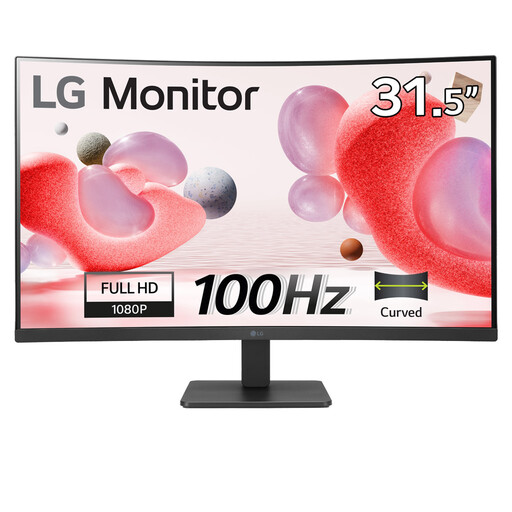
LG 32MR50C-B 32-inch Full HD curved monitor
Consider the larger physical screen for a fixed planning desk, but check that the monitor and stand fit before choosing it.
The named variant has a VA panel, anti-glare treatment and HDMI. Its Full HD resolution gives less room for several windows than QHD or 4K; check the stand adjustments if repositioning is important.
Joybuy
Common questions
Will a brighter monitor solve reflections from the window?
No: brightness alone will not remove a reflection. The Health and Safety Executive advises arranging the desk and screen to avoid glare or bright reflections; use blinds or curtains where needed, then consider the monitor’s surface and positioning options.
Is Full HD enough for weekly meal planning?
Full HD may be enough if you mainly use one planning window. If you want a calendar, recipes and a shopping list visible together, compare QHD and 4K workspace as well, and check that text remains comfortable at your chosen display-scaling setting.
Can one USB-C cable connect the monitor and charge my laptop?
It can if the laptop supports video over USB-C and the monitor’s power delivery meets the laptop’s charging needs. BenQ specifies 65W power delivery for the GW2790QT, while LG specifies 90W for the 27U730A-B; check compatibility for the exact laptop and monitor you choose.


