
24/7 Customer Support

Free returns

Same-day & Next-day Delivery

Quality Guaranteed

Unlock Your Welcome Offers: FREE Delivery | Up to 80% OFF | Free 30-day JoyPlus trial
Download the APP
A mechanical gaming keyboard can improve typing comfort, key consistency and desk organisation, but the wrong model may create daily frustrations. A compact layout can hide important navigation keys, wireless connectivity may require regular charging, and impressive response-rate figures may matter less than the games you play and the computer you use.
This guide explains the specifications that deserve attention before you buy, followed by our top recommendations for different UK users.
A 60% gaming keyboard saves desk space by omitting the function row, arrow keys and navigation cluster. These functions are usually available through shortcuts, but that may feel inconvenient for programming, spreadsheets or office work.
A 65% gaming keyboard normally adds dedicated arrow keys, while a 75% mechanical keyboard often restores the function row in a compact arrangement. An 80% mechanical keyboard, commonly called tenkeyless, removes the number pad but keeps the main navigation keys. A full-size model retains the number pad and is generally more suitable for finance work, data entry and users who frequently enter figures.
Polling rate, actuation distance and Rapid Trigger are separate features. An 8,000Hz polling rate refers to how frequently the keyboard reports its status to the computer. Adjustable actuation controls how far a key must travel before registering. Rapid Trigger can alter the reset behaviour of compatible switches.
These features can be useful for competitive FPS games, but they are not essential for every player. They may also depend on compatible software, USB connectivity and system configuration. Look for clearly stated adjustment ranges rather than relying on vague phrases such as “ultra-fast”.
An RGB mechanical keyboard can personalise a desk and make legends easier to see, but lighting does not automatically improve input accuracy. Wireless models also need a battery, receiver and charging routine. Check whether the keyboard offers wired, Bluetooth and 2.4GHz modes, how many devices it can remember and whether the receiver is included.
For shared homes, university accommodation or an office, also consider noise. Clicky switches can be noticeably louder than linear or tactile alternatives, particularly in a quiet room.
Hall Effect switches use magnetic sensing rather than a traditional fixed contact mechanism. A Hall Effect gaming keyboard may offer adjustable actuation and Rapid Trigger, but magnetic-switch models are not interchangeable with ordinary mechanical switches.
A wired mechanical gaming keyboard avoids battery management and usually provides a straightforward connection for a desktop PC. A wireless mechanical keyboard is more flexible for laptops, tablets and uncluttered desks. Tri-mode models combine USB, Bluetooth and 2.4GHz wireless connections.
Battery capacity is measured in mAh, but actual runtime varies with RGB brightness, connection mode and usage. A larger battery is a useful indicator of capacity, not a guarantee of a particular number of days between charges.
Many products listed as a QWERTY US layout keyboard use a different Enter key shape, backslash position and left Shift arrangement from a UK ISO keyboard. Windows can be configured for UK or US input, but the physical legends may not match the characters produced. Check the layout photographs and product description before ordering, especially if you regularly type £, quotation marks or programming symbols.
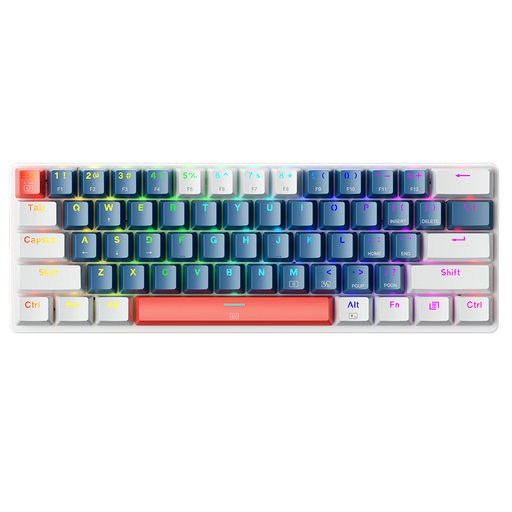
Why This Fits Their Persona: A wired 60% format suits new PC gamers and students who want a smaller footprint without adding wireless charging to their setup. Its QWERTY US layout and brown switches should be checked against your preferred typing feel.
The wired connection removes battery-related upkeep, while the compact format makes the space-saving trade-off clear before purchase.
60% layout; wired USB connection; brown mechanical switches; RGB lighting.

Why This Fits Their Persona: This 96% keyboard keeps arrow and number keys while using a smaller footprint than a full-size model, making it suitable for hybrid work, coding and gaming.
Tri-mode connectivity provides a wired fallback, and hot-swap support makes future switch changes possible rather than locking you into the supplied feel.
Bluetooth, 2.4GHz and USB-C; 99-key layout; 8000mAh battery; 3-pin and 5-pin hot-swap support.

Why This Fits Their Persona: FPS players who understand actuation settings may value this 68-key board for mouse space and adjustable magnetic-switch input.
The specification identifies Hall Effect switches, a 0.2–4.0mm adjustment range and Rapid Trigger, so the performance features are more concrete than generic speed claims.
68-key compact layout; magnetic linear switches; adjustable actuation; stated 8000Hz polling rate; detachable USB-C cable.

Why This Fits Their Persona: A 75% tri-mode keyboard suits users moving between a desktop, laptop and tablet while retaining arrow and function-row access.
The three connection modes reduce reliance on one wireless method, while the 4000mAh battery specification gives a clearer basis for comparison.
Wired, Bluetooth and 2.4GHz modes; 75% layout; RGB backlighting; media control knob; full-key hot-swap support.
We have compiled a complete, real-time list of products that fully satisfy these strict selection criteria and UK safety regulations.
Yes, provided the switch noise and layout suit your workplace. Linear or tactile switches are often less disruptive than clicky switches. A 75%, 80% or 96% layout can retain useful navigation keys without occupying the full width of a traditional keyboard.
Wired keyboards generally draw power through USB and do not need separate charging. Wireless models use rechargeable batteries, with RGB brightness and connection type affecting charging frequency. Turning off lighting when it is not needed can reduce power use.
Lifespan depends on switch construction, keycap material, cleaning and physical handling. Double-shot PBT keycaps are designed to resist worn legends, while a hot-swappable PCB can extend practical usability by allowing compatible switches to be replaced. Keep the board dry, disconnect it before cleaning and follow the supplied safety instructions.