
24/7 Customer Support

Free returns

Same-day & Next-day Delivery

Quality Guaranteed

Unlock Your Welcome Offers: FREE Delivery | Up to 80% OFF | Free 30-day JoyPlus trial
Download the APP
A mechanical gaming keyboard can improve typing feel, desk comfort and in-game control, but the specification sheet does not always tell the full story. A high polling-rate figure may be irrelevant if your computer or game setup cannot take advantage of it, while a compact layout can create daily frustration if you regularly use a number pad or function row.
Before buying, UK shoppers should look beyond RGB lighting and response-time claims. The layout, switch technology, connectivity and software support will have a much greater effect on whether the keyboard suits your desk and routine.
A 60% gaming keyboard saves considerable space but usually removes the dedicated arrow keys, function row and navigation cluster. You can access many commands through the Fn layer, but that is not always convenient for spreadsheets, office software or games with numerous shortcuts.
A 65% gaming keyboard normally retains arrow keys, making it a useful middle ground. A 75% mechanical keyboard adds the function row while remaining narrower than a traditional board. By contrast, a full-size mechanical gaming keyboard includes the number pad and is more suitable for accounting, data entry and users who prefer a familiar arrangement.
Also check the regional layout. A UK layout gaming keyboard uses ISO positioning and UK key legends, while a US layout mechanical keyboard generally follows ANSI sizing and arrangement. Switching between them can affect the position and shape of the Enter, Shift and symbol keys.
Traditional mechanical switches use physical contacts. Magnetic switch keyboards and Hall Effect keyboards detect key movement differently, allowing some models to offer adjustable actuation and Rapid Trigger.
These features can be useful for competitive FPS players, particularly when making repeated movement inputs. However, they require compatible software and time to configure. A very sensitive setting may also cause accidental presses during normal typing. Treat Rapid Trigger, Snap Tap and similar functions as configuration options rather than automatic performance improvements.
An RGB mechanical keyboard can suit a gaming setup, but lighting does not indicate switch quality, keycap durability or chassis stability. Check whether the board has a detachable cable, anti-ghosting or N-key rollover, and whether replacement switches are supported.
A hot-swappable mechanical keyboard can be more adaptable because compatible switches may be changed without soldering. Confirm the socket type before buying replacement parts, as not every switch is compatible with every board.
Measure the usable width and depth of your desk, including room for a mouse. Compact keyboards can create more space for low-sensitivity FPS play, but they may require shortcut combinations for missing keys.
As a practical guide:
Linear red switches provide a smooth keypress without a tactile bump, which may suit rapid gaming and shared workspaces. Brown switches offer tactile feedback without the pronounced click of blue switches. Clicky switches can be enjoyable for typing but may be distracting in an office or shared room.
On a magnetic or adjustable actuation keyboard, the actuation point can be changed through software. Some listed models provide a range from 0.1mm or 0.2mm to 4.0mm, depending on the product. A lower setting can register a press earlier, while a deeper setting can reduce accidental input. Check the manufacturer’s software compatibility with your operating system before purchase.
A wired gaming keyboard usually provides straightforward plug-and-play use and avoids battery charging. USB-C detachable cables can simplify transport and replacement, although the computer-side connector may be USB-A.
A wireless mechanical keyboard is more flexible for multi-device desks, but buyers should check battery capacity, charging time and whether wireless mode introduces limitations compared with wired mode. The Lofree OE907, for example, supports Bluetooth 5.1 and USB-C wired operation.
An 8000Hz gaming keyboard reports inputs more frequently than a standard 1000Hz model. The practical benefit depends on the computer, game, monitor refresh rate and software settings. It should not be the sole reason for choosing a keyboard.
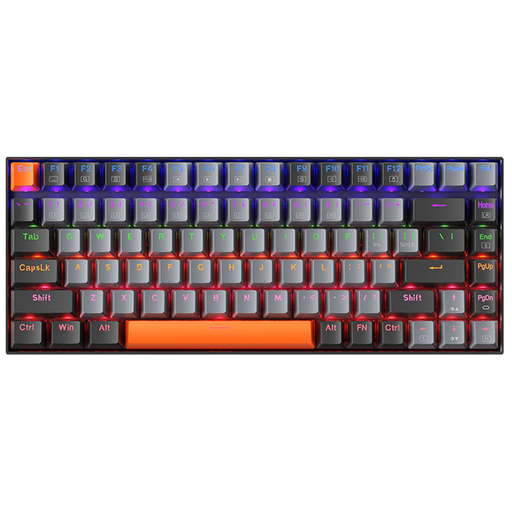
Why This Fits Their Persona: A practical entry point for UK students, home workers and gamers who want a compact board without losing the function row and arrow keys.
The 84-key layout avoids the missing-key compromises of a 60% board, while the wired connection avoids battery maintenance.
Linear red switches, detachable USB-C cable, LED backlighting, NKRO and Windows, macOS and Linux compatibility.
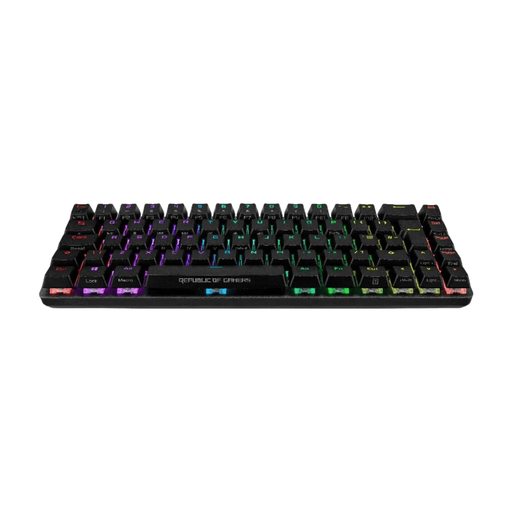
Why This Fits Their Persona: A UK-layout option for enthusiasts who want premium construction, compact dimensions and extensive control over key response.
Its listed UK ISO layout prevents the common mismatch between US key positioning and UK typing habits.
Hall Effect switches with 0.1–4.0mm adjustable actuation, Rapid Trigger, 8000Hz polling, dual USB-C and five-layer dampening.
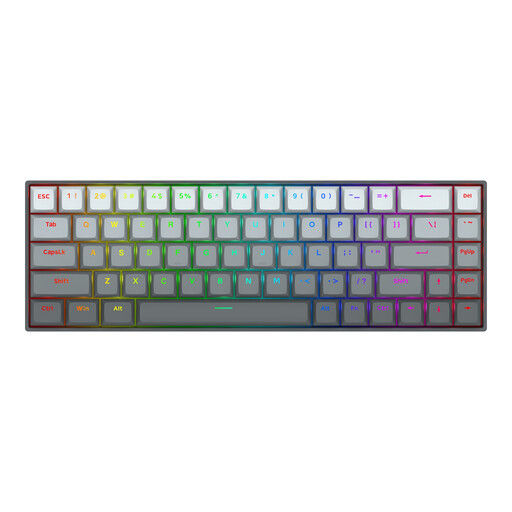
Why This Fits Their Persona: The 68-key format leaves more room for mouse movement while retaining arrow keys for players focused on Valorant, CS2 and similar titles.
The product specification clearly identifies magnetic switches, adjustable 0.2–4.0mm actuation and Rapid Trigger rather than relying only on a generic speed claim.
Anodised aluminium top plate, detachable Type-C cable, RGB lighting and listed 8000Hz polling rate.
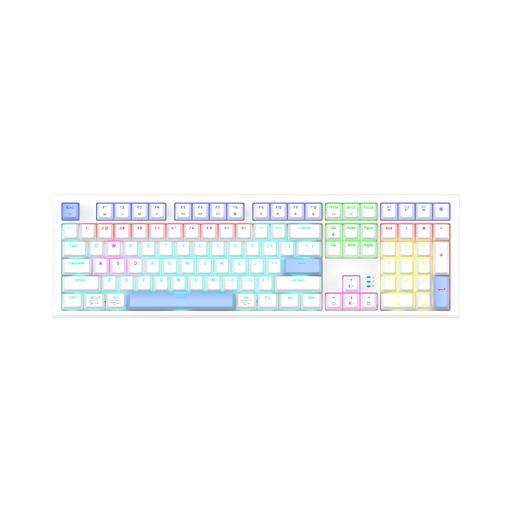
Why This Fits Their Persona: Office users, MMO players and anyone working with figures may prefer dedicated navigation and number-pad keys over maximum desk space.
The full-size 104-key format makes the key count and layout clear, reducing the risk of buying a compact board that lacks frequently used controls.
Wired USB-A connection, QWERTY US layout, mechanical construction and RGB backlighting with dynamic modes.
We have compiled a complete, real-time list of products that fully satisfy these strict selection criteria and UK safety regulations.
Yes, provided the switch type and noise level suit the environment. Linear red switches are generally less audible than clicky switches, while tactile brown switches provide feedback without a pronounced click. A full-size or 75% keyboard may also be more convenient for documents and spreadsheets.
Lifespan depends on switch design, construction, cleaning and use. Mechanical switches are replaceable on some hot-swappable models, which can extend practical serviceability. Keep the board dry, disconnect it before cleaning and use a soft cloth or suitable keyboard vacuum rather than corrosive cleaners.
It can increase the frequency at which the keyboard reports inputs, but the visible or competitive benefit depends on the complete system, including the game, processor, USB connection and monitor. Prioritise a suitable layout, reliable software and comfortable switches before treating polling rate as a deciding factor.