
24/7 Customer Support

Free returns

Same-day & Next-day Delivery

Quality Guaranteed

Unlock Your Welcome Offers: FREE Delivery | Up to 80% OFF | Free 30-day JoyPlus trial
Download the APP
A mechanical gaming keyboard can improve the feel of gaming, coding, office work and everyday typing, but product pages often make comparisons harder than they need to be. Bright lighting, impressive-sounding switch names and large battery figures may distract from the details that affect daily use.
Before choosing, watch for three common buying traps:
The right choice depends on your desk, devices, typing habits and tolerance for maintenance—not simply the number of lighting effects.
Layout determines which keys are physically available.
UK buyers should also check the printed layout carefully. Several products in this selection use a US QWERTY mechanical keyboard arrangement. It may differ from a UK ISO keyboard in the position and shape of the Enter, Shift and symbol keys. Confirm the layout before ordering if you regularly type £, @ or quotation marks.
A wired mechanical gaming keyboard is generally straightforward: connect the USB cable and use it without charging or wireless pairing. It can also keep your desk setup predictable for desktop gaming.
A wireless mechanical keyboard offers a tidier desk and easier movement between devices. Bluetooth is convenient for laptops, tablets and phones, while 2.4GHz wireless commonly uses a USB receiver. A tri-mode model combines Bluetooth, 2.4GHz and USB-C wired operation, giving you more flexibility.
Battery capacity is listed in mAh, but capacity alone does not equal a fixed running time. RGB brightness, polling behaviour, wireless mode and usage all affect charging intervals. Look for a stated battery figure and remember that advertised endurance may be measured with lighting switched off.
Switch choice changes the key feel and sound:
A hot-swappable keyboard allows compatible switches to be removed and replaced without soldering. Check whether the sockets support 3-pin, 5-pin or both, and use a switch puller carefully with the keyboard unplugged.
A gasket mount keyboard uses cushioning elements around the plate or PCB to create a more flexible key feel. Foam layers may also change the sound by reducing resonance, but they do not make a keyboard silent. For long typing sessions, consider stabiliser quality, keycap profile and wrist position alongside the mounting style.
PBT keycap keyboards use a material that is commonly valued for resistance to surface shine and wear. Double-shot or dye-sublimated legends can also affect how characters remain visible over time. These details are more useful than RGB colour count when assessing long-term practicality.
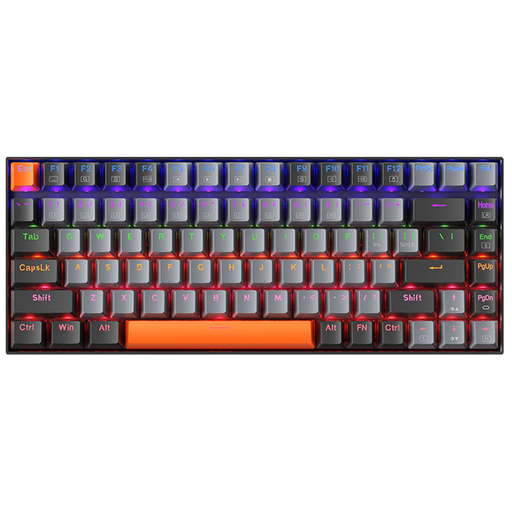
Why This Fits Their Persona: A practical starting point for UK students, first-time mechanical keyboard buyers and desktop gamers who prefer a simple USB connection.
Its 75% layout keeps arrow and function keys while avoiding the compromises of many 60% boards. Wired USB-C operation also avoids battery management.
Red linear switches, detachable USB-C cable, LED backlighting and N-key rollover.
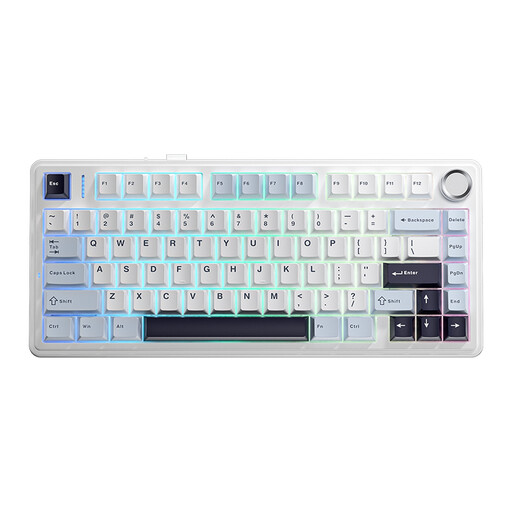
Why This Fits Their Persona: Suits hybrid workers and enthusiasts wanting a compact board with wireless flexibility and a more customisable internal design.
The tri-mode connection is clearly specified, while full-key hot-swap support provides an upgrade path beyond the pre-installed switches.
Bluetooth, 2.4GHz and wired modes; 4000mAh battery; gasket structure; double-shot PBT keycaps and RGB lighting.
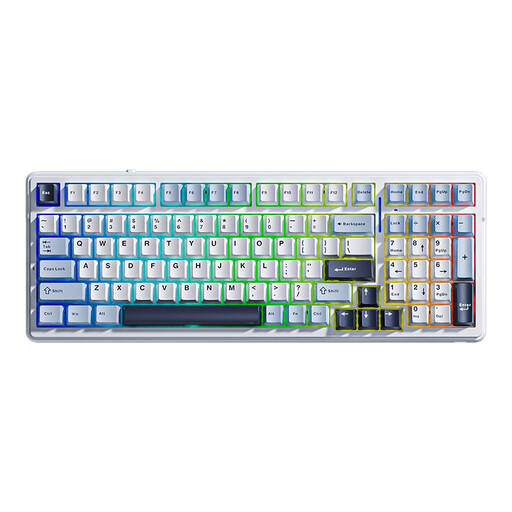
Why This Fits Their Persona: A 96% compact option for programmers, office professionals and gamers who need number keys without moving to a full-size footprint.
It retains a number row while specifying multi-device tri-mode connectivity, hot-swap support and five-layer sound dampening.
8000mAh rechargeable battery, double-shot PBT keycaps, RGB effects, full N-key rollover and support for 3-pin and 5-pin switches.
We have compiled a complete, real-time list of products that fully satisfy these strict selection criteria and UK safety regulations.
Yes, provided the switch sound and layout suit your workplace. Linear switches are often less audible than clicky switches, while a 75% or 96% layout can retain useful keys for documents, coding and spreadsheets. In an open-plan office, consider the noise from both the switch and the keycap when bottoming out.
Lifespan depends on switch construction, materials, cleaning and usage. Many listings provide an estimated switch rating, but this is not a guarantee of identical performance for every user. Replaceable switches and keycaps can make some keyboards easier to maintain than sealed designs.
It can be. Bluetooth is convenient for general use, while 2.4GHz wireless is commonly selected for desktop gaming. A keyboard with wired, Bluetooth and 2.4GHz modes gives you a fallback connection when charging, pairing or interference becomes an issue. Always check the manufacturer’s connection instructions and charge the keyboard using a suitable USB power source.