
24/7 Customer Support

Free returns

Same-day & Next-day Delivery

Quality Guaranteed

Unlock Your Welcome Offers: FREE Delivery | Up to 80% OFF | Free 30-day JoyPlus trial
Download the APP
A new mechanical keyboard can improve desk comfort, shortcut access and gaming control, but the wrong model may create unnecessary compromises. UK buyers often focus on RGB lighting or headline polling rates while overlooking layout, software support and connection type.
Before choosing among gaming keyboards, wireless gaming keyboards or compact gaming keyboards, watch for these common purchasing traps.
A high polling rate is only one part of responsiveness. The switch mechanism, actuation point, firmware and connection also affect how a key behaves. An 8,000Hz polling rate may appeal to competitive players, but it does not automatically make a keyboard suitable for every user.
Magnetic switch keyboards and optical-mechanical models can offer adjustable actuation, while conventional mechanical switches usually have a fixed actuation point. Consider whether you will actually use these adjustments before paying more for them.
A 60% gaming keyboard normally removes the function row, navigation cluster and number pad. A 65% layout may add arrow keys, while a 75% mechanical keyboard generally retains the function row in a narrower design. These formats can free space for a mouse, but shortcuts may require the Fn key.
For spreadsheets, accounting, coding or frequent data entry, a full-size mechanical keyboard or 96% layout may be more practical. Also check whether the product uses a US QWERTY layout rather than the UK layout. Key placement and symbols can differ, which may be inconvenient for everyday typing in Britain.
Bluetooth is useful for tablets, laptops and multi-device setups, but 2.4GHz wireless is generally the more relevant option for low-latency gaming. Wired USB remains straightforward and avoids battery charging.
For a wireless model, check battery capacity, charging connection, receiver storage and whether lighting affects battery life. Built-in lithium batteries should not be punctured, disassembled or exposed to excessive heat. Follow the supplied safety information and dispose of electronic equipment through appropriate UK recycling channels.
Traditional mechanical switches are available in linear, tactile and clicky formats. Linear switches provide a smooth keypress, tactile switches offer a noticeable bump and clicky switches produce a more audible sound. Your choice affects both gaming and shared-home use.
Adjustable actuation allows the key to register at different depths. A shorter setting may suit rapid inputs, while a longer setting can reduce accidental presses during typing. Rapid Trigger keyboards take this further by resetting a key as soon as it moves upwards by a configured amount. This can be useful in competitive FPS games, but it is not essential for casual play.
Hall Effect keyboards use magnetic sensing, while optical switches detect movement through light. These designs have different firmware and software ecosystems, so confirm compatibility with your operating system before buying.
Choose the smallest format that still includes the controls you regularly use:
Measure your desk and consider mouse movement, monitor stands and the position of a desk mat. A smaller keyboard is not automatically more comfortable if you constantly reach for missing keys.
Look for N-key rollover and anti-ghosting if you regularly press several keys together. These features help ensure simultaneous inputs are registered correctly, although they do not replace good switch tuning or suitable software.
Hot-swappable keyboards allow compatible switches to be changed without soldering. Confirm whether the sockets support 3-pin, 5-pin or specific magnetic switches. Double-shot PBT keycaps generally resist legends wearing away more effectively than basic printed caps, while gasket structures and internal foam can alter the sound and feel.
RGB mechanical keyboards are primarily a visual feature. Per-key lighting, onboard memory and software profiles are more useful when you want different layouts for games, work or content creation. Check whether settings can be stored in the keyboard itself if you use it across computers.
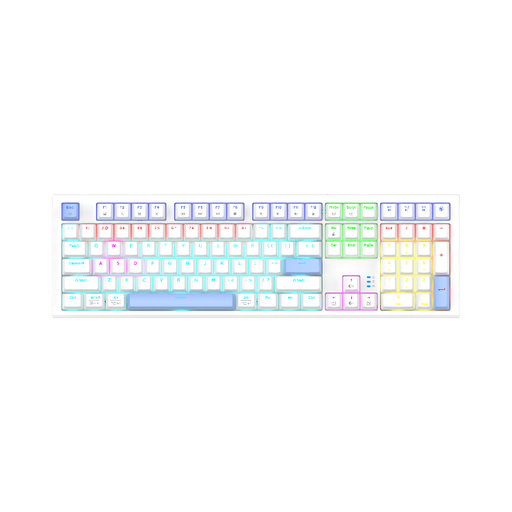
Why This Fits Their Persona: A wired full-size option suits new PC gamers, students and home-office users who want familiar 104-key access without managing a battery.
The full-size layout avoids the missing-key problem, while USB-A wired connectivity avoids wireless charging concerns.
104 keys, RGB backlighting, US QWERTY layout and a direct wired connection.

Why This Fits Their Persona: Competitive FPS players who prioritise adjustable control and a compact wired setup may value its per-key actuation settings and onboard profiles.
It clearly specifies the 60% layout, detachable USB-C cable and adjustable 0.1–4.0mm actuation, so buyers can assess the trade-offs.
Optical analogue switches, Rapid Trigger, six onboard profile slots and double-shot PBT keycaps.

Why This Fits Their Persona: Players of fast FPS titles who want magnetic switch control, Rapid Trigger settings and a 65% footprint may find this format appropriate.
The product information identifies the 68-key format, adjustable 0.2–4.0mm actuation and wired USB-C connection instead of relying only on speed-focused wording.
Hall Effect magnetic switches, Rapid Trigger, 8,000Hz polling and an aluminium top plate.

Why This Fits Their Persona: Students, creators and hybrid workers can switch between wired, Bluetooth and 2.4GHz connections while keeping the function row in a compact form.
Tri-mode connectivity gives a wired fallback, while the 75% format retains more everyday controls than a 60% board.
Bluetooth, 2.4GHz and USB connectivity, a 4,000mAh battery, RGB lighting and full-key hot-swap sockets.
Yes, but switch choice matters. Linear and tactile switches are often easier to live with in shared rooms than clicky switches. Internal foam, gasket construction and quieter keycaps can also reduce sound, although no mechanical keyboard is completely silent.
Rapid Trigger can alter how quickly a key resets and may suit movement-heavy competitive games. It does not improve graphics, internet performance or general decision-making. For office work, typing and slower-paced games, a standard mechanical switch may provide sufficient responsiveness.
Lifespan depends on switch construction, usage, dust, liquid exposure and keycap wear. Some product specifications quote a keystroke figure, but that number is not a guarantee of overall product life. A detachable cable, replaceable keycaps and hot-swappable switches can make maintenance or future customisation easier.