
24/7 Customer Support

Free returns

Same-day & Next-day Delivery

Quality Guaranteed

Unlock Your Welcome Offers: FREE Delivery | Up to 80% OFF | Free 30-day JoyPlus trial
Download the APP
Navigating the world of mechanical keyboards can feel overwhelming. The market is flooded with technical jargon and flashy marketing, making it difficult to distinguish genuine quality from expensive gimmicks. Many buyers end up with a keyboard that looks the part but fails to deliver on its promises, leading to buyer's remorse.
As a Joybuy Product Recommendation Officer, my role is to help you sidestep these issues. We will focus on the practical considerations that matter, ensuring you find a keyboard that truly enhances your gaming, work or creative pursuits. Before you spend your money, be aware of these common purchasing pitfalls:
To make an informed decision, focus on the fundamental components that define a keyboard's performance and longevity. Here are the three most critical areas to analyse.
The switch is the heart of a mechanical keyboard, determining how each keystroke feels and sounds. Unlike mushy membrane keys, mechanical switches provide distinct feedback. They generally fall into three categories:
Beyond these, you will also encounter optical switches, which use a beam of light for actuation instead of a metal contact. This can result in faster response times and greater durability. Also, consider the form factor; a low profile keyboard uses slimmer switches and keycaps for a sleeker design and shorter key travel, which can be more ergonomic for some users.
The size and layout of your keyboard have a major impact on ergonomics and desk space. While a full-size keyboard includes a number pad, many users now prefer more compact designs:
A keyboard's construction dictates its durability and typing experience. Look for a sturdy frame, ideally with an aluminium top plate, which adds rigidity and a premium feel. Keycaps are also vital; PBT (polybutylene terephthalate) keycaps are more durable and resistant to the shine that develops on cheaper ABS (acrylonitrile butadiene styrene) keycaps over time.
For a wireless mechanical keyboard, prioritise models with tri-mode connectivity (Wired, Bluetooth and 2.4GHz). A dedicated 2.4GHz wireless connection via a USB dongle almost always provides a more stable, lower-latency experience than Bluetooth, making it essential for serious gaming.
Instead of a one-size-fits-all approach, we have matched our recommendations to specific user needs.

Why This Fits Their Persona: This keyboard is built for one purpose: speed. Its ultra-compact 60% layout frees up maximum desk space for wide mouse movements, a critical factor in competitive FPS games. The wired connection ensures zero latency.
It sidesteps the "gaming tax" by providing features with tangible performance benefits. The Gen-2 Optical Switches with adjustable actuation and Rapid Trigger technology offer a measurable competitive edge, not just aesthetic flair.
Its key advantage is its near-instantaneous responsiveness. The ability to customise actuation from 0.1mm to 4.0mm and the instant reset of Rapid Trigger give players unparalleled control.

Why This Fits Their Persona: This keyboard is an excellent foundation for someone who loves to tinker. The 75% keyboard layout is practical, and the combination of a gasket-mounted structure and five layers of sound-dampening foam provides a premium typing feel straight out of the box.
It fully delivers on the customisation promise. As a true hot swappable keyboard, it allows users to easily experiment with different switch types without soldering. Its reliable tri-mode wireless also avoids the latency trap.
Its main advantage is the combination of high-end features at an accessible price point. The gasket mount, hot-swap sockets and included TFT display offer a level of functionality and customisation potential often found in more expensive boards.
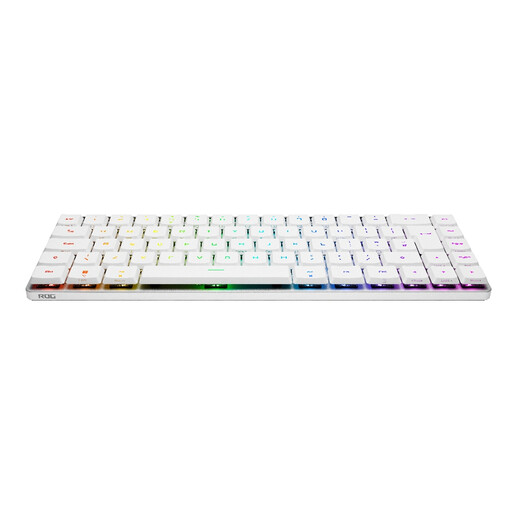
Why This Fits Their Persona: For those who value premium materials, a minimalist aesthetic and portability. This low profile keyboard features a slim aluminium frame and a clever protective cover, making it ideal for travel or a clean, modern desk setup.
It counters the wireless latency myth with its high-performance ROG SpeedNova 2.4GHz technology, which provides a stable, low-lag connection and extensive battery life. Its build quality is immediately apparent, justifying its position as a premium product.
Its standout features are the exceptional build quality and versatile, high-performance wireless connectivity. The combination of a 65% keyboard layout, low-profile optical switches and multi-device support makes it a powerful tool for both work and play.
For many people, yes. The distinct feedback from mechanical switches can lead to improved typing accuracy and speed, as you don't need to "bottom out" each key (press it all the way down). This can also reduce finger fatigue during long typing sessions compared to standard membrane keyboards. The variety of switch types also allows you to choose a feel that is most comfortable for you.
A well-built mechanical keyboard is a long-term investment. The switches are typically rated for 50 to 100 million keystrokes, far exceeding the 5-10 million keystroke lifespan of most membrane keyboards. Models with durable PBT keycaps and a solid aluminium frame are built to withstand years of heavy use.
A hot-swappable keyboard can be an excellent choice for a beginner. It provides a safe and easy way to explore the world of mechanical switches without needing any technical skills like soldering. If you buy a keyboard with linear switches but later decide you prefer a tactile feel, you can simply buy a new set of switches and swap them in, rather than having to purchase an entirely new keyboard.