
24/7 Customer Support

Free returns

Same-day & Next-day Delivery

Quality Guaranteed

Unlock Your Welcome Offers: FREE Delivery | Up to 80% OFF | Free 30-day JoyPlus trial
Download the APP
Navigating the world of mechanical keyboards can feel overwhelming. With endless marketing buzz around "pro-level gaming" and "ultimate typing," it's easy to end up with a keyboard that looks the part but fails to deliver. As a Joybuy Product Recommendation Officer, my role is to help you sidestep the common pitfalls and identify the features that truly matter for your setup, whether it's for work, gaming or a bit of both.
Before you add anything to your basket, let's look at the frequent traps that UK buyers fall into.
To ensure you get a keyboard that feels great and lasts for years, focus on the internal construction and core specifications, not just the marketing highlights.
The way the keyboard's internal plate is mounted to its case has the single biggest impact on typing feel and acoustics.
Your keyboard should adapt to your workflow, not the other way around.
A good mechanical keyboard is an investment. Features that allow for customisation and ensure longevity provide the greatest long-term value.
Here are a few options that align with these quality principles, matched to different user needs.
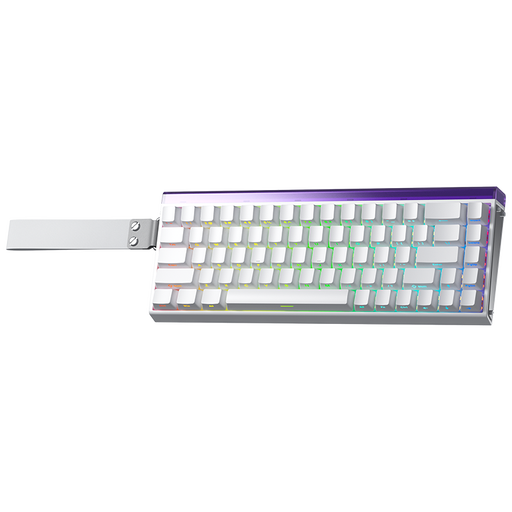
Why This Fits Their Persona: This is for the player who needs every competitive edge. The 60% compact keyboard layout frees up maximum desk space for wide mouse movements, while the Hall Effect magnetic switches offer near-instantaneous response times crucial for fast-paced FPS and rhythm games.
It sidesteps the "gaming aesthetics" tax by focusing on tangible performance. Instead of just RGB, it delivers cutting-edge Hall Effect switches with adjustable actuation and Rapid Trigger, features that directly translate to faster in-game actions.
The main advantage is its customisable performance, including an 8K polling rate and adjustable actuation down to 0.01mm for incredibly fast and precise inputs.
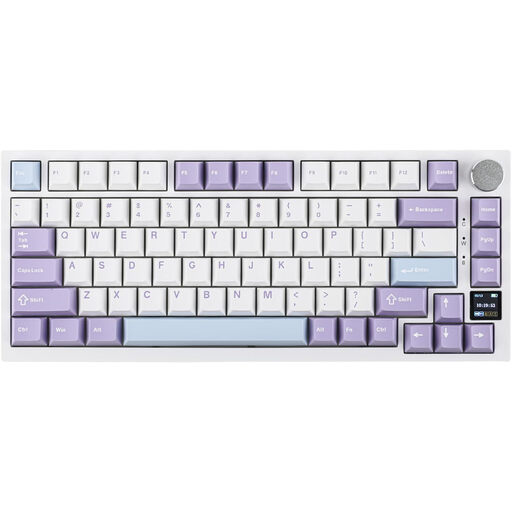
Why This Fits Their Persona: Ideal for the tech-savvy professional who values both performance and aesthetics. The 75% keyboard layout is compact yet retains function keys, while the tri-mode connectivity makes it easy to switch between a work laptop and a home gaming PC. The TFT screen is a genuinely useful feature for monitoring status without guesswork.
It completely avoids the hollow typing trap by incorporating a true gasket mount structure with multiple layers of sound-dampening foam. This delivers the quiet, deep and satisfying typing sound that many buyers are looking for.
The combination of a gasket mount for a premium feel, versatile tri-mode connectivity and a useful TFT display makes it a feature-rich package for both productivity and leisure.
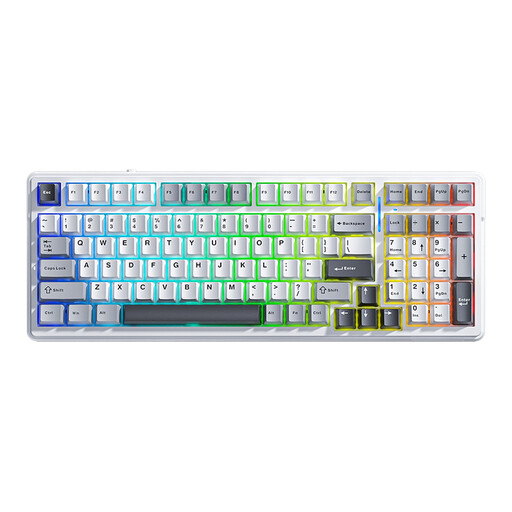
Why This Fits Their Persona: This is an excellent starting point for anyone curious about the custom mechanical keyboard hobby. It provides a high-quality foundation with enthusiast-level features, but at a more accessible price. The 96% layout is space-efficient while retaining a number pad, and the huge battery is great for long wireless sessions.
It offers genuine, tangible upgrades over basic models. The hot-swappable PCB means you are not locked into the switches it comes with, and its gasket structure provides a typing feel that punches well above its price point, avoiding the cheap feel of many starter boards.
Its key advantage is future-proofing. The hot-swappable board supports both 3-pin and 5-pin switches, giving you maximum freedom to experiment and upgrade your typing experience over time.
We have compiled a complete, real-time list of products that fully satisfy these strict selection criteria and UK safety regulations.
For many users, the difference is significant. A gasket mount provides a cushioned, less rigid typing feel by isolating the internal plate from the hard outer case. This can reduce finger fatigue during long typing or coding sessions and produces a deeper, more muted sound profile compared to the harsher, louder feedback from standard tray-mounted keyboards.
A well-built mechanical keyboard can last for many years. The switches themselves are typically rated for 50 million keystrokes or more. Longevity is enhanced by durable materials like PBT keycaps, which resist wear and shine. Furthermore, a hot-swappable keyboard has a potentially even longer lifespan, as you can easily replace an individual switch if it fails, rather than having to replace the entire keyboard.
It depends on the type of gaming. For most single-player and casual multiplayer games, a modern 2.4GHz wireless connection offers latency so low that it is practically indistinguishable from a wired connection. However, for highly competitive, professional-level esports, a wired connection is still the standard to guarantee zero interference and the absolute lowest possible input lag. A tri-mode keyboard gives you the flexibility to choose the best connection for the situation.