
24/7 Customer Support

Free returns

Same-day & Next-day Delivery

Quality Guaranteed

Unlock Your Welcome Offers: FREE Delivery | Up to 80% OFF | Free 30-day JoyPlus trial
Download the APP
A mechanical keyboard can improve typing feel, gaming control and desk organisation, but the specification lists are often more confusing than helpful. Terms such as “gasket mount”, “8K polling” and “tri-mode” may sound impressive without explaining whether the keyboard suits your actual setup.
Before buying, UK shoppers should look beyond RGB lighting and promotional wording. The main risks are choosing an unsuitable layout, assuming every wireless mode performs the same or buying a keyboard that cannot be customised later. The following guide breaks down the practical details and highlights our top recommendations for different users.
A 60% mechanical keyboard saves considerable desk space, but usually removes the dedicated function row, arrow keys and navigation cluster. These functions may still be available through Fn shortcuts, although that can be slower for spreadsheets, coding or office software.
A 75% mechanical keyboard generally keeps the arrow keys and function row in a smaller frame. A 96% or 90% layout retains more of the number-pad functionality while reducing some of the empty spacing found on a full-size model. Check the number of keys and the physical dimensions rather than relying only on the percentage label.
A wireless mechanical keyboard may support Bluetooth, 2.4GHz wireless or both. Bluetooth is convenient for laptops, tablets and multi-device use, while 2.4GHz usually uses a USB receiver and is commonly selected for gaming. Wired USB-C connection can be useful when charging, updating firmware or seeking a direct connection.
A tri-mode mechanical keyboard offers Bluetooth, 2.4GHz and wired USB connectivity, but battery capacity, device compatibility and software support still vary. Confirm whether the receiver is included and whether the keyboard uses a UK ISO or US ANSI layout.
Linear, tactile and clicky switches describe the operating feel, not the exact sound level. Case construction, keycap material, stabilisers and internal foam also influence acoustics. A keyboard advertised with a “creamy” or “thocky” sound may still sound different in your room, particularly on a hard desk.
For shared UK offices or late-night student accommodation, check for sound-dampening layers and consider linear or tactile switches. Clicky switches provide audible feedback, but may be unsuitable around colleagues or housemates.
A QWERTY mechanical keyboard with a US ANSI layout may have a different Enter key shape, punctuation placement and symbol arrangement from a UK ISO keyboard. If you regularly type £, quotation marks or other UK-specific characters, verify the operating-system layout and keycap legends before ordering.
A hot-swappable mechanical keyboard allows compatible switches to be removed and replaced without soldering. Confirm whether the PCB accepts 3-pin, 5-pin or both types. This feature is useful if you want to change from a light linear switch to a more tactile or quieter option later.
Switch force is also worth checking. Lighter switches may feel quick for gaming but can result in accidental presses, while heavier switches may suit users who prefer more deliberate key presses. If a listing does not state the switch type or replacement compatibility clearly, treat customisation claims cautiously.
For gaming, check whether the keyboard offers a wired mode and whether N-key rollover is specified. A high polling-rate figure may be relevant to competitive players, but it does not replace a suitable switch, stable firmware and comfortable layout.
For wireless use, compare the stated battery capacity and whether figures refer to lighting switched off. RGB mechanical keyboard lighting can reduce battery life, so users seeking extended wireless use may prefer adjustable brightness or the option to turn the backlight off. Rechargeable batteries should be charged with suitable USB power sources and kept away from heat and moisture.
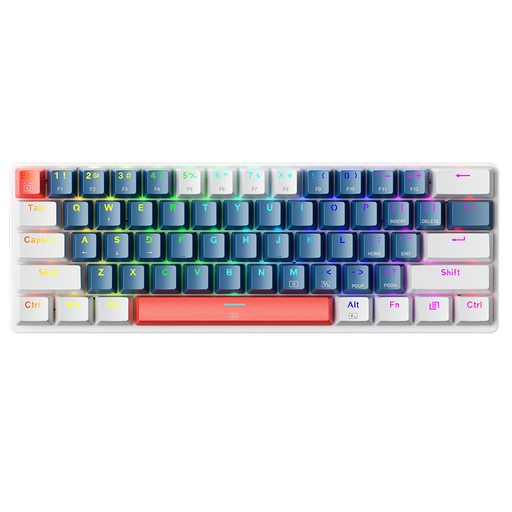
Why This Fits Their Persona: A straightforward wired option for students, first-time buyers and compact gaming desks where battery charging is unnecessary.
The wired USB-C connection avoids wireless battery limitations, while the 60% format is clearly suited to users who do not need dedicated navigation keys.
Blue mechanical switches, RGB backlighting and a detachable USB-C connection are specified.

Why This Fits Their Persona: A suitable match for enthusiasts wanting a compact, customisable board for work, gaming and everyday typing.
The 75% layout retains commonly used navigation functions, while tri-mode connectivity avoids locking you into Bluetooth or a cable.
It includes a gasket construction, TFT display, volume knob and hot-swappable Star Vektor switches.

Why This Fits Their Persona: Designed for users moving between workstations, laptops, tablets and gaming devices who still need arrow and number-key functions.
Its 96% layout is more practical than a 60% board for productivity, and the three connection modes provide a wired fallback when wireless charging is inconvenient.
The listed features include an 8000mAh battery, five-layer sound dampening, hot-swappable 3-pin/5-pin support and multi-device switching.

Why This Fits Their Persona: A desk-based choice for coding, document work and gaming where a stable wired connection and quick volume control are useful.
The 75% design preserves useful keys without the bulk of a full-size board, while the wired connection removes battery-related interruptions.
The specification lists hot-swappable support, PBT keycaps, gasket structure, a CNC volume knob and N-key rollover.
A mechanical keyboard with volume knob can be convenient for meetings, games and media playback, but it should be treated as a workflow feature rather than a reason to overlook layout or switch compatibility. RGB is similarly optional: it can improve visibility in low light and personalise a desk, but it may affect wireless runtime.
If posture and long typing sessions are your main concern, compare an ergonomic wireless keyboard with split-zone designs, negative tilt and wrist support. Not every ergonomic model is mechanical; the HP 960, for example, is a wireless ergonomic keyboard rather than a mechanical keyboard. This distinction matters if switch feel is a priority.
We have compiled a complete, real-time list of products that fully satisfy these strict selection criteria and UK safety regulations.
Yes, provided the switch and sound profile suit the workplace. Linear or tactile switches with internal dampening are generally less intrusive than clicky switches. Also check the key layout, especially if you use UK punctuation or a number pad daily.
Service life depends on the switches, PCB, stabilisers, keycaps and usage. Hot-swappable designs can be easier to maintain because compatible switches can be replaced without soldering. Keep the board dry, disconnect it before cleaning and follow the manufacturer’s care instructions.
It may require occasional charging or battery replacement, while a wired model draws power through USB. RGB lighting can increase wireless power consumption. For regular desk use, tri-mode models offer flexibility; for a fixed gaming or office station, a wired mechanical keyboard avoids battery management altogether.