
24/7 Customer Support

Free returns

Same-day & Next-day Delivery

Quality Guaranteed

Unlock Your Welcome Offers: FREE Delivery | Up to 80% OFF | Free 30-day JoyPlus trial
Download the APP
Navigating the world of mechanical keyboards can feel overwhelming. With endless marketing buzz around features and specifications, it's easy to make a purchase you later regret. As your Joybuy Product Recommendation Officer, my role is to help you sidestep the common pitfalls and focus on what truly matters for your gaming, typing or professional needs.
Many shoppers in the UK fall into a few common traps. They might overspend on a "gaming" model with features that offer no real-world advantage, or they choose a keyboard size that cramps their desk space and hinders their workflow. Before you add anything to your basket, let's break down the essential factors to ensure your money is well spent.
gaming mechanical keyboard with aggressive styling and a premium price, yet their core components are no different from more affordable models. True gaming performance comes from specific features like switch actuation point, polling rate and low-latency connectivity, not just a flashy design.customisable keyboard is appealing, but not all hot-swappable keyboard models are created equal. Some affordable boards only support 3-pin switches, severely limiting your upgrade path. Others may use fragile sockets that can be damaged after just a few switch changes, defeating the purpose of the feature entirely.To avoid these issues, focus on three non-negotiable specifications. Understanding these will empower you to choose a keyboard that genuinely fits your requirements.
The physical layout is arguably the most critical decision. It dictates your desk ergonomics and daily usability.
75% mechanical keyboard layout that keeps the arrow keys and function row in a tightly packed format. It's a fantastic balance of function and form for both gaming and professional work.compact gaming keyboard. It removes the function row and navigation keys for maximum mouse space, relying on function layers for missing keys. Perfect for minimalist setups and FPS gamers.How your keyboard connects to your PC has a direct impact on performance and convenience.
wireless mechanical keyboard using a dedicated USB dongle provides a connection that is virtually indistinguishable from wired in terms of latency. It's the go-to for a clean, cable-free gaming setup.The internal construction of a keyboard defines its typing feel and sound.
gasket mount keyboard uses soft, porous material to suspend the plate on which the switches are mounted. This isolates vibrations and creates a softer, quieter and more cushioned typing experience that many enthusiasts prefer.Based on these practical criteria, here are a few options tailored to different user needs.
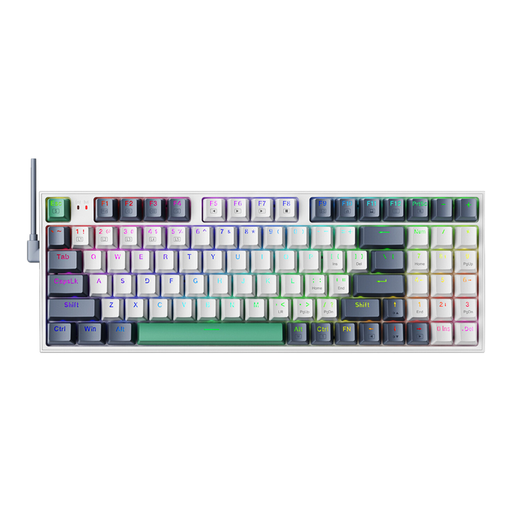
Why This Fits Their Persona: This keyboard is an excellent entry point for anyone new to mechanical keyboards. It provides a tangible upgrade from a standard membrane keyboard without an intimidating price tag, making it perfect for students or home office setups in the UK.
It avoids the "gaming tax" by focusing on core functionality. The 90% layout is a smart solution to the layout pitfall, retaining the number pad while saving desk space compared to a full-size board.
Features a reliable wired connection for plug-and-play simplicity and a space-saving 90% layout. The linear red switches offer a smooth, quiet keystroke suitable for both office work and gaming.

Why This Fits Their Persona: This keyboard is built for gamers who demand speed and responsiveness. Its compact form factor is perfect for competitive players in the UK who need maximum desk space for wide mouse movements in FPS and MOBA titles.
It sidesteps the "gaming" tax by delivering tangible performance features. Instead of just aesthetics, it offers Hall Effect magnetic switches with adjustable actuation and Rapid Trigger technology for a measurable competitive edge.
Features ultra-responsive magnetic switches with a customisable actuation point from 0.1mm. The 8K polling rate ensures near-instantaneous input registration, and the 68-key compact layout maximises mouse space.
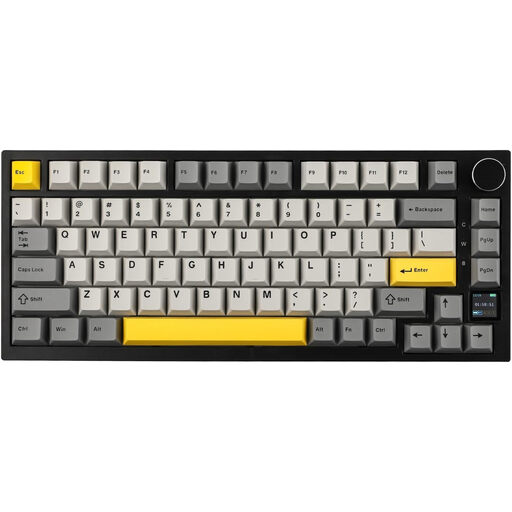
Why This Fits Their Persona: For the tech-savvy professional or budding keyboard enthusiast who values aesthetics, performance and versatility. It's perfect for a clean desk setup that can switch between a work laptop and a gaming PC seamlessly.
This model justifies its feature set. The hot-swap is robust, the gasket mount provides a premium feel, and the 75% layout is a deliberate choice for efficiency. The TFT screen adds genuine utility, not just a gimmick.
Offers tri-mode connectivity, a premium gasket-mounted structure for a superior typing feel, and a useful TFT screen for status info. It's also hot-swappable and features durable PBT keycaps.
We have compiled a complete, real-time list of products that fully satisfy these strict selection criteria and UK safety regulations.
1. How long does a mechanical keyboard last? A well-built mechanical keyboard is a long-term investment. The switches themselves are typically rated for 50 million keystrokes or more, which translates to many years of heavy use. Because they are built with individual switches, they are also more repairable than their membrane counterparts. A hot-swappable keyboard further extends this lifespan, as you can easily replace a faulty switch without needing to replace the entire board.
2. Is a gasket mount keyboard really better for typing? "Better" is subjective, but a gasket mount keyboard provides a noticeably different typing experience. The internal cushioning absorbs the impact of each keystroke, resulting in a softer, less rigid feel and a deeper, more muted sound profile. Many users who type for long periods find this reduces finger fatigue and is more pleasant to use compared to stiffer tray-mount or top-mount designs.
3. Do I need to install software for an RGB keyboard? Not always. Most RGB keyboard models come with pre-programmed lighting effects and brightness controls that can be accessed via key combinations (e.g., Fn + arrow keys). However, to unlock the full potential—such as per-key customisation, creating your own patterns or synchronising the lighting with games and other peripherals—you will typically need to install the manufacturer's optional software.