Catalogue data-entry workers
If your catalogue work involves repeated dimensions, stock numbers and other structured fields, a dedicated number pad and a familiar key layout may matter more than extra controls.


Choose the keyboard around catalogue tasks, not the number of screens: a full-size layout is worth considering if you regularly enter dimensions, prices or stock details. Multi-device switching matters only if the keyboard must move between separate computers or other host devices. Check the exact UK layout, switch sound and desk fit before deciding whether programmable controls would help your workflow.
If your catalogue work involves repeated dimensions, stock numbers and other structured fields, a dedicated number pad and a familiar key layout may matter more than extra controls.
If you move between separate computers or a computer and tablet, look at how a keyboard switches host devices. Two displays connected to one computer do not create that need.
For long typing sessions near colleagues, consider switch sound as well as feel. The Health and Safety Executive advises looking at the whole display-screen workstation, including equipment, furniture and working conditions.
Start with the keys you use throughout catalogue preparation, then decide whether you need to switch host devices or assign recurring commands. Finally, check how the chosen keyboard fits the workspace.
| Concern | What to check | Who this matters to |
|---|---|---|
| Numeric entry and layout | Check for a dedicated number pad and confirm the exact UK-ISO variant if UK key placement matters. | If I enter measurements and stock details repeatedly, I want number keys and a layout I can use without adapting my usual keystrokes. Roughly 42% of consumers put structured entry first. |
| Host switching and shortcuts | Count the host devices that will use the keyboard; check connection modes and whether your required shortcuts can be assigned. | If my catalogue files move between separate devices, I want to change the keyboard connection without disrupting my work. Around 33% of consumers prioritise host switching or recurring commands. |
| Sound and workstation fit | Confirm the selected switch type and allow space for the keyboard within the whole workstation setup. | When I type for long stretches near colleagues, I need a tolerable switch sound and a keyboard position that works with my desk and displays. For about 25% of consumers, that long-session fit comes first. |
Logitech’s Easy-Switch changes the connected host device; it does not select a monitor attached to one computer.
Count the computers or other host devices that will share the keyboard before making switching a requirement.
A Joybuy AULA listing identifies its layout as QWERTY US, while Keychron offers separately identified UK-ISO variants. The storefront alone does not settle which keys you will receive.
Check the selected variant, layout description and keycap photographs before ordering.
Correcting an unsuitable layout can delay catalogue preparation.
Manufacturers offer different switch types, while dedicated macro keys are useful only if you have recurring commands to assign. A clicky option may also be unwelcome beside colleagues.
Identify the commands you would map and check the exact switch option against the shared workspace.
The Health and Safety Executive advises considering the whole display-screen workstation and working conditions, rather than one item of equipment in isolation.
Review the displays, chair, desk and keyboard position together; use your employer’s workstation assessment process where applicable.
The full-size MX Mechanical is relevant if you want a number pad, a low-profile design and the option to switch between host devices.
The K10 Max is a full-size option to examine if UK-ISO availability, remappable keys and connection choices matter to your catalogue workflow.
The BlackWidow V4 X is worth considering when you can identify catalogue commands that need dedicated macro keys.
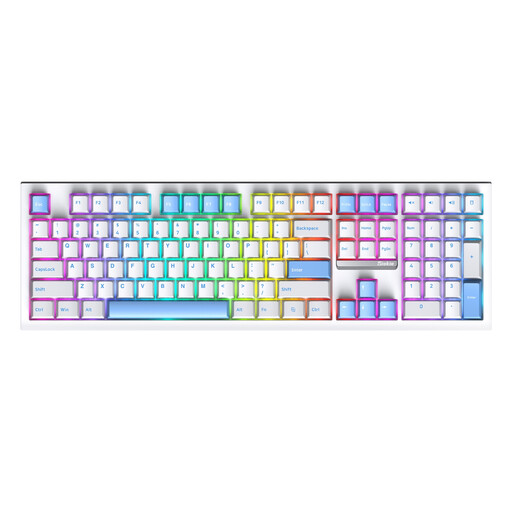
This 108-key mechanical keyboard is one to examine for catalogue preparation involving structured entry. Check its exact layout and switches against your own workspace needs.
 No image available
Consider its 108-key design if you regularly enter structured catalogue details, but check the exact key layout before relying on it for your preferred number-pad arrangement.
The product name identifies a detachable-switch, 3MODE RGB mechanical keyboard. Confirm the switch type and sound, and whether it can switch between separate host devices if your workflow requires that.
No: two monitors connected to one computer do not require keyboard host switching. Logitech describes Easy-Switch as a way to change the connected device, so consider it when the keyboard will serve separate computers or other host devices.
Choose UK-ISO if you need its familiar physical layout and UK key legends. Confirm the selected variant: Keychron identifies UK-ISO options, while a Joybuy AULA listing specifies QWERTY US Layout.
No: switch sound and workstation comfort are separate considerations. The Health and Safety Executive advises assessing the whole display-screen workstation, including equipment, furniture and working conditions.
Check the applicable electrical-equipment collection or recycling route rather than assuming an old keyboard belongs in ordinary waste. UK government guidance on waste electrical and electronic equipment describes recovery, reuse and recycling as ways to reduce disposal to landfill or incineration.