For exhibition catalogue work, choose a full-size keyboard if you regularly enter prices, dimensions or object references; choose a compact one if desk space matters more than dedicated keys. In a shared workspace, check the exact switch option and typing sound, then confirm the physical layout and compatibility with your devices. A new keyboard should fit your workstation rather than stand in for a well-arranged desk and screen.
Who needs which features?
Catalogue spreadsheet and copy specialists
If you alternate between captions and tables of prices, dimensions or stock references, consider how often you need dedicated number-entry and navigation keys. Check the physical layout you will actually use for typing.
Shared-studio deadline workers
Long typing sessions near colleagues or household members make switch sound worth checking alongside key feel. Quiet-oriented options are available, but their names do not tell you how a keyboard will sound at your desk.
Multi-device catalogue editors
If you review proofs or assets across a desktop, laptop and tablet, check both device-switching controls and compatibility with each operating system you use.
What should you check?
Start with the keys your catalogue tasks require, then consider typing sound, device switching and how the keyboard fits your desk.
| Concern |
What to check |
Who this matters to |
| Numeric and editing keys |
Check for a dedicated number pad and the physical key positions you prefer, including UK-ISO if required. |
If I spend much of the day entering dimensions and object references, I want number entry within easy reach; roughly 36% of consumers put structured data entry first. |
| Typing sound |
Confirm the installed switch variant and, if possible, listen to a sound sample for that configuration. |
Typing beside other people makes the sound of sustained work important to me; around 29% of consumers make shared-workspace sound their primary concern. |
| Device switching |
Check the supported devices, operating systems and switching method; connection modes alone do not establish a switching workflow. |
When proofs and source files sit on different devices, I need to move between them without disrupting my work; roughly 21% of consumers prioritise multi-device use. |
| Workstation fit |
Check that the keyboard fits your desk arrangement and can sit just below elbow height where practicable. |
During long catalogue sessions, I need the keyboard to work with my screen, mouse and seating arrangement; about 14% of consumers put workstation fit first. |
Mistakes to avoid
-
Assuming a UK seller means UK-ISO keys
Keychron offers distinct regional ISO versions of the Q6 Max, so the seller’s location does not identify the selected keyboard’s physical layout.
If UK-ISO is important to your typing, check the exact variant and its key positions before ordering.
-
Choosing a switch without considering nearby people
Logitech offers different switch options for MX Mechanical, while Razer’s quieter description applies to the named Pro Type Ultra design. A range name alone cannot establish the sound of every variant.
Check the installed switch and listen to a sample where possible if you will type in a shared room.
-
Expecting a keyboard to fix the whole workstation
Keyboard position is only one part of a display-screen setup. The Health and Safety Executive also addresses screen placement and posture in its workstation guidance.
Arrange the screen, keyboard, mouse and seating together; for prolonged laptop work, consider a separate keyboard and mouse so the screen can be raised.
-
Putting an old keyboard in general rubbish
UK guidance from the Office for Product Safety and Standards and the Department for Environment, Food & Rural Affairs describes waste-electrical rules intended to support recovery, reuse and recycling.
Check local electrical-waste collection or retailer take-back options when replacing a keyboard.
Relevant brands to consider
Keychron
Keychron’s UK-ISO range is relevant if you want to compare full-size and custom-layout options.
- Keychron describes the Q6 Max UK-ISO as a full-size QMK/VIA keyboard with 2.4 GHz, Bluetooth 5.1 and wired USB-C connectivity.
- Confirm the selected switch, physical layout and availability for the exact configuration.
Logitech
Logitech’s MX Mechanical range offers full-size and Mini formats for different desk-space needs.
- Logitech lists Tactile Quiet, Clicky and Linear switch choices and switching between up to three devices.
- Check the physical key layout of the selected retail variant rather than assuming every version has the same one.
Razer
Razer’s Pro Type Ultra is relevant to shoppers considering a wireless productivity keyboard for a shared workspace.
- Razer describes silent mechanical switches, sound-dampening foam, programmable shortcuts and wired, Bluetooth and 2.4 GHz connections on this model.
- Check the exact physical layout and whether the included wrist rest fits your desk.
Joybuy keyboards for catalogue work
These keyboards offer different starting points for catalogue typing: two 108-key options for shoppers considering a larger layout, and a compact wireless option for those weighing desk space against dedicated keys. Check each variant’s physical layout and switch details against your own workflow.
 No image available
Ticktype DP104 108-key US layout, Gecha Gray, Silent Tactile Switches
Consider this full-size option if structured catalogue entry matters and a US physical layout suits your typing.
- The named variant has 108 keys, hot-swappable switches and Silent Tactile Switches; assess its sound for your workspace rather than assuming a measured noise level.
- Its US layout is not UK-ISO. Check the key positions before buying, and confirm device-switching support if you work across several devices.
View on Joybuy
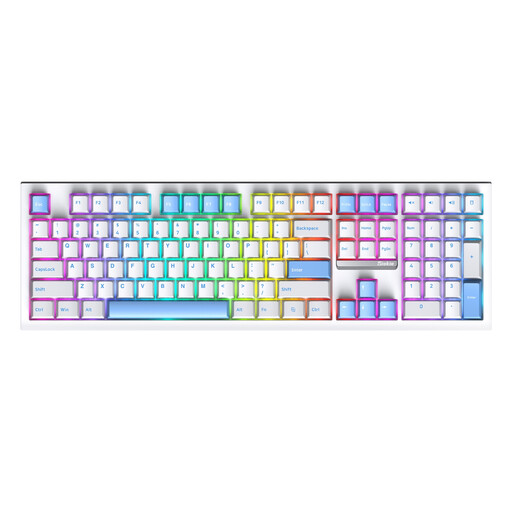 No image available
Siukie PL108W 108-key Detachable Switch 3MODE, White
Consider this 108-key model if frequent number entry makes a larger keyboard worth assessing.
- The product name identifies a detachable-switch, 3MODE mechanical keyboard.
- Check its exact physical layout and installed switch before choosing it for UK-key-position preferences or a shared workspace. Confirm device-switching behaviour separately if that matters to your work.
View on Joybuy
 No image available
HyperX Alloy Rise 75 Wireless Keyboard UK
Consider this compact wireless model when desk space and moving between proofing devices matter more than assuming access to a dedicated number pad.
- Check the exact key arrangement before relying on it for frequent numeric entry; the UK wording in the product name does not by itself establish every physical key position.
- Check the installed switches and typing sound if colleagues will be nearby.
View on Joybuy
Common questions
Do I need a full-size keyboard for exhibition-catalogue work?
A full-size keyboard is worth considering if you often enter prices, dimensions or object IDs and want dedicated number keys. Logitech identifies an integrated number pad on the full-size MX Mechanical, while Keychron describes the Q6 Max as full-size; a compact format may suit you better when desk width matters more.
Should I prioritise a quiet switch in a shared studio?
Prioritise checking switch sound if other people will hear sustained typing. Logitech distinguishes its Tactile Quiet, Clicky and Linear MX Mechanical variants, while Razer describes silent switches and sound-dampening foam on the Pro Type Ultra; neither description establishes how every keyboard will sound in your room.
How should I set up a keyboard for long laptop-based catalogue sessions?
Use the keyboard as part of the whole workstation setup, not as a substitute for arranging the screen and seating. The Health and Safety Executive advises placing a keyboard just below elbow height where practicable; a separate keyboard and mouse can also let you raise a laptop screen for prolonged work.
What should I do with an old keyboard?
Check electrical-waste collection or retailer take-back options rather than treating the keyboard as general rubbish. UK waste-electrical guidance from the Office for Product Safety and Standards and the Department for Environment, Food & Rural Affairs addresses recovery, reuse and recycling; collection arrangements depend on the service you use.


