
24/7 Customer Support

Free returns

Same-day & Next-day Delivery

Quality Guaranteed

Unlock Your Welcome Offers: FREE Delivery | Up to 80% OFF | Free 30-day JoyPlus trial
Download the APP
A mechanical keyboard can improve typing feedback, gaming control and desk comfort, but the wrong model may create unnecessary noise, connectivity problems or compatibility issues. Product listings often highlight RGB lighting and impressive switch-life figures while leaving out details that matter more in daily UK use.
Before buying, watch for three common traps:
A 75% mechanical keyboard normally retains the function row and navigation cluster in a compact arrangement, making it a practical compromise for smaller desks. A full-size model includes the number pad and is useful for spreadsheets, finance work and data entry.
Check whether the keyboard uses a UK ISO layout or a US ANSI layout. The difference affects the Enter key, left Shift key and punctuation positions. Several products listed here use a US layout, so UK buyers should confirm the arrangement before ordering. Replacement keycaps must also match the layout and stem type.
PBT keycaps are generally valued for their textured feel and resistance to the glossy wear that can develop on some ABS keycaps. However, “PBT” alone does not confirm thickness, legends, profile or compatibility. Check whether the caps use OEM, Cherry or another profile before planning replacements.
Mechanical switches affect actuation feel, sound and fatigue. Common options include:
A hot-swappable mechanical keyboard allows compatible switches to be changed without soldering. Confirm whether the PCB accepts 3-pin, 5-pin or both types. Hot-swap sockets make future customisation easier, but they do not automatically make a keyboard compatible with every switch.
Mounting style also changes the feel. A gasket mount keyboard uses cushioning around parts of the plate or assembly to create a more flexible typing response. Marketing descriptions can differ, so also look for information about the plate, foam layers, stabilisers and case material.
A wired USB-C mechanical keyboard offers a straightforward connection and avoids battery charging. For gaming or intensive desktop use, a cable can also provide consistent input without wireless interference.
A tri-mode keyboard commonly combines USB-C, Bluetooth and 2.4GHz wireless connectivity. This is useful if you move between a desktop, laptop and tablet, but check whether the receiver is included and whether the operating systems you use are supported.
Other practical details include:
RGB lighting can be useful in a dim room or for visual customisation, but it should be treated as a secondary feature rather than a measure of keyboard performance.

Why This Fits Their Persona: A compact wired option for students, home-office users and first-time mechanical keyboard buyers who want customisation without adding wireless charging to their routine.
Its stated hot-swap support, wired USB-C connection and 75% layout are clearly defined, helping buyers avoid vague connectivity and compact-layout descriptions.
Features a gasket structure, hot-swappable PCB, OEM PBT keycaps, RGB backlighting and a CNC volume knob.

Why This Fits Their Persona: Suits users who want a full-size board, multi-device flexibility and a more substantial aluminium construction for a permanent workstation.
The listing identifies tri-mode connectivity, a full-size 108-key layout, hot-swap support and an 8000mAh battery, rather than relying on a generic wireless label.
Includes a full aluminium body, leaf spring mount, RGB lighting and a customisable pixel screen. This version uses thocky linear switches.
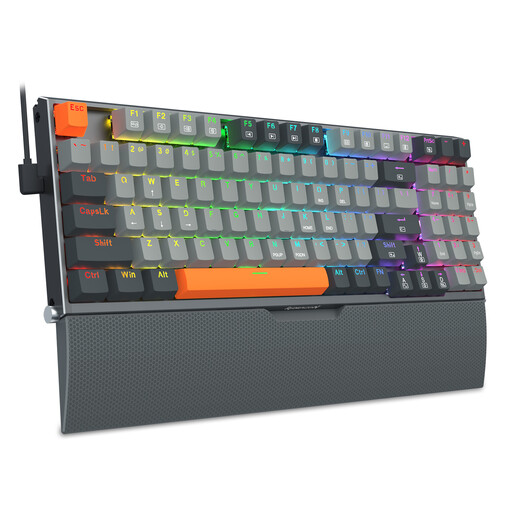
Why This Fits Their Persona: A practical choice for gamers, programmers and creators who want a denser layout with a phone stand and wrist support at a fixed desk.
It uses a wired connection, so there is no battery to monitor, and its hot-swappable socket PCB allows switch changes without soldering.
The specification includes 94 keys, mixed-colour PBT double-shot keycaps, pre-lubricated switches, RGB backlighting and a detachable wrist rest.
Connect a wired model directly to a compatible USB port and check whether the manufacturer provides software for lighting or key remapping. On Windows and macOS, confirm the selected keyboard layout in system settings, especially when using a US ANSI board in the UK.
For wireless models, charge the battery before pairing and keep the 2.4GHz receiver accessible rather than hidden behind dense cables or metal equipment. Keep firmware and configuration software from the official product source where available.
Disconnect the USB cable before cleaning. Use a soft, dry cloth or compressed air around the keycaps, and avoid spilling liquids into the case. Do not open or modify a keyboard containing a lithium battery unless the manufacturer specifically permits it.
We have compiled a complete, real-time list of products that fully satisfy these strict selection criteria and UK safety regulations.
Yes, but switch choice and case construction matter. Linear and tactile models can be audible, while silent switches and dampening layers may reduce sound. Check workplace preferences and avoid assuming that a “quiet” label means silent in every environment.
Lifespan depends on switch construction, hot-swap socket durability, stabilisers, keycap wear and care. A stated switch rating is a manufacturer specification, not a guarantee of identical performance for the whole keyboard. Hot-swappable designs can extend practical use by allowing worn or unsuitable switches to be replaced.
RGB lighting adds to power use, particularly on a wireless keyboard, but the exact amount depends on brightness, lighting zones and battery capacity. Lowering brightness or switching the lighting off can reduce battery drain. A wired keyboard draws power through the computer, while a wireless model requires periodic charging.