Frequent number-entry users
If stock updates involve quantities, item codes and spreadsheet rows, access to a dedicated numpad may matter more to you than a smaller keyboard.


Choose a keyboard with an integrated numpad if entering stock quantities is your main task. If repeated spreadsheet or inventory-system commands take more of your time, consider programmable keys instead. A compact board may fit a smaller desk, but check which dedicated keys it gives up, the exact switch variant and how the keyboard fits your workstation.
If stock updates involve quantities, item codes and spreadsheet rows, access to a dedicated numpad may matter more to you than a smaller keyboard.
If you repeat the same commands across an inventory system, spreadsheet or browser, programmable keys may be useful—provided your software accepts the shortcuts you intend to use.
A shared room, calls or limited desk width can make switch choice, keyboard footprint and workstation positioning part of the purchase decision.
For home-office stock updates, decide whether dedicated number entry, repeatable commands or desk fit is your main priority. Full-size layouts, compact layouts and dedicated macro keys address different parts of that work; the checks below help distinguish them.
| Concern | What to check | Who this matters to |
|---|---|---|
| Number entry and familiar keys | Confirm an integrated numpad if you use one regularly; check the physical UK layout and any navigation keys you rely on. | When I enter quantities throughout the day, I want dedicated number keys rather than layers or the top number row. Around 42% of consumers put numeric entry first. |
| Repeatable commands | Check that your software and operating system permit the shortcuts you want, and whether remappable keys or separate macro keys suit them. | If the same stock-system actions keep coming up, I want a way to trigger them without repeating every keystroke. Programmable workflow is the main priority for around 33% of consumers. |
| Home-office fit | Check desk width, the keys a compact layout omits, connection needs and the exact switch variant. | In a shared or narrow workspace, I need the keyboard to fit alongside my other equipment without overlooking typing sound. Around 25% of consumers put space and noise considerations first. |
A smaller board can give you more desk space while removing keys you use for repeated quantities or navigation. Logitech distinguishes its full-size MX Mechanical, which has an integrated numpad, from the Mini; Keychron describes the V1 Max as a 75% layout.
Note which keys you use during a typical stock update. If a dedicated numpad is essential, confirm its presence on the exact layout before choosing a compact model.
Switch options differ within keyboard families. Logitech lists Tactile Quiet, Clicky and Linear choices for MX Mechanical; Razer describes its BlackWidow V4 X Green switch as clicky and its Yellow option as smooth and silent. Those descriptions are not a measurement of sound in your room.
Check the switch fitted to the particular variant you are buying, especially if you take calls or share the workspace.
The Health and Safety Executive advises considering the complete workstation. Its setup guidance includes keeping the keyboard just below elbow height and the screen and keyboard central, without twisting your back.
Consider the chair, desk, screen, mouse and keyboard together. Where an employee’s display screen equipment use meets the assessment conditions, follow the employer’s workstation-assessment process rather than relying on a keyboard change alone.
The Razer BlackWidow V4 X Minecraft Edition and the standard BlackWidow V4 X have different model identities. A shared base name does not establish that their layouts, switches or bundles are identical.
Compare the full model and edition names, physical layout, switch variant and included items on the exact listing before buying.
The MX Mechanical range offers a choice between a full-size keyboard and the smaller Mini.
The UK-ISO V5 Max and V1 Max offer different layouts for buyers interested in customisation.
The BlackWidow V4 X is a route for users who specifically want separate programmable controls.
These mechanical keyboards offer different approaches to home-office stock work, from a full-size key arrangement to compact and wireless options. Check the exact listing for a dedicated numpad, physical UK key positions and switch variant where those details determine your choice.
 No image available
Consider this model if connection choice matters alongside a more compact keyboard arrangement. Its title specifies wired, Bluetooth and 2.4 GHz modes and a US QWERTY layout. If you enter quantities on a separate number pad, confirm the physical key arrangement before buying; also check whether the US layout suits your UK typing needs.
 No image available
If you want a smaller wireless model, compare the Alloy Rise 75’s key arrangement with the controls you use for stock updates. The product title identifies a UK version, but check its exact physical layout and whether it has the dedicated number keys you need.
 No image available
The full-size 108-key arrangement is worth examining if you prefer a broad set of physical keys for stock work. The title specifies a US layout and Silent Tactile switches; the switch name is not a guarantee of how quiet it will sound in your room. Confirm the numpad arrangement and UK typing compatibility on the exact variant.
 No image available
The 96% layout and tri-mode wireless specification may interest you if desk fit and connection choice matter. Its title specifies US QWERTY, so check the physical key positions and numpad arrangement before relying on it for stock quantities. The listing warns that its motorised lift can pinch or crush; keep fingers and objects clear when adjusting it.
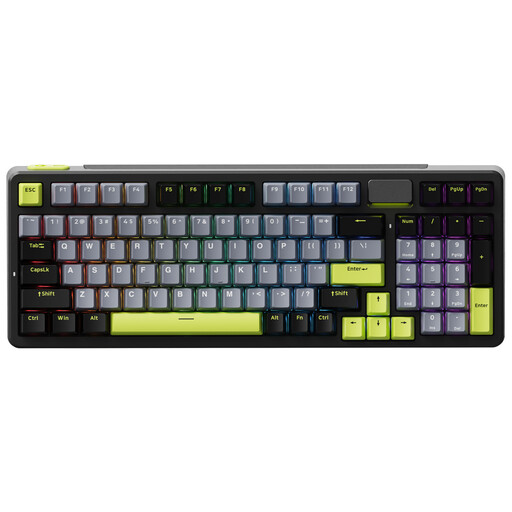 No image available
This 96% model is another layout to consider when desk width matters. The title specifies tri-mode connection and US QWERTY. Before using it for frequent stock entry, check the dedicated number-key arrangement, the physical layout and the switch variant on the exact listing.
Choose a model explicitly identified as UK-ISO if familiar UK physical key positions matter to you. Keychron identifies UK-ISO variants of its V5 Max and V1 Max; check the exact colour and switch configuration rather than assuming every variant shares that layout.
If you are an employee using display screen equipment daily as part of normal work for continuous periods of an hour or more, the Health and Safety Executive says your employer must carry out a workstation assessment. It considers the whole workstation and working conditions, so buying a keyboard does not replace it.
Some models can, but check the particular keyboard and the devices you use. Logitech says the MX Mechanical can switch between up to three devices; Keychron says the V1 Max can pair with three devices over Bluetooth 5.1 and also offers a 2.4 GHz connection.
Check an electrical-equipment collection or take-back option rather than putting it in general rubbish. UK government guidance describes the waste electrical and electronic equipment scheme as supporting recovery, reuse and recycling; ask your retailer or local authority which collection route is available to you.