Choose a full-size mechanical keyboard if frequent number entry and familiar dedicated keys matter most; choose a compact board if space for your pointing device matters more. A split board offers more freedom to position each half, but its unfamiliar layout takes time to learn. Whichever you prefer, check the keyboard height at your standing desk and confirm the physical layout, switches and keys you need for booklet work.
Who this choice affects
Standing-desk layout designer
If you spend long sessions revising pages, copy and print details while alternating between sitting and standing, keyboard height and mouse position matter alongside typing feel. The Health and Safety Executive advises keeping the keyboard just below elbow height and the mouse in line with the elbow.
Shortcut-heavy visual creator
If you move between a design app, browser, proofs and messages, check whether a smaller layout retains the navigation keys, shortcuts and number entry you use regularly.
Comfort-first keyboard experimenter
If you are willing to remap keys or learn layers, a split layout gives you different positioning options. Allow time to adapt rather than changing to an unfamiliar arrangement just before a booklet deadline.
What to check before choosing
Set the standing desk to a workable height before choosing a keyboard profile. Then decide which dedicated keys you need and how much space to leave for your pointing device.
| Concern | What to check | Who this matters to |
|---|
| Keyboard height and posture |
At your standing height, check whether the keys can sit just below elbow level with relaxed shoulders. Assess the desk and screen position together. |
If the desk cannot go low enough, I need to know whether the keyboard height makes a comfortable setup harder. Around 33% of consumers put this workstation fit first. |
| Room for a pointing device |
Measure the space for both devices, then check what keys a compact layout removes. |
When I alternate between page layout and mouse work, I want the pointing device within easy reach. For around 27% of consumers, that space is the primary concern. |
| Editing keys and shortcuts |
Check the exact arrangement of arrows, navigation keys, function keys and number pad, as well as the physical UK layout if you need it. |
I need frequent editing commands and number entry without hunting through layers during revisions. Dedicated-key access comes first for around 27% of consumers. |
| Sound and connections |
Check the exact switch variant, device compatibility and stated connection options; try the switch sound where possible. |
In a shared workspace, I want typing that suits the room and connections that suit my devices. Around 13% of consumers prioritise those needs. |
Buying pitfalls
-
Choosing the keyboard before adjusting the desk
A thinner keyboard cannot by itself correct a desk that is too high, a poorly placed screen or a distant mouse.
Set the desk to your intended standing height first. Follow the Health and Safety Executive's guidance to keep the keyboard just below elbow height, shoulders relaxed and mouse in line with the elbow.
A laptop-based setup may also need a stand and a separate pointing device so the screen and input devices can be positioned independently.
-
Assuming a compact layout preserves every editing key
A smaller board can free desk width but may move navigation, number entry or other commands to key combinations and layers.
List the keys and shortcuts you use while designing and proofing the booklet, then check how each candidate layout provides them.
-
Treating ergonomic claims as a guarantee
Split halves and adjustable angles offer positioning choices, but they do not guarantee comfort or prevent pain. A layered layout can also interrupt familiar shortcuts while you learn it.
Consider a split keyboard only if you have time to configure and practise with it. Seek appropriate professional advice for persistent discomfort rather than treating a keyboard as treatment.
-
Overlooking the exact variant
A model family can include different physical layouts and switches, which may change how familiar the keys feel and sound.
Check the product page for the physical UK or US layout, exact switch variant, device compatibility, required accessories and current availability before ordering.
Brands to consider
Logitech
The MX Mechanical range offers conventional full-size and compact low-profile layouts.
- Logitech lists an integrated number pad on the full-size MX Mechanical and a smaller footprint for the Mini.
- Check the exact physical layout and whether the Mini retains the dedicated keys you use. Logitech's posture claims for its smaller model are manufacturer claims, not a guarantee of individual fit.
Keychron
The K3 UK ISO and K2 UK ISO offer compact 75% mechanical layouts; the K3 is low-profile, while the K2 is standard-height.
- Keychron specifies Bluetooth and wired connections for both models, with UK ISO physical layouts.
- Neither 75% layout provides a dedicated number pad; check the key arrangement against your editing workflow.
ZSA
Voyager is a compact, programmable, low-profile split mechanical keyboard.
- ZSA specifies 52 keys, hot-swappable low-profile switches and browser-based customisation.
- Its compact layout places many conventional commands on layers, so allow time to learn it before deadline-sensitive work.
MoErgo
Glove80 is a split, contoured mechanical keyboard intended for a configurable workstation.
- MoErgo specifies independently positionable wireless halves and continuously adjustable tenting.
- Its layout and configuration require adaptation. MoErgo's ergonomic claims should not be treated as independent evidence of a health outcome.
Joybuy keyboard options
These full-size and compact mechanical keyboards offer conventional-layout options for booklet work. Compare their physical key layouts and desk fit before choosing; the split-keyboard route discussed above requires a different layout and learning commitment.
 No image available
HyperX Alloy Rise 75 Wireless Keyboard UK
Consider its 75% layout if leaving space for a pointing device matters more than having a full-size board.
Wireless model. Check the exact physical key arrangement, the editing keys you need and its height at your standing desk; UK in the name does not establish a UK ISO layout.
View on Joybuy
 No image available
Ticktype DP104 Custom tri-mode mechanical keyboard, Gecha Gray, silent tactile switches
Consider this full-size option if you prefer a broader physical layout and have room beside it for your pointing device.
108 keys, US layout, hot-swappable switches and an 8000mAh battery are specified in the product name. Silent tactile describes the switch variant, not a measured sound level; check its key arrangement and keyboard height before buying.
View on Joybuy
 No image available
MACHENIKE KG87 80% mechanical tri-mode keyboard, Latte Switch-Pink
Consider the 80% layout if you want a smaller board but are prepared to check how it provides your editing shortcuts.
QWERTY US layout and Latte Switch-Pink variant. Confirm its dedicated keys and height against your booklet workflow and standing-desk setup.
View on Joybuy
 No image available
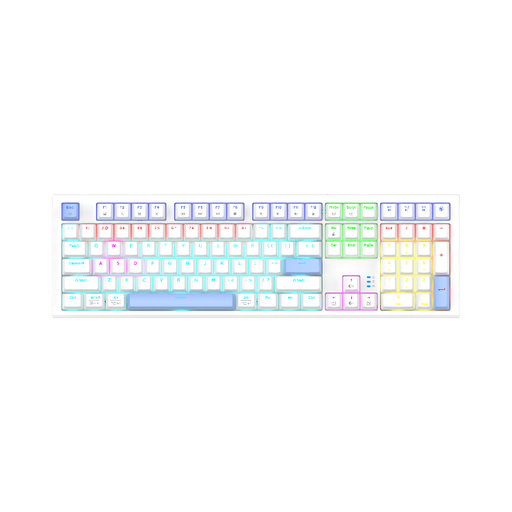
ochama J104 full-size wired mechanical keyboard, white
Consider this option if you want a full-size board with a direct wired connection and have enough desk width for your pointing device.
104-key, USB-A and QWERTY US layout. Check the exact editing-key arrangement and keyboard height, and whether its described clicky feel suits your workspace.
View on Joybuy
Common questions
How should I position a keyboard when working standing up?
Position it just below elbow height with your shoulders relaxed, following Health and Safety Executive guidance. Keep the keyboard and screen central and the mouse in line with your elbow; adjust the desk before relying on a lower-profile keyboard to improve the fit.
Would a separate keyboard help with a laptop at a standing desk?
A separate keyboard can help if raising the laptop screen puts its built-in keys too high for your hands. Check that your desk has room to position the screen, keyboard and pointing device together, with the keys just below elbow height.
Which mechanical switch should I choose for a shared workspace?
Choose by the sound and feel of the exact switch variant rather than assuming all mechanical keyboards sound alike. Logitech, for example, lists Tactile Quiet, Clicky and Linear options for MX Mechanical; listen to or try the variant you intend to buy where possible.


