What matters when choosing?
Start with the keys your statistics workflow actually uses, then consider shortcuts, switch sound and the space available at your desk. A layout name alone does not confirm that the particular variant has the keys you need.
| Concern |
What to check |
Who this matters to |
| Numeric entry |
Inspect the key diagram for a physical number pad; confirm the full-size or compact variant. |
When I enter scores and event counts repeatedly, I want the number-pad keys I already use. Around 40% of consumers put that need first. |
| Repeatable shortcuts |
Identify commands in your statistics software, then check the keyboard's configuration method and software compatibility. |
If I move through the same fields or commands throughout a match, I want shortcuts I can test without changing records by mistake. Roughly 30% of consumers prioritise that workflow. |
| Switch feel and sound |
Check the exact switch variant, particularly when choosing a clicky or quieter option. |
At a shared desk, I need a switch whose sound and feel suit the people around me as well as my typing. About 20% of consumers make this their primary concern. |
| Desk and device flexibility |
Check the keyboard's dimensions, connection modes and required keys for each device you use. |
When desk room is limited or I change devices, I want a setup that fits without losing essential controls. This comes first for around 10% of consumers. |
Joybuy keyboards for statistics entry
These mechanical keyboards offer different layout, switch and connection choices for match-statistics entry. For any model you plan to use for repeated figures, inspect its physical key layout and confirm that it suits your software and preferred UK key positions before buying.
 No image available
Ticktype DP104 Gecha Gray, Silent Tactile switches
Consider this full-size option if you want room for a 108-key layout and prefer the listed Silent Tactile switch variant.
US layout; tri-mode wireless mechanical keyboard; hot-swappable; 8000mAh; RGB.
Inspect the exact key diagram for a physical number pad and check whether the US key positions suit your work.
View on Joybuy
 No image available
MACHENIKE KG87 80%, Latte Switch-Pink
Consider the 80% layout if a smaller keyboard footprint matters more to you than a conventional full-size arrangement.
QWERTY US layout; tri-mode mechanical keyboard; Latte switch variant.
Compare its key diagram with the numeric and navigation keys your statistics application requires, and check the US key positions.
View on Joybuy
No image available
Ticktype DP104 Gecha Gray, Thocky Linear switches
Consider this 108-key full-size variant if you want the listed Thocky Linear switches rather than the Silent Tactile variant.
US layout; tri-mode wireless mechanical keyboard; hot-swappable; 8000mAh; RGB.
Confirm the physical number-pad arrangement and US key positions before choosing it for repeated numeric entry.
View on Joybuy
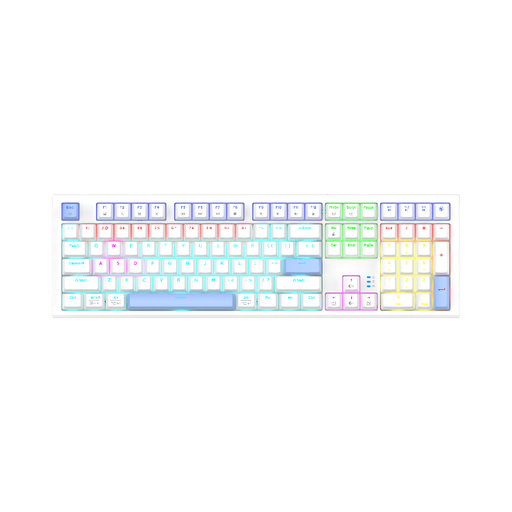 No image available
ochama J104 wired mechanical keyboard, White
Consider this wired full-size option if a USB-A connection fits your statistics-entry setup.
104-key QWERTY US layout; RGB; USB-A.
Check the key diagram for the number pad you need and whether the US layout suits your workflow.
View on Joybuy
 No image available
Razer BlackWidow V4 X Minecraft Edition
Consider this mechanical keyboard only after checking that its controls suit the repeated commands in your statistics software.
Minecraft Edition variant.
Confirm its physical layout, number pad, switch option and shortcut-configuration compatibility for this exact model before buying.
View on Joybuy
Common questions
Do I need a full-size keyboard to enter match statistics?
Not necessarily: choose a full-size model when a physical number pad is central to your repeated entry work. A compact keyboard may fit a smaller desk, but inspect its key diagram to make sure it retains the controls you use.
Are macro keys useful with match-statistics software?
They can be useful for stable, repeatable actions that your software supports. Check the configuration method for the exact keyboard and test mappings with non-critical data so a shortcut cannot accidentally duplicate or mistime a live record.
Which switches should I consider for a shared room?
Start with the sound and feel of the exact switch variant, rather than the keyboard model alone. Logitech lists Tactile Quiet, Clicky and Linear options for MX Mechanical, while Razer describes different Green and Yellow options for BlackWidow V4; an audible clicky choice may distract people nearby.
Is changing the keyboard enough for a regular statistics-entry workstation?
No: consider the keyboard as one part of the workstation. The UK Health and Safety Executive's display-screen-equipment checklist also covers the pointing device, display, software, furniture and work environment, so assess those parts of the setup together.


