Live match-statistics operators
If you enter scores and other figures while watching a live feed, a dedicated number pad is a useful starting point. Consider programmable controls only after checking how your statistics software handles shortcuts.


Start with a full-size UK-ISO mechanical keyboard if you enter figures repeatedly and have room to keep the mouse within easy reach. Multi-device switching matters when you type into separate computers, not simply because you use two screens. A compact layout gives the mouse more space but requires more thought about number entry.
If you enter scores and other figures while watching a live feed, a dedicated number pad is a useful starting point. Consider programmable controls only after checking how your statistics software handles shortcuts.
If the live feed and reporting work run on separate computers, check how a keyboard changes typing target. Two displays connected to one computer do not create the same need.
If a mouse, laptop, notes and match equipment share a narrow surface, a compact keyboard may leave more room. Decide how you will enter figures before giving up an integrated number pad.
Work out whether the two screens use one computer or two, then choose a layout around your number-entry workload and available mouse space.
| Concern | What to check | Who this matters to |
|---|---|---|
| Numerical entry | Confirm that the exact variant has a dedicated number pad and the UK-ISO layout you want. | If I enter figures throughout a match, I want number keys I can reach without changing my usual layout; around 33% of consumers put numerical entry first. |
| Computer switching | Check whether the screens use separate computers and, if so, how the keyboard switches between them. | When reporting happens on a second computer, I need to change where my typing goes without reconnecting the keyboard; around 33% of consumers make switching their primary concern. |
| Comfort and noise | Consider switch sound and keyboard height, and keep the mouse within easy reach as part of the whole workstation setup. | For long sessions in a shared area, I care about mouse reach and the sound of typing; around 20% of consumers place these working conditions first. |
| Desk space | Compare keyboard dimensions with the available desk width, then plan how a compact layout will handle numbers. | If match equipment crowds my desk, I need room to move the mouse and can reconsider how I enter figures; around 14% of consumers prioritise desk space. |
Two displays driven by one computer still use one typing target. Pairing with several devices becomes relevant when you actually move between separate computers.
Trace which computer drives each screen before choosing a connection or switching feature.
A smaller keyboard can leave more mouse space, but the number row or a function layer may not suit repeated entry as well as a dedicated number pad.
Try your statistics-entry sequence before choosing a compact layout, or allow room for a separate keypad.
A separate keypad is another item to position and connect.
Keyboard choice is only part of a workstation that also includes mouse reach, posture and screen placement. The Health and Safety Executive advises keeping the mouse within easy reach.
Set up the keyboard and mouse together. For work involving daily display-screen-equipment use in continuous periods of an hour or more, the Health and Safety Executive says employers must conduct a workstation assessment.
A programmed command may act on the wrong field or fail to follow the statistics application’s intended sequence.
Check the application’s shortcuts and any workplace or organiser rules, then test macros with non-live data and retain a manual-entry method.
Relevant when a UK-ISO full-size layout and connection choice are priorities.
Relevant when the keyboard must switch between computers and a full-size number pad remains important.
Relevant if verified shortcuts make dedicated macro controls useful in your statistics application.
These keyboards include larger and compact layouts for a match-statistics desk. Compare each variant’s number-entry arrangement, connections and footprint with the computers and space you actually use.
 No image available
Consider this 96-layout keyboard if you want to balance space for a mouse with frequent figure entry; confirm that its number-entry arrangement suits your workflow.
Check the exact switch variant and how its connections would work with your computer setup.
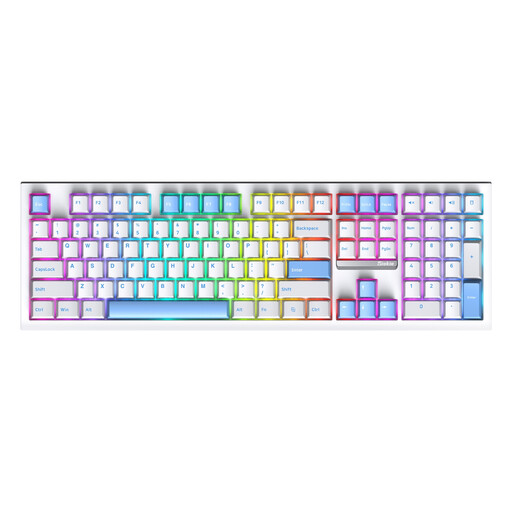 No image available
For frequent numerical entry, consider whether this 108-key layout fits your desk and gives you the key arrangement you prefer.
Confirm the exact UK key layout and how device switching works if you type into two computers; three connection modes alone do not establish switching behaviour.
 No image available
Consider the 65-layout format when desk width matters more than having a large key arrangement, but establish how you will enter repeated figures.
Check the number-entry layout and whether its wired connection arrangement suits both computers, if you use two.
 No image available
A 75-layout keyboard is worth considering if you need room for a mouse alongside your match equipment and can plan another method for repeated number entry.
Confirm the exact UK key arrangement, whether a number pad is available and how the wireless connection suits your computers.
A full-size keyboard is a sensible starting point if you enter figures repeatedly because it retains an integrated number pad. A compact layout can free desk space, but check whether its number row or a separate keypad works for your entry sequence, and confirm the exact variant’s UK layout.
No: two screens attached to one computer normally use a single keyboard connection. Switching features matter when you type into separate computers; Logitech says its Easy-Switch technology can pair a keyboard with up to three devices.
They may help when your statistics application supports the relevant shortcuts and their use is permitted. Check the exact commands and test them with non-live data before relying on a macro during a match.
Check the whole workstation, including mouse reach, posture, screen placement and breaks, rather than choosing a keyboard switch in isolation. The Health and Safety Executive says employers must assess workstations when workers use display screen equipment daily as part of normal work for continuous periods of an hour or more.