Frequent price-list number entry users
If you regularly amend quantities, unit prices, VAT figures or totals, a dedicated number pad and familiar symbol placement may matter more than a compact footprint.


Choose a full-size mechanical keyboard with a number pad if you enter price-list figures frequently. Where spare USB ports are scarce, Bluetooth can avoid a receiver if your computer supports it; a 2.4 GHz receiver is another option when a port is available. Check the exact key layout, connection and charging arrangements, and switch variant before choosing.
If you regularly amend quantities, unit prices, VAT figures or totals, a dedicated number pad and familiar symbol placement may matter more than a compact footprint.
If another receiver or cable would occupy a needed computer port, Bluetooth is worth considering when your computer supports it. A wireless keyboard still needs a charging arrangement.
If you type near colleagues for extended periods, consider the selected switch’s sound and feel alongside the keyboard’s layout and connection options.
Work out whether mains sockets, computer USB ports or both are limited. For regular figure entry, settle the number pad and key layout before comparing connection options.
| Concern | What to check | Who this matters to |
|---|---|---|
| Numeric entry and UK layout | Confirm that the exact variant has a number pad and, if familiar UK key placement matters, is labelled UK-ISO. | If I repeatedly enter prices, quantities and VAT figures, I want a dedicated number pad without having to adjust to unfamiliar keys; roughly 42% of consumers put numeric entry and layout first. |
| Ports and connections | Check computer Bluetooth support, whether 2.4 GHz needs a USB receiver, and how the keyboard charges. | With few spare computer ports, I want a connection that does not tie up one with a receiver; around 33% of consumers make port-friendly connectivity their primary concern. |
| Typing sound and feel | Identify the switch fitted to the exact variant and whether any sound-damping features are specified. | When I check lists for long stretches near other people, I care about the feel and sound of each keystroke; roughly 25% of consumers put the typing experience first. |
A tenkeyless layout omits the number pad, which matters if you enter price-list figures repeatedly rather than mainly reviewing them.
Choose an explicitly full-size layout when the number pad is essential; consider a smaller board when desk space matters more.
If you later need a separate numeric keypad, it becomes another item to place and connect.
Bluetooth can avoid a receiver on a compatible computer, but a 2.4 GHz receiver normally occupies a USB port. Rechargeable keyboards still need charging.
Check your available USB ports and computer Bluetooth support, then confirm the selected keyboard’s connection modes and charging method.
A keyboard family can include different regional variants. Keychron UK, for example, lists UK-ISO alongside other ISO layouts in its relevant ranges.
If UK key placement matters to your work, check the exact variant in the product title or configuration selector before ordering.
Switch options differ in sound and feel. Logitech lists distinct switch choices for MX Mechanical, while Razer’s quieter-typing description applies to its named Pro Type Ultra configuration, not mechanical keyboards generally.
Identify the switch variant in the listing and consider whether its stated sound characteristics suit a shared workspace.
Relevant if you want an explicitly listed UK-ISO option with a full-size number pad and a choice of connection modes.
Relevant if you alternate between devices and want to choose between a full-size low-profile mechanical keyboard and a smaller Mini version.
Relevant if you are considering several connection methods or a keyboard-and-mouse setup using a compatible shared receiver.
These mechanical keyboards offer different size and layout choices for price-list work. Check each exact variant against your number-pad, key-placement and connection needs rather than treating a wireless label alone as a solution to limited sockets.
 No image available
Consider this 96% mechanical keyboard if you want the listed UK layout in a format smaller than a conventional full-size board. Confirm that its key arrangement includes the number pad you need, and check the exact switch and charging arrangements before buying.
 No image available
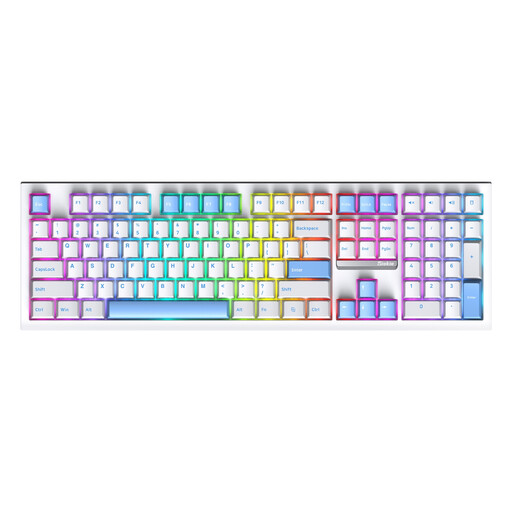
Consider the full-size 108-key format if repeated figure entry takes priority over desk space. The named variant specifies a US layout, silent tactile switches and an 8000mAh battery; check that the key placement suits your work and confirm how it charges.
 No image available
Consider this 108-key model if you want to assess a larger keyboard with three listed connection modes. Before relying on it for price entry, confirm the number-pad arrangement, physical key layout and charging method for the exact variant.
Not necessarily: wireless operation can reduce desk cabling, but a rechargeable keyboard still needs charging. Bluetooth can avoid a USB receiver if your computer supports it, whereas 2.4 GHz operation normally uses a receiver; check the model’s charging arrangement separately from its connection mode.
A full-size keyboard is worth considering if you regularly enter prices, quantities or totals and want a dedicated number pad. If you mostly review figures and need more mouse space, a smaller layout may suit you, but confirm whether it omits the number pad before choosing.
Yes, if familiar UK key placement matters when you enter symbols or edit figures. Check the exact variant rather than the keyboard-family name: Keychron UK lists UK-ISO versions alongside other regional ISO layouts in its relevant ranges.