For screenplay writing in a quiet study, choose the exact switch variant before choosing a keyboard family: a clicky version can work against your need to keep typing noise down, while a quiet-oriented switch or damped construction is worth examining without assuming it will be silent. Then check whether the layout leaves room for notes without hiding keys you use, and confirm the key legends, device compatibility and connection options before ordering.
Who is this for?
Noise-sensitive screenplay writers
If you write in a quiet or shared study, the fitted switch and the sound of the complete keyboard matter more than a general mechanical-keyboard label. Logitech, Keychron and SteelSeries describe different switch or damping options, but their descriptions do not establish how every variant will sound on your desk.
Writers with limited desk space
A compact layout can leave space beside the keyboard for a script or notes. Check which dedicated keys you would give up: Keychron lists the K3 Version 3 as a 75% board, while Logitech distinguishes the MX Mechanical Mini from its full-size model with an integrated numpad.
Writers who use shortcuts or several devices
If drafting and revision take you between devices, compare switching and remapping before choosing. Logitech states that the MX Mechanical Mini switches between up to three compatible devices; Keychron lists Bluetooth, wired use and QMK configuration for the K3 Version 3 ISO.
What matters when choosing?
For a quiet screenplay study, settle the switch and sound question first, then choose a layout that fits both your desk and your frequently used keys. Check connections and configuration requirements for the particular variant you intend to buy.
| Concern |
What to check |
Who this matters to |
| Typing noise |
Identify the fitted switch, not just the keyboard family; assess the exact board and switch together rather than treating damping as a promise of silence. |
When I write in a quiet study, I want keypresses that will not needlessly disturb anyone nearby, even if that narrows my preferred feel. Around 42% of consumers put quieter typing first. |
| Layout and writing workflow |
Compare the space taken by the board with the dedicated navigation keys and numpad you use; confirm the key layout and legends you want. |
I keep notes beside my script, but I do not want a smaller board to make familiar editing keys awkward to reach. For around 33% of consumers, layout fit is the primary concern. |
| Connections and customisation |
Confirm device compatibility, wired or wireless options and any conditions for remapping; check whether the exact variant supports switch changes if you need them. |
If I draft on one device and revise on another, dependable switching or tailored shortcuts may matter more to me than a particular footprint. Around 25% of consumers prioritise that flexibility. |
Mistakes to avoid
-
Assuming every switch in a keyboard family sounds alike
Logitech offers Tactile Quiet, Clicky and Linear versions of the MX Mechanical Mini. A family name alone will not tell you which one you are ordering.
Check the switch name on the specific product page and order details. If disturbance is your main concern, do not choose a clicky variant without considering its sound.
-
Treating damping as proof of silent typing
Keychron describes acoustic foam in the K3 Version 3, and SteelSeries describes sound-dampening foam in the Apex Pro line. Neither feature establishes how quiet every complete keyboard and switch combination will be.
Consider the fitted switch as well as the construction. Where possible, listen to a demonstration of the exact variant or check the applicable return terms before ordering.
-
Choosing a compact layout without checking your keys
A 75% or TKL board may suit a desk covered with script pages, but it is not interchangeable with a full-size layout. Logitech identifies its full-size MX Mechanical as the model with an integrated numpad.
List the navigation, number and shortcut keys you regularly use, then check their positions and the available layout on the variant you want.
Brands to consider for this writing setup
Logitech
The MX Mechanical line is worth examining if you want a low-profile board and straightforward switching between writing devices.
- Logitech offers a Tactile Quiet MX Mechanical Mini variant and states that the Mini can switch between up to three compatible devices.
- The same Mini family also includes Clicky and Linear versions. Choose the exact switch; consider the related full-size MX Mechanical if an integrated numpad is essential.
Keychron
The K3 Version 3 ISO line suits writers considering a compact, configurable mechanical layout.
- Keychron lists a 75% layout, UK-ISO options, Bluetooth and wired connectivity, and QMK configuration.
- A 75% board does not give you a full-size numpad. Check the fitted switch and the exact variant if hot-swapping matters; the acoustic foam does not establish silent operation.
SteelSeries
Its gaming-keyboard lines offer quiet-oriented features to assess if typing noise matters more than gaming extras.
- SteelSeries describes sound-dampening foam and per-key lubrication for the Apex Pro line, and Whisper Quiet switches for the Apex 3 TKL.
- A TKL layout omits the numpad. SteelSeries describes the Apex 3 typing feel as mechanical-like, so do not assume it has the conventional mechanical construction you may be seeking.
Joybuy keyboard options for a quiet-study setup
These mechanical keyboards offer different stated switches, layouts and connection options for a screenplay-writing desk. For any model you are considering, weigh its exact switch and key layout against your own need to keep the study quiet.
 No image available
Ticktype DP104 Gecha Gray, Silent Tactile switches, US layout
Consider this if you want the listing's quiet-oriented switch option without giving up a full-size keyboard. The title specifies 108 keys, hot-swappable switches and tri-mode wireless use; it also specifies a US layout, so check that its key positions suit your screenplay workflow. The Silent Tactile name does not establish how the complete keyboard will sound in your study.
Joybuy
 No image available
GravaStar Mercury K1 Lite, Chinese retail version, black
The 75% layout may appeal if script pages compete for desk space, while hot-swapping offers a way to change switch feel. The title specifies a US layout and Bluetooth 5.0, 2.4G and USB-C connections. Confirm the installed switch and the applicable support and return terms for this Chinese retail version before relying on it for quiet-study use.
Joybuy
 No image available
AULA F75 PRO, 75%, US QWERTY layout
This compact option may suit a desk where you keep notes alongside the keyboard. Its title specifies hot-swappable switches and Bluetooth, 2.4G and wired connection modes. Check which switches are fitted and whether the US QWERTY key positions suit your writing before judging its quiet-study fit.
Joybuy
 No image available
MACHENIKE KG87 80%, Latte Switch-Pink, US QWERTY
The stated 80% layout is an option to examine if you want a smaller writing setup. The title identifies Latte switches, a gasket mount and tri-mode connectivity, but those terms alone do not tell you how the board sounds. Check the US QWERTY key positions and seek a sound demonstration of this switch and board combination if noise is decisive.
Joybuy
 No image available
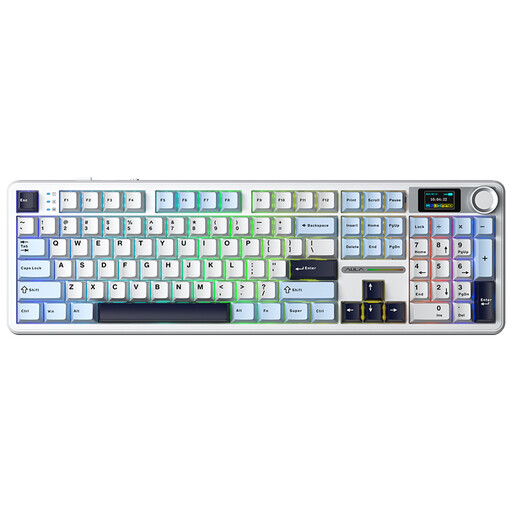
AULA F108 Pro, Reaper Linear switches, light blue
Consider this model if switch changes and a choice of connection modes matter to your writing setup. The title specifies hot-swappable pre-lubed Reaper Linear switches and Bluetooth, 2.4G and USB-C connectivity. Confirm the exact key layout and how this board sounds before deciding whether it fits a quiet UK study.
Joybuy
Common questions
Are clicky switches a good choice for a quiet study?
If minimising disturbance is a priority, start with a different switch option. Logitech lists Tactile Quiet, Clicky and Linear as distinct MX Mechanical Mini variants, so confirm the exact switch rather than judging sound by the keyboard's family name.
Will a 75% keyboard work for screenplay writing?
A 75% board can work if its key arrangement suits the shortcuts and navigation you use, but check what you would lose compared with a full-size layout. Keychron lists the K3 Version 3 ISO as a 75% keyboard with UK-ISO options; confirm the particular variant and its key positions before ordering.
Can I cancel an online keyboard purchase in the UK if the feel does not suit me?
For an eligible online purchase, UK government guidance says you can tell the seller you want to cancel within 14 days of receiving the item. Check the applicable cancellation conditions and the retailer's process before trying the keyboard; rights concerning faulty or misdescribed goods are a separate matter.
What can I do with an old keyboard when replacing it?
Use an appropriate electrical recycling route rather than treating the old keyboard as ordinary household rubbish. UK Office for Product Safety and Standards guidance says that when you buy a new electrical product, the retailer must accept an old like-for-like item free of charge; ask the retailer how its take-back arrangement works.


