Two screens connected to one computer do not require a keyboard that switches between devices. If you rarely use a number pad, a 75% or tenkeyless layout can leave more room for your mouse while keeping writing controls accessible; choose a full-size layout when numeric entry is a regular part of your work, or consider a low-profile model if you prefer a shallower keyboard. Check the exact key layout, switch option and connection mode before ordering.
Who this choice affects
Space-conscious dual-screen writers
If both displays share one workstation, a shorter keyboard can free horizontal space for a mouse or desk notes. The useful compromise is a layout that still has the function row, arrow keys and any navigation keys your writing workflow requires.
Long-session writers in shared spaces
Switch sound and key feel matter when drafting for extended periods or working near someone else. Keyboard choice is only one part of the setup: the Health and Safety Executive also advises considering screen, keyboard and mouse positioning.
Shortcut-heavy, multi-device writers
Remapping and macros may be useful if you have established screenplay shortcuts. Switching between paired devices matters if you actually alternate between separate computers, tablets or phones—not simply because one computer drives two monitors.
What matters when choosing
Start with the keys and mouse space you need at your two-screen desk. Then compare switch feel and sound; assess device switching separately from the number of displays.
| Concern |
What to check |
Who this matters to |
| Desk space and essential keys |
Compare the exact 75%, tenkeyless and full-size key arrangements. Check the function row, arrows, navigation keys and number pad against your own shortcuts. |
If my mouse needs more room, I want a shorter board without losing the writing controls I use. Around 40% of consumers put desk space and essential keys first. |
| Feel, sound and workstation setup |
Compare the selected switch variant’s feel and sound. Consider keyboard and mouse position alongside the screens; the Health and Safety Executive advises placing the keyboard just below elbow height. |
For long drafting sessions in a shared space, I want a key feel and sound I can live with. Around 40% of consumers make that their primary concern. |
| Shortcuts and separate devices |
Confirm whether you need remapping or macros, and whether you switch between separate devices. Check the selected model’s supported connections and pairing options. |
If I move between a computer and another device, I want my keyboard controls and shortcuts to fit that routine. Around 20% of consumers prioritise shortcuts or genuine device switching. |
Buying mistakes to avoid
-
Buying device switching just because you have two displays
Two monitors connected to one computer do not create a second device for the keyboard to control. Multi-device controls address a different setup.
Count the computers, tablets or phones you actually type on before treating Bluetooth device switching as a requirement.
-
Assuming every variant has a UK-ISO layout
A product family may have several regional key arrangements. A UK label in a listing is not, by itself, a reason to assume that the exact selected variant has the key shapes and symbols you expect.
Check the selected configuration and its key-layout images before ordering, particularly if your shortcuts depend on familiar symbol positions.
-
Choosing a compact layout without checking its keys
A 75% or tenkeyless board can preserve an F-row and arrows while omitting a dedicated number pad; other navigation keys may be arranged differently.
List the keys you use for scriptwriting and any regular production or budgeting tasks, then compare that list with the exact keyboard pictured.
-
Treating low-profile or quiet switches as a complete workstation solution
Switch preferences do not settle screen position, mouse placement or posture. The Health and Safety Executive advises arranging the screen and keyboard centrally to avoid twisting.
Assess the selected switch and the whole desk arrangement together rather than relying on a keyboard label to address discomfort.
Brands worth comparing
Keychron
Keychron offers UK-ISO options in both tenkeyless and full-size mechanical keyboard lines.
- The K8 Max combines an 80% tenkeyless layout with wired, Bluetooth and 2.4 GHz connections, plus remapping and macros. The K10 Pro offers a 100% layout with VIA remapping, according to Keychron UK.
- Check the exact layout, switch and availability of the variant you select; features of one configuration should not be assumed for another.
Logitech
The MX Mechanical line is relevant if you want to compare low-profile switches and full-size versus smaller keyboard formats.
- Logitech United Kingdom lists Tactile Quiet, Clicky and Linear switch options and switching between up to three devices.
- Choose the size and key arrangement for your work; support for multiple devices brings little benefit if you type on only one computer.
Razer
Razer’s BlackWidow V4 models are relevant when low-profile switch choices or multi-device controls are specific requirements.
- Razer United Kingdom describes low-profile switch choices and Bluetooth switching among three devices for the BlackWidow V4 Low-Profile HyperSpeed.
- Check the selected model’s layout and switch behaviour rather than assuming gaming-oriented controls will help with screenplay writing.
NuPhy
NuPhy’s Node range offers a comparison between a smaller low-profile layout and a full-size option.
- NuPhy lists ISO-British options, 75% and 100% layouts, hot-swap support, and wired, Bluetooth and 2.4 GHz connections.
- Confirm the precise layout and applicable delivery and returns terms for the configuration you intend to order.
Joybuy keyboards for this setup
These keyboards offer compact and number-pad-oriented layouts to consider for a two-screen writing desk. Compare each exact key arrangement with your screenplay shortcuts, particularly where a UK-ISO layout matters to you.
 No image available
HyperX Alloy Rise 75 Wireless Keyboard UK
Consider this model if you want a compact keyboard for a desk shared with two screens and a mouse.
The product name identifies it as a wireless Alloy Rise 75 variant. Check the exact key map if you need UK-ISO symbols and key shapes.
View on Joybuy
 No image available
ASUS ROG Strix Scope II 96 Wireless Keyboard, Black, UK Layout
Compare this model if you are considering a keyboard with more keys than a 75% board while managing desk width.
The named variant is wireless, black and labelled UK Layout. Check its exact key map and supplied switch option before deciding whether it suits your writing setup.
View on Joybuy
 No image available
AULA S75 Pro 75% Wireless Keyboard, Star Vektor Switch
Its 75% format is worth considering when mouse space is a priority, provided its individual keys fit your shortcuts.
The product name specifies a TFT display, knob, side-printed keycaps and hot-swappable Star Vektor switches. Check the exact key arrangement and regional layout before ordering.
View on Joybuy
 No image available
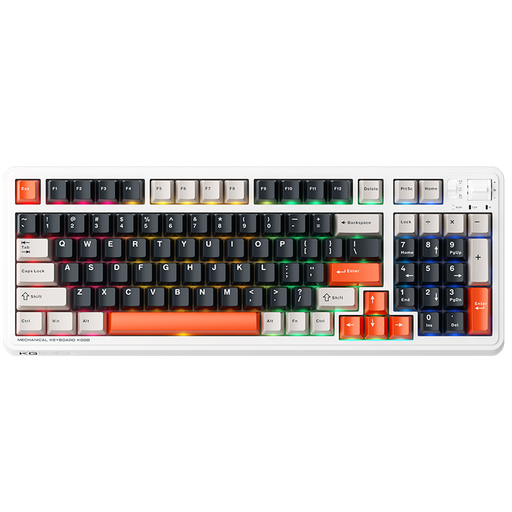
MACHENIKE KG98 96% Tri-Mode Keyboard, US Layout
Compare this 96% model if you want to assess a layout with more keys than a smaller compact board.
The product name specifies a QWERTY US layout, hot-swappable switches and a black, white and orange colourway. If UK-ISO key shapes or symbols are essential, check the key map carefully: this named variant is labelled US layout.
View on Joybuy
 No image available
Siukie PL87W 87-Key Three-Mode Keyboard
An 87-key layout is worth checking if you want a shorter keyboard beside your mouse.
The product name specifies detachable switches and RGB lighting. Confirm the exact key arrangement, regional layout and installed switch type for the variant you select.
View on Joybuy
Common questions
Do two monitors mean I need a multi-device keyboard?
No, not when both monitors connect to the same computer. Multi-device switching is useful when you alternate between separate devices, such as a computer and a tablet; choose it for that routine rather than for the monitor count.
Should I choose a UK-ISO keyboard for screenplay writing?
Choose the exact layout whose key shapes and symbols suit your established shortcuts. If you expect UK-ISO, check the selected variant rather than its product-family name; Keychron UK, for example, lists UK-ISO versions of the K8 Max and K10 Pro.
How should I position a keyboard at a two-screen workstation?
Arrange the screen and keyboard centrally so you do not need to twist while typing. The Health and Safety Executive also advises placing the keyboard just below elbow height; assess mouse placement and the rest of the workstation rather than expecting a keyboard feature alone to address discomfort.
What if a keyboard bought from a UK trader is faulty?
A faulty keyboard bought from a trader may qualify for a remedy under the Consumer Rights Act 2015. GOV.UK explains that the Act covers faulty goods, including repair or replacement in relevant circumstances. Keep your order details and contact the trader about the fault; a change-of-mind returns policy is a separate matter.


