People entering totals frequently
If repeated number entry drives the work, start by checking for a physical number pad. Logitech identifies one on the full-size MX Mechanical, but the layout still needs checking on the exact keyboard being ordered.


For repeated attendance totals, start with a mechanical keyboard whose exact layout has a physical number pad. Where colleagues sit nearby, check the installed switch rather than assuming that all mechanical keyboards sound alike. A wired connection suits a keyboard that stays at one workstation; multi-device wireless is useful when switching between approved devices justifies managing connections and charging.
If repeated number entry drives the work, start by checking for a physical number pad. Logitech identifies one on the full-size MX Mechanical, but the layout still needs checking on the exact keyboard being ordered.
Switch choice matters when typing sound carries across a shared desk. Logitech describes its clicky switches as audible and offers a Tactile Quiet option for the MX Mechanical; confirm which variant is fitted.
When successive users work at one computer, a wired keyboard can make the connection straightforward to hand over. A multi-device keyboard calls for a clear way to identify the active device.
Check the number-entry layout first, then the installed switch and the connection routine the shared desk can support.
| Concern | What to check | Who this matters to |
|---|---|---|
| Entering totals | Confirm a physical number pad on the exact layout; allow room for a full-size keyboard. | If I enter totals repeatedly, I want a dedicated area for the numbers rather than choosing a compact layout without checking its keys. Around 42% of consumers put number-entry layout first. |
| Typing noise | Check the fitted switch variant and its described sound; do not assume a quiet option is fitted as standard. | Working beside colleagues makes me wary of an audible clicky switch, even if I like its feedback. Roughly 33% of consumers place shared-desk typing noise first. |
| Desk handover | For wired use, check the required port and cable position; for wireless use, establish the active-device and charging routine. | When several people use one workstation, I need the keyboard to connect to the intended computer without confusion at handover. About 25% of consumers prioritise connection management. |
A compact layout can save desk space but may remove the dedicated keys used for repeated totals. Logitech distinguishes its full-size MX Mechanical, which has an integrated number pad, from the smaller MX Mechanical Mini.
Inspect the exact layout and product variant before letting lighting or other features decide the purchase.
Switches differ in sound and feel. Logitech describes clicky switches as audible and linear switches as often quieter; those descriptions do not establish how two finished keyboards will sound at your desk.
Check the installed switch, and avoid choosing a clicky variant by default when nearby colleagues need a quieter workspace.
Logitech says the MX Mechanical can switch between up to three devices, while Razer lists several connection modes for the Pro Type Ultra. At a shared desk, users still need to know which computer is active.
If device switching is necessary, agree how users will select the device and manage charging. Otherwise, consider a wired setup for a keyboard that remains at one workstation.
A reference for a wired, full-size keyboard at a fixed workstation: Keychron describes its C2 Pro 8K as a wired 100% model.
Its full-size MX Mechanical combines an integrated number pad with a choice of switch variants, including Tactile Quiet.
Razer presents the Pro Type Ultra as a productivity keyboard with silent mechanical switches, a wrist rest and wired, Bluetooth and 2.4 GHz modes.
The UK-labelled STRAFE RGB MX Silent is a wired model for shoppers considering Cherry MX Silent switches.
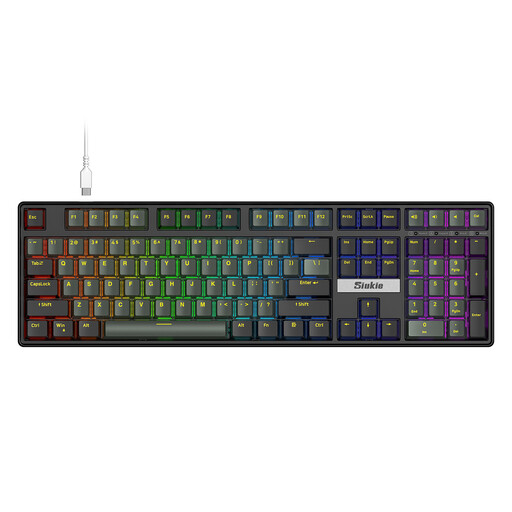
These 108-key Siukie options offer a choice between a three-mode model and a wired model for the shared desk. Check the exact number-pad layout and switch before deciding which fits the attendance workflow.
 No image available
Consider this model if the desk needs connection choices rather than a permanently wired setup. Its title identifies 108 keys, detachable switches and 3MODE connectivity; confirm the available modes, physical number pad, UK layout and fitted switch for the exact variant.
 No image available
For a keyboard that stays at one workstation, this wired model avoids a wireless connection handover. Its title identifies 108 keys and detachable switches; confirm the physical number pad, UK layout and fitted switch, particularly if typing noise matters.
A full-size keyboard is a useful starting point if you enter numbers repeatedly, but check that the exact version has a physical number pad. Logitech explicitly identifies an integrated number pad on the full-size MX Mechanical and describes the Mini separately as a space-saving version.
Start by checking quieter switch options rather than choosing a clicky variant automatically. Logitech describes clicky switches as audible, offers Tactile Quiet as an MX Mechanical option and says linear switches are often quieter; confirm which switch is installed in the keyboard you intend to buy.
Wired is a straightforward choice when the keyboard stays with one computer; Keychron identifies the C2 Pro 8K as wired. If the desk needs to switch between approved devices, a multi-device option may help, provided users know how to select the active device and manage charging.
Check the electrical-equipment recycling options offered by your local authority or retailer. GOV.UK identifies the Waste Electrical and Electronic Equipment Regulations 2013, as amended, as the basis of UK controls for electrical-equipment waste; the available collection route depends on your location and provider.