For exhibition catalogue work in a shared office, start with a keyboard variant that has a specifically named quiet or non-clicky switch; a mechanical keyboard is not necessarily silent. Then choose between a full-size layout for frequent number entry and a compact layout for a crowded desk, checking the exact key layout, device connections and wider workstation setup before ordering.
Who is this for?
Shared-office typists
If you draft and revise catalogue copy beside colleagues, check the selected switch rather than assuming that the word mechanical tells you how the keyboard will sound. Logitech and Razer each distinguish quieter options from clicky ones within their ranges.
Catalogue builders who enter figures
If your work involves product codes, quantities and spreadsheet cells, an integrated number pad may be useful. Check the key arrangement and symbol placement you need before giving up desk space for a full-size board.
Hot-desk and multi-device users
If you move between desks or devices, compare the keyboard’s footprint and available connections with your actual setup. Confirm the exact key layout as well: UK delivery does not, by itself, establish UK-ISO keys.
What matters when choosing?
For shared-office catalogue work, settle the noise-sensitive switch choice first, then weigh number entry against desk space. Connection options and programmable keys matter only if they fit the devices and tasks you use.
| Concern |
What to check |
Who this matters to |
| Noise near colleagues |
Check the exact switch variant. Logitech lists Tactile Quiet and Clicky options for MX Mechanical; Razer distinguishes Yellow from clicky Green switches on BlackWidow V4. Neither name guarantees silence at your desk. |
I spend long stretches editing copy beside other people and want to avoid an unnecessarily clicky keyboard. Around 36% of consumers put that need first. |
| Catalogue-entry layout |
Decide whether frequent number entry warrants an integrated number pad, and confirm UK-ISO keys if familiar UK symbols matter. A 75% arrangement needs a closer look at your shortcuts. |
When I enter codes and figures repeatedly, I need the keys I use to be easy to find without changing my workflow. Roughly 29% of consumers prioritise layout for that reason. |
| Shared-desk flexibility |
Check the available desk space and whether the keyboard’s wired or wireless connections work with each device you intend to use. |
My workstation changes, so I need a keyboard that fits the desk and connects to the devices I actually use. About 21% of consumers make that flexibility their main concern. |
| Repeated software actions |
Identify the commands you repeat, then check whether the selected keyboard’s remapping or dedicated macro controls work with your office setup. |
If the same publishing commands interrupt my work throughout the day, accessible shortcuts matter more to me than extra controls I would never configure. Around 14% of consumers put customisation first. |
Buying pitfalls
-
Assuming a model name tells you how it sounds
Logitech offers MX Mechanical with Tactile Quiet, Clicky and Linear switches, while Razer offers different switch choices for BlackWidow V4. Choosing the right model but the wrong variant can still leave you with a clicky keyboard beside colleagues.
Read the full switch name on the variant you select, and favour a named quiet or non-clicky option when noise is a priority.
-
Assuming UK delivery means UK keys
Keychron offers a UK-ISO K3 Max variant, but a keyboard listed for UK shoppers can instead have a US layout. That distinction matters when you rely on familiar key legends and symbol positions for catalogue editing.
Check that the exact variant says UK-ISO, or inspect a layout image that clearly shows the keys.
-
Choosing compactness before checking the work
Keychron’s K3 Max has a 75% layout, whereas the full-size Logitech MX Mechanical has an integrated number pad. The smaller arrangement deserves a closer look if catalogue work involves frequent number entry or particular navigation shortcuts.
List the keys you use repeatedly, then compare that list with the exact layout before choosing a desk footprint.
-
Treating a new keyboard as a workstation fix
For workers using display screen equipment daily for continuous periods of an hour or more, UK Health and Safety Executive guidance applies to the wider workstation. A keyboard choice does not replace attention to the desk, chair, screen and work conditions.
If that pattern describes your work, address the appropriate workstation assessment alongside the keyboard purchase.
Brands to consider for these keyboard features
Logitech
The MX Mechanical range offers low-profile, productivity-oriented layouts for people comparing number entry and multi-device use.
- According to Logitech’s UK MX Mechanical specifications, the full-size version has an integrated number pad and can switch between up to three devices.
- Logitech lists Tactile Quiet, Clicky and Linear switches. Check the exact variant rather than assuming they have the same sound or feel.
Keychron
The K3 Max is a compact, low-profile option for a desk where layout and connection choices need careful checking.
- Keychron lists a UK-ISO K3 Max with a 75% layout, wired, Bluetooth and 2.4 GHz connections, and QMK/VIA remapping.
- Check its compact arrangement against frequent number entry and the shortcuts used in your catalogue software.
Razer
The BlackWidow V4 is worth considering when dedicated programmable controls serve a defined catalogue-production task.
- Razer specifies six dedicated macro keys and describes its Yellow switch option as smooth and silent.
- Razer also offers a clicky Green switch, while the keyboard’s lighting and gaming-oriented controls may be unnecessary for this office workflow.
Joybuy product choices for catalogue work
These keyboards offer full-size or compact layouts to consider for a shared desk. Check each exact variant against your noise needs and preferred key layout; a quiet-sounding product description or a UK-labelled title does not settle those questions on its own.
 No image available
Ticktype DP104 108-key Gecha Gray, Silent Tactile, US Layout
Consider this full-size option if your catalogue work involves substantial number entry and you want a variant explicitly named Silent Tactile. The title specifies 108 keys, tri-mode wireless operation and an 8000mAh battery.
Its US Layout may change familiar UK symbol positions. Silent Tactile is a variant description, not a measured sound level at your workstation.
Joybuy
 No image available
AULA F75 75% mechanical keyboard, US Layout
Consider the compact 75% arrangement if desk space matters more than a full-width key layout. The title lists wired, Bluetooth and 2.4G connection options.
Check whether its US Layout suits your catalogue shortcuts and symbols, and confirm the selected switch and sound characteristics before using it near colleagues.
Joybuy
 No image available
HyperX Alloy Rise 75 Wireless Keyboard UK
This wireless model is worth examining if a smaller desk footprint and movement between devices matter to your work. Compare its key arrangement with the number-entry and navigation tasks in your catalogue software.
Confirm the precise UK key layout and the selected switch’s sound characteristics if familiar symbols or reduced disturbance are essential.
Joybuy
 No image available
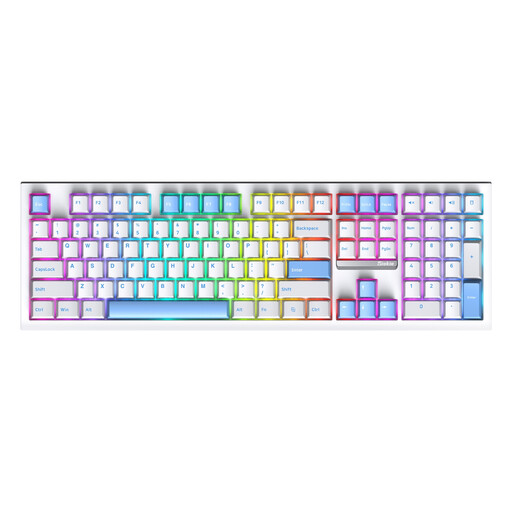
Siukie PL108W 108-key 3MODE mechanical keyboard, White
Consider this 108-key option if you prefer a larger arrangement for catalogue entry rather than a compact board. The title identifies a 3MODE mechanical keyboard.
Check the exact switch configuration, sound characteristics and key layout against the needs of your shared office before ordering.
Joybuy
Frequently asked questions
Do I need a UK-ISO keyboard for catalogue work?
Choose UK-ISO if familiar UK key legends and symbol positions are important to your editing workflow. Check the exact variant: Keychron lists a UK-ISO K3 Max, while keyboards offered to UK shoppers can also be labelled US Layout.
Is a quiet mechanical switch completely silent?
No switch description guarantees silent typing at your desk. Logitech distinguishes Tactile Quiet from Clicky variants, and Razer describes its Yellow option as silent in contrast with its clicky Green switch; check the selected variant and allow for the effects of typing style and desk setup.
Does catalogue work call for a DSE workstation assessment?
For a UK worker who uses display screen equipment daily for continuous periods of an hour or more, Health and Safety Executive guidance calls for assessment of the workstation. That means considering the wider equipment, furniture and work conditions, not treating a keyboard purchase as the whole solution.


