For writing radio scripts near colleagues, start with the exact switch variant: consider a quiet tactile, linear or silent-switch option rather than a clicky one. Then choose a layout that leaves room for your notes without hiding keys you use to edit, and check connection options or switch compatibility only if your workflow calls for them. None of these features alone establishes how loud a particular keyboard will sound at your desk.
Who this choice affects
Noise-conscious script writers
If you draft and revise beside colleagues, switch sound matters alongside typing feel. Corsair’s shared-workspace guidance describes linear mechanical switches as generally quieter than tactile ones and clicky styles as louder; the sound of a complete keyboard also depends on its construction.
Compact-desk, multi-device writers
If scripts, notes or audio equipment share your desk, a smaller keyboard may leave more working room. Logitech describes the MX Mechanical Mini as space-saving and says it can switch between up to three devices.
Typing-feel customisers
If you want UK key placement and may change switches later, check the exact layout and hot-swap sockets before choosing a board. Keychron offers UK-ISO versions of its V5 Max and Q5 Max with switch-customisation options.
What to check before buying
For a shared-office radio script, settle the switch and sound question first, then decide which keys and connections your writing setup needs.
Ready-made low-profile keyboard
Consider it when: you want a finished wireless setup and prefer a lower-profile feel. Logitech offers MX Mechanical models with Tactile Quiet and Linear switch variants.
Trade-off: the space-saving Mini and number-pad-equipped full-size model suit different desks; neither is silent simply because it is low-profile.
Hot-swappable UK-ISO keyboard
Consider it when: UK key placement and the option to change typing feel later matter enough to justify checking parts compatibility. Keychron offers UK-ISO V5 Max and Q5 Max versions.
Trade-off: hot-swap support does not mean every replacement switch fits or that the selected board arrives with quiet switches.
Wired keyboard with quiet-switch design
Consider it when: the keyboard stays at one desk and avoiding charging matters more than cable-free placement. PCMag UK describes the be quiet! Light Mount as a wired board with silent tactile switches and sound-damping material.
Trade-off: the cable limits placement, and a full-width board needs more desk room than a compact one.
| Concern |
What to check |
Who this matters to |
| Sound near colleagues |
Check the selected switch variant, not just the keyboard family; consider case damping and the sound of that model and switch together. |
When I am revising a script beside colleagues, I want feedback without making every keystroke conspicuous. Around 42% of consumers put reducing disturbance first. |
| Writing and editing layout |
Decide whether you need dedicated navigation keys or a number pad, and confirm the physical key layout and legends. |
A long draft is easier for me to manage when the keys I use to move through and revise it are where I expect them. Around 33% of consumers prioritise their writing layout. |
| Flexible desk setup |
Match wired or wireless connections to your devices; if you plan to change switches, check the board’s socket and the replacement switch’s pin format. |
If I clear my desk or move between devices, I need the keyboard to fit that routine without adding unwanted setup work. Around 25% of consumers make desk and device flexibility their primary concern. |
Buying pitfalls
-
Choosing the Clicky version of a quieter keyboard family
Logitech offers Tactile Quiet, Clicky and Linear versions of its MX Mechanical keyboards. Their sound and feel differ, so the family name cannot tell you how your selected variant will behave near colleagues.
Check the switch named on the exact variant before ordering; consider Tactile Quiet or Linear rather than Clicky for this setting.
-
Assuming linear switches make a whole keyboard silent
Corsair’s shared-workspace guidance identifies the switch as one acoustic factor alongside damping and keyboard construction.
Use switch type as an initial filter, then assess the exact keyboard and switch combination; listen to a sample of that combination where possible.
-
Ordering the wrong physical layout
Keychron offers different national ISO variants. A layout that puts familiar writing and editing keys elsewhere can interrupt an established workflow.
If you want UK key placement and legends, confirm that the selected variant is explicitly UK-ISO before ordering.
-
Assuming every quiet replacement switch will fit
Hot-swap support depends on the board and switch. Keychron describes the Q5 Max as compatible with almost all 3-pin and 5-pin MX-style switches, which is not a promise of universal fit.
Compare the exact board’s socket specification with the replacement switch’s pin format before buying switches.
Brands to consider
Logitech
Its MX Mechanical range is a ready-made, low-profile wireless option for an office-oriented writing setup.
- Logitech offers Tactile Quiet, Clicky and Linear variants; the Mini saves desk space, while the full-size MX Mechanical includes a number pad.
- Select the switch variant carefully: the presence of quieter options in the range does not make its Clicky version suitable for a noise-conscious desk.
Keychron
Its UK-ISO V5 Max and Q5 Max lines suit writers considering wireless connections and later switch changes.
- Keychron describes UK-ISO versions with Bluetooth and 2.4 GHz connection options and hot-swappable, MX-style switch support.
- Check the selected layout, supplied switch and socket compatibility; hot-swappable does not mean quiet out of the box.
Corsair
Corsair’s shared-workspace guidance offers a way to assess switch choice and keyboard construction when comparing models.
- Its guidance discusses linear, tactile and clicky switch sound, as well as damping and low-profile construction.
- Those manufacturer descriptions are general guidance, not measured noise results for every Corsair keyboard or a ranking across brands.
Joybuy keyboard options
These options cover compact keyboards for desks shared with scripts or equipment and a full-size keyboard for writers who prefer a larger key set. Check the stated physical layout and the sound of the exact switch combination before choosing one for a shared office.
 No image available
AULA S75 Pro 75% Star Vektor keyboard
Consider this compact option when scripts and other equipment must share desk space.
The title specifies tri-mode wireless operation, hot-swappable Star Vektor switches, five-layer padding, a TFT display and a knob. Check whether its listed US key placement suits your writing habits, and assess the sound of this exact switch and board combination.
View on Joybuy
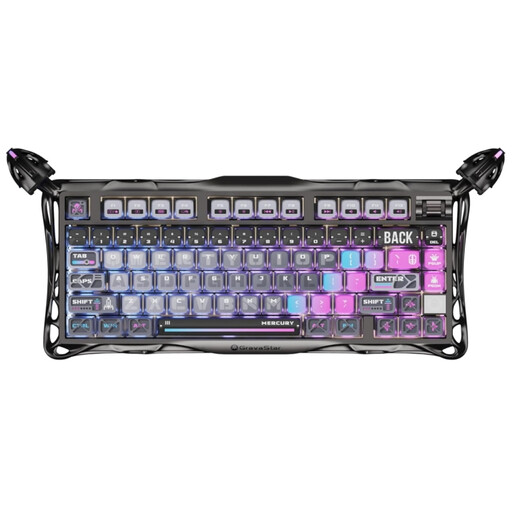 No image available
GravaStar Mercury K1 Pro Cyberpunk Edition, Black (Chinese retail version)
Consider this 75% model if you want a compact keyboard with more than one connection method.
The title specifies tri-mode wireless operation, hot-swappable switches and a QWERTY US layout. Confirm that its key placement suits your script-writing workflow and assess the sound of the selected board and switches.
View on Joybuy
 No image available
GravaStar Mercury K1 Lite 75%, Black (Chinese retail version)
Consider this compact layout when you need room beside the keyboard and a choice of connection methods.
The title lists Bluetooth 5.0, 2.4 GHz wireless and USB-C modes, hot-swap support and a QWERTY US layout. Check the key placement and the sound of the exact keyboard and switch combination.
View on Joybuy
 No image available
MACHENIKE KG87 80%, Latte Switch-Pink
Consider this 80% keyboard if you prefer its key arrangement to a 75% layout while keeping the desk setup relatively compact.
The title specifies tri-mode operation, gasket mounting and a QWERTY US layout. Check that the key placement works for your editing habits and assess the sound of this switch and board together.
View on Joybuy
 No image available
Ticktype DP104 Gecha Gray, Silent Tactile switches
Consider this full-size option if a larger key set matters more to your script-editing routine than saving desk space.
The title specifies 108 keys, tri-mode wireless operation, hot-swappable switches and a US layout. Silent Tactile is the stated switch variant, not a measured sound result; check its sound and whether the physical layout suits you.
View on Joybuy
Common questions
Which switches should I avoid beside colleagues?
Avoid clicky variants if reducing disturbance is a priority. Corsair’s shared-workspace guidance describes linear mechanical switches as generally quieter than tactile switches and clicky styles as louder, but you should assess the sound of the exact keyboard and switch combination.
Should I choose a UK-ISO layout?
Choose an explicitly labelled UK-ISO variant if you want UK physical key placement and legends. Keychron offers several national ISO variants, so confirm the selected version rather than assuming that a model name identifies the layout.
Is a compact keyboard practical for writing radio scripts?
Yes, if its available keys suit the way you navigate and revise scripts. Logitech describes the MX Mechanical Mini as space-saving, while its full-size MX Mechanical includes a number pad; compare the keys you regularly use before giving up desk space or dedicated keys.
What upkeep does a wireless keyboard add?
A wireless keyboard needs charging, unlike a standard wired one. PCMag UK identifies charging as a practical distinction; check the charging method for the exact model if the keyboard must be ready whenever you return to a shared desk.


