Small-desk fiction writers
If a notebook or mouse needs to sit beside your keyboard, a compact layout is worth considering. Check that it still gives you convenient access to the arrows and editing keys you use while drafting.


For short-story writing at a small desk, start by considering a 75% keyboard if you want to keep a function row and arrow keys while making room beside the board. A 65% layout may suit you if desk space matters more than immediate access to every editing key. Check the exact dimensions, key layout, switch variant and connection options before choosing: a compact label alone does not settle those questions.
If a notebook or mouse needs to sit beside your keyboard, a compact layout is worth considering. Check that it still gives you convenient access to the arrows and editing keys you use while drafting.
Switch sound matters when other people are nearby. Compare the feel of non-clicky options with your preference for key feedback rather than assuming every mechanical keyboard will sound alike.
If you use UK key positions and move between devices, check the selected keyboard variant for its exact key layout and the connection modes your devices need.
Measure the space available for the keyboard before comparing layouts; then decide which keys, switch feel and device connections matter most to your writing routine.
| Concern | What to check | Who this matters to |
|---|---|---|
| Desk space and editing keys | Compare the board’s dimensions with the usable desk area, leaving room for other items. Inspect the layout diagram for arrows, the function row and navigation keys. | I need room beside the keyboard, but I do not want drafting and editing to depend on unfamiliar shortcuts. Around 40% of consumers put this balance first. |
| Switch feel and sound | Check the switch fitted to the selected variant and whether it is clicky, tactile or linear. Allow space in front of the board to rest your hands when not typing. | When I write near other people, I want key feedback without choosing an audible click by default. For around 30% of consumers, typing feel and the shared-space setup come first. |
| UK layout and devices | Confirm the selected key layout and the connection modes required by your computer or other devices; check any remapping setup requirements. | I regularly type UK punctuation or switch devices, so key placement and connections need to fit my routine. These are the primary concern for around 30% of consumers. |
The same keyboard family can have different national key layouts, which matters when you type punctuation frequently.
Check that the particular variant you select is labelled UK-ISO if that is the layout you want.
Clicky switches add an audible click, so a preferred typing feel may still be a poor fit for a shared room.
Compare the actual switch variants available and consider a non-clicky option where noise matters. Treat a manufacturer’s quietness description as a claim, not a universal sound measurement.
Compatibility differs by model and configuration. The Keyboard Company states that an older Keychron K3 optical-switch variant does not accept conventional MX-style mechanical switches; Keychron limits its K3 Version 3 hot-swap description to the RGB hot-swappable version.
Match any replacement switch to the full keyboard model and selected switch configuration before ordering it.
A compact keyboard can free desk space, but its size alone does not determine how comfortably the rest of the writing setup works.
Use the available space deliberately. The Health and Safety Executive advises leaving room in front of the keyboard to rest your hands and wrists when not typing.
Its low-profile K3 models are relevant if you want to compare 75% boards with UK-ISO variants.
The MX Mechanical Mini is a low-profile option to examine if switch choice and switching between devices matter to you.
The Air75 V2 is a low-profile 75% model to examine if connection options and key customisation matter.
These 75% and 65% keyboards are choices to compare if reducing the keyboard’s footprint is part of your small-desk plan. Several are labelled US layout, so check key placement carefully if you normally type on UK-ISO.
 No image available
Consider this 75% board if you want to compare a compact keyboard with wired and wireless connection choices.
The title lists Bluetooth 5.0, 2.4 GHz and USB-C modes, hot-swap construction and a US layout. Check its dimensions against your desk and whether the US key placement suits your typing.
 No image available
This is a 75% choice for a writer comparing compact layouts and connection flexibility.
The title identifies a Gateron White switch variant and a US layout. Check the board’s dimensions, key positions and the switch feel you want before ordering.
 No image available
Consider this 75% model if keeping readily accessible editing controls matters alongside a smaller layout.
Check the selected variant’s key diagram and physical dimensions: UK wording in a product title alone does not establish its exact key layout.
 No image available
This 75% model is worth comparing if you want a compact board with a choice of connection modes.
The title lists wired, Bluetooth and 2.4 GHz modes, PBT keycaps and a US layout. Check the installed switch variant, dimensions and key placement against your writing setup.
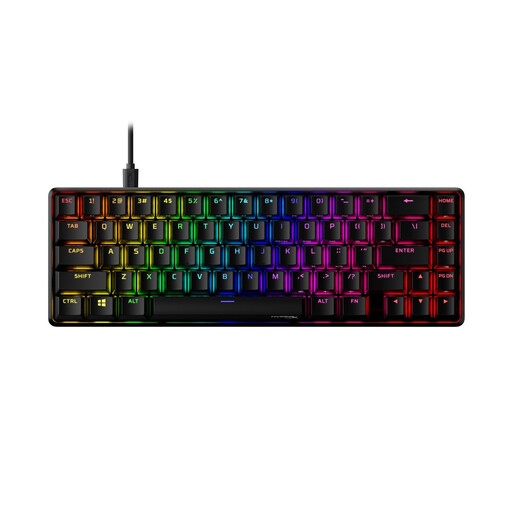 No image available
Consider this 65% board if freeing desk space matters more to you than retaining a dedicated function row.
The title specifies an HX Red switch variant and a US layout. Check the key diagram for the editing controls you use, as well as the dimensions and key placement.
A 75% layout is a useful starting point if you want a smaller board while keeping a function row and arrow keys. Compare its actual dimensions with your desk and inspect where its navigation keys sit before deciding that it saves enough room.
Yes, if UK-ISO is the layout you normally use: an English-language title does not confirm the selected key arrangement. Keychron UK lists multiple national ISO variants within its K3 family, so check the specific option you put in your basket.
No single keyboard size settles the wider workstation setup. The Health and Safety Executive advises allowing space in front of the keyboard to rest your hands and wrists when not typing; consider how the keyboard fits alongside your screen, chair and available desk space.
Remapping can help if the particular keyboard and configuration method support the shortcuts you need. Keychron lists QMK/VIA for the K3 Max and Launcher remapping for the K3 Version 3; check the setup requirements for the exact model before relying on custom keys.