Frequent spreadsheet number-entry users
If you regularly enter income, bills and transactions, an integrated numeric keypad may matter more to you than a smaller keyboard. Logitech's full-size MX Mechanical illustrates the keypad layout to look for.


Choose a full-size mechanical keyboard with a numeric keypad if repeated entry of household figures is your priority. A compact UK-ISO board makes more sense when desk space matters more than a dedicated keypad; consider a split shape only if you are comfortable adapting to it and have confirmed its switch technology. At a standing desk, keyboard position matters too: the Health and Safety Executive advises placing the keyboard just below elbow height and keeping it central with the screen.
If you regularly enter income, bills and transactions, an integrated numeric keypad may matter more to you than a smaller keyboard. Logitech's full-size MX Mechanical illustrates the keypad layout to look for.
If you spend long periods at the desk, check keyboard height and whether you can keep the screen, keyboard and mouse comfortably positioned. The Health and Safety Executive advises placing the keyboard just below elbow height and keeping it central with the screen.
If desk width is limited or other people share the room, a smaller physical layout and a suitable switch choice may take priority. Confirm the selected keyboard's UK layout and connection options rather than assuming every variant is the same.
For household budgeting, settle the keypad-versus-desk-space decision alongside the position of your keyboard and mouse at standing height.
Choose it when: You enter figures repeatedly and want an integrated numeric keypad; Logitech documents one on the full-size MX Mechanical.
Allow for: The wider keyboard may leave less room to place a mouse comfortably on a narrow desk.
Choose it when: Mouse space matters more than a separate numeric keypad. Keychron offers a UK-ISO option for its low-profile K3 Version 3.
Allow for: A 75% layout is not the full-size keypad route; check the exact layout and switch variant before ordering.
Choose it when: You specifically want to try a split shape and are willing to adapt your typing habits. Razer describes its Pro Type Ergo as a wireless split keyboard.
Allow for: A split shape is not proof of better comfort for you; check the physical layout and switch technology if mechanical switches are essential.
| Concern | What to check | Who this matters to |
|---|---|---|
| Standing-desk position | Compare keyboard height with your standing elbow height, then check that the keyboard and mouse can sit comfortably in front of you. The Health and Safety Executive advises keeping the keyboard just below elbow height. | I want to type while standing without reaching awkwardly or twisting towards the screen; around 39% of consumers put workstation position first. |
| Number entry | Check for an integrated numeric keypad if you enter amounts repeatedly; otherwise decide whether the top number row or a separate keypad suits your work. | When I update several bills and transactions, I want a dedicated cluster of number keys. Roughly 38% of consumers prioritise number entry. |
| Space and shared use | Confirm the selected variant's physical UK layout, switch type and required device connections. | I need room for my mouse and a keyboard layout that feels familiar in a shared space; about 23% of consumers place these needs first. |
A keyboard cannot compensate for an awkward desk height or a screen that makes you twist. The Health and Safety Executive's posture guidance addresses the workstation arrangement, not a particular switch type.
Set your standing height so the keyboard is just below elbow level, keep the screen and keyboard central, and check where the mouse sits before changing keyboards.
Logitech's full-size MX Mechanical has an integrated numeric keypad, whereas Keychron's K3 Version 3 is a 75% board. They serve different priorities when you enter budget figures.
Think through your usual amount and date entry before choosing the smaller layout; if you plan to add a separate keypad, check that it will fit beside your mouse.
A separate keypad is another item to position on the desk.
Keychron lists UK-ISO as a selectable K3 Version 3 layout, so the particular configuration matters more than the location of the shop.
Check the selected physical layout, switch option and current fulfilment message before ordering.
Comfort statements for Razer's Pro Type Ergo include brand material and a user testimonial, which cannot establish how the shape will feel at your desk.
Consider the adjustment to a different key arrangement, check the seller's applicable return terms and reassess the workstation setup if discomfort persists.
The MX Mechanical range offers a choice between a full-size low-profile keyboard and the smaller Mini for different desk-space and keypad priorities.
The low-profile K3 Version 3 is a compact 75% option with a UK-ISO configuration for buyers who put desk space ahead of a full-size layout.
Razer offers alternative keyboard shapes and switch technologies for buyers considering something other than a conventional office layout.
These mechanical keyboards offer full-size or space-conscious layouts for household-budget work. All three are listed with a US physical layout, so check key positions carefully if you prefer UK-ISO; also confirm a dedicated keypad where that is central to your choice.
 Image unavailable
Consider this full-size mechanical board if you prefer a wider layout for budget work; confirm the physical numeric-key cluster if that is your deciding feature.
The product name specifies tri-mode wireless connectivity, a hot-swappable layout, an 8000mAh battery and Silent Tactile switches. The switch name does not establish a measured noise level.
Check whether the stated US layout suits your typing and whether the keyboard's height fits your standing-desk position.
 Image unavailable
Consider the 80% layout when you want a smaller keyboard beside your budget sheet; confirm your preferred method of number entry before choosing it.
The product name specifies tri-mode connectivity, a gasket mount and the Latte Switch-Pink variant.
Check the stated US physical layout and the keyboard's dimensions against your standing-desk setup.
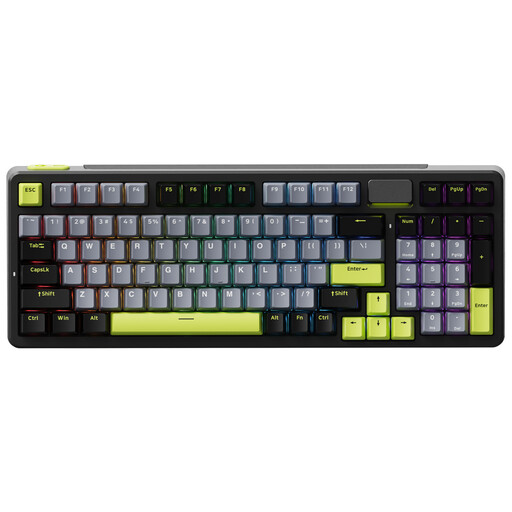 Image unavailable
Consider this 96% layout if you want an alternative to a conventional full-size board; check its exact key arrangement if repeated number entry matters.
The product name specifies a mechanical tri-mode keyboard and the Gasket Mount-BG variant. Confirm the included switch type if switch feel is important to you.
Check whether the stated US physical layout and the keyboard's height suit your workstation.
Place it just below elbow height and keep it central with the screen, as the Health and Safety Executive advises. Check that your mouse position does not make you reach or twist; a different keyboard alone will not correct an awkward desk arrangement.
A full-size board is a practical choice if you repeatedly enter figures and want an integrated numeric keypad, as offered on Logitech's full-size MX Mechanical. If mouse space matters more, consider a compact layout and decide whether top-row number entry or a separate keypad will work for you.
Check the selected physical layout rather than assuming it is UK-ISO. Keychron offers UK-ISO as a K3 Version 3 configuration, while the Joybuy products shown here are named as US-layout variants.