
24/7 Customer Support

Free returns

Same-day & Next-day Delivery

Quality Guaranteed

Unlock Your Welcome Offers: FREE Delivery | Up to 80% OFF | Free 30-day JoyPlus trial
Download the APP
Navigating the world of mechanical keyboards can feel overwhelming. With endless marketing buzzwords and technical specifications, it is easy to end up with a keyboard that looks the part but fails to deliver on performance or longevity. As the Joybuy Product Recommendation Officer, my role is to help you sidestep the common purchasing traps and focus on the features that truly matter for your desk setup, whether it's for work, gaming or a bit of both.
Many buyers fall victim to a few recurring pitfalls. Let's look at the main ones to avoid:
To make an informed choice, it helps to understand a few core parameters. Focusing on these will ensure you get a keyboard that feels right, performs reliably and fits your specific needs.
The physical layout of a keyboard dictates its footprint on your desk and its functionality. There is no single "correct" size; it depends entirely on your workflow and available space.
The switches beneath the keycaps define the typing experience. They determine the sound, feel and responsiveness of each keystroke.
How your keyboard connects to your device is a crucial consideration for convenience and performance.
Based on these practical criteria, we have identified several keyboards that offer genuine value and performance for different types of users in the UK.

Why This Fits Their Persona: This user needs every possible competitive edge in games like Valorant or CS2. The M68 is built for pure performance, with a compact 65% layout that maximises desk space for large mouse movements.
It sidesteps the "Gaming Tax" by focusing on substance over style. Instead of just RGB, it delivers pro-grade Hall Effect magnetic switches with Rapid Trigger and an 8000Hz polling rate for near-instantaneous response.
Fully adjustable actuation (0.2mm to 4.0mm) via software allows for complete control over key sensitivity. The solid aluminium top plate prevents flex during intense gameplay.
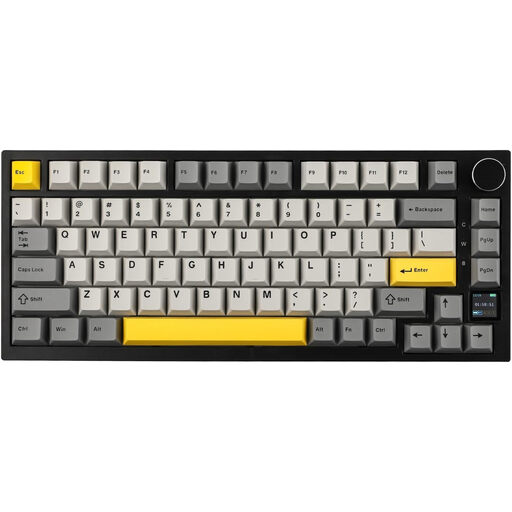
Why This Fits Their Persona: This user splits their time between work projects and gaming sessions, often switching between a PC and a laptop. They need a single, high-quality keyboard that can do it all with style and comfort.
It avoids the "Wireless Illusion" by offering a reliable tri-mode keyboard connection, including low-latency 2.4GHz for gaming. The 4000mAh battery provides genuine long-lasting wireless use and the TFT screen adds real utility, not just a gimmick.
The gasket mount structure provides a premium, cushioned typing feel that reduces fatigue during long workdays. Its 75% mechanical keyboard layout is the perfect compromise between function and desk space.

Why This Fits Their Persona: This user is keen to enter the world of keyboard customisation but wants a solid, feature-rich platform to start with. They value a good out-of-the-box experience with plenty of room to upgrade and experiment later.
It solves the "Hot-Swap Headache" by including a high-quality PCB that properly supports both 3-pin and 5-pin switches. This gives the user true freedom to try almost any switch on the market without worry.
Its five-layer sound-dampening structure provides an excellent acoustic profile from the start. The massive 8000mAh battery and functional 96% layout make it a practical and enduring choice.
For those with a hot-swappable keyboard, the journey doesn't end with the purchase. The next step in creating your perfect typing experience is finding the ideal switches.
We have compiled a complete, real-time list of products that fully satisfy these strict selection criteria and UK safety regulations.
A well-built mechanical keyboard is a long-term investment. The switches themselves are typically rated for 50 to 100 million keystrokes, which translates to many years of heavy use. The overall lifespan also depends on the build quality of the case and keycaps. Models with a hot-swappable keyboard design can have their lifespan extended even further, as you can easily replace worn-out or faulty switches without needing to replace the entire unit.
Absolutely. The noise level of a mechanical keyboard is determined by its switches and internal construction. A quiet mechanical keyboard equipped with linear or tactile switches (as opposed to clicky ones) is often no louder than a standard office membrane keyboard. Models that include sound-dampening foam and a gasket mount structure are exceptionally quiet and produce a soft, muted sound that is perfectly acceptable for most office environments.
A 75% mechanical keyboard is a compact layout that includes the full alphabet, number row, function row (F1-F12) and arrow keys. It achieves its small size by compressing the navigation cluster (keys like Home, End, Page Up/Down) into a single vertical column. It is an increasingly popular choice as it saves significant desk space compared to a TKL or full-size board while retaining most of the essential keys for both productivity and gaming.