
24/7 Customer Support

Free returns

Same-day & Next-day Delivery

Quality Guaranteed

Unlock Your Welcome Offers: FREE Delivery | Up to 80% OFF | Free 30-day JoyPlus trial
Download the APP
Navigating the world of mechanical keyboards can feel like a minefield of technical jargon and flashy marketing. For every genuinely great keyboard, there are dozens that promise high performance but fail to deliver, leaving you with a purchase you regret. As a Joybuy Product Recommendation Officer, my role is to help you sidestep these issues by highlighting what truly matters. Before you spend your hard-earned money, let's look at the common pitfalls and how to avoid them.
Many shoppers, especially those new to the scene, fall for the same marketing tactics. Understanding these can save you both money and frustration.
gaming keyboard simply because they feature an aggressive design and vibrant RGB keyboard lighting. However, these aesthetics often mask inferior build quality, high-latency connections and mushy, inconsistent key switches. A true gaming keyboard prioritises response time and durability, not just looks.wireless mechanical keyboard offers a clean, cable-free desk, but not all wireless technology is created equal. Many cheaper models rely solely on standard Bluetooth, which can introduce noticeable input lag—a deal-breaker for fast-paced gaming or even rapid typing. This can lead to missed keystrokes and a frustratingly sluggish experience.custom keyboard is the ability to tailor it to your exact preferences. However, many keyboards are advertised as customisable while having their switches permanently soldered to the circuit board. This prevents you from easily changing them if one fails or if you simply want to try a different typing feel, locking you into the factory setup.To make a smart choice, focus on the fundamental specifications that define a keyboard's performance and feel.
The defining feature of any mechanical keyboard is its switches. These individual mechanisms under each keycap determine how a keystroke feels and sounds. While there are many variations, they generally fall into three categories:
Beyond the switch itself, look for two key features:
hot swappable keyboard allows you to pull out and replace switches without any soldering. This is a crucial feature for longevity and customisation, letting you repair a faulty switch or change the entire feel of your board down the line.gasket mount keyboard uses soft material (like silicone or poron) to suspend the main plate-and-PCB assembly within the case. This isolates vibrations, resulting in a softer, quieter and more consistent typing experience compared to more rigid mounting styles.Keyboards come in various sizes, and choosing the right one depends on your needs for desk space and key accessibility.
compact gaming keyboard like this maximises mouse space but requires getting used to key combinations.Your connection method is critical for performance.
wireless mechanical keyboard intended for gaming.Based on these practical criteria, here are a few keyboards that offer genuine value for different types of users in the UK.
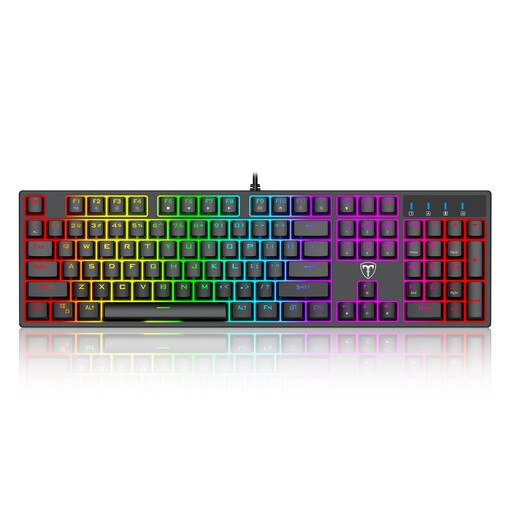
Why This Fits Their Persona: This is an excellent entry point for anyone wanting to experience a true mechanical keyboard without a large financial commitment. It's a no-nonsense, full-size board that's perfect for a home office or first gaming setup, providing all the keys you need for any task.
It avoids the wireless latency trap by being a reliable wired keyboard. It also sidesteps the "gaming" tax by focusing on core functionality—authentic blue mechanical switches—rather than unnecessary frills.
Features a full 104-key layout with anti-ghosting for reliable input and a spill-resistant design for added durability. The clicky blue switches provide clear, satisfying tactile and audible feedback.

Why This Fits Their Persona: For the professional who games after hours or the enthusiast who values a clean desk. This keyboard offers the flexibility to switch between a low-latency gaming setup and a multi-device work configuration, all while providing a premium typing feel in a space-saving 75% layout.
It defeats the wireless latency lie by offering tri-mode connectivity, including a high-performance 2.4GHz mode for gaming. It also avoids the customisation illusion with its full-key hot-swappable sockets, offering genuine flexibility.
Its gasket mount structure and five-layer internal padding deliver a quiet, soft and satisfying typing sound and feel. The 4000mAh battery ensures long wireless usage between charges.

Why This Fits Their Persona: This keyboard is built for one purpose: speed. It's for the competitive player who needs the fastest possible response time. The 60% compact layout maximises desk space for wide mouse movements, a common requirement in FPS games.
It completely rejects the "gaming" tax by delivering tangible performance features instead of just aesthetics. Its magnetic switches with Rapid Trigger and Adjustable Actuation are advanced technologies that directly improve in-game reaction speed.
The Hall Effect magnetic switches allow you to customise the actuation point of every key and enable Rapid Trigger mode for instant re-presses. Combined with an 8000 Hz polling rate, it offers exceptionally low input latency.
We have compiled a complete, real-time list of products that fully satisfy these strict selection criteria and UK safety regulations.
A well-built mechanical keyboard can last for many years. The switches are typically rated for 50 million or more keystrokes. Durability also depends on the keycaps; double-shot PBT keycaps are highly resistant to wear and shine compared to standard ABS plastic. Models with a hot swappable keyboard design have an even longer potential lifespan, as you can easily replace a single failing switch instead of the entire keyboard.
Whether a gasket mount keyboard is "better" is subjective, but it offers a distinct feel that many users prefer. By isolating the typing assembly from the case, it reduces high-frequency vibrations and creates a softer, less rigid bottom-out feel. This can lead to a more comfortable and quieter typing experience, especially during long sessions. It's a premium feature that often indicates a higher level of build quality and design consideration.
No, you do not. An RGB keyboard offers customisable backlighting that is purely for aesthetics. It can help you create an immersive setup and may help with visibility in low light, but it has zero impact on performance. For a true gaming keyboard, prioritise features like switch type, low-latency connectivity (wired or 2.4GHz) and a high polling rate over the lighting effects.