Choose the layout around your booklet work: a full-size keyboard keeps a numpad available for frequent figures, while tenkeyless (TKL) leaves more room for a mouse and printed proofs without giving up the usual navigation keys. If sound matters at home, check the exact switch variant; if you repeat design commands, check how the keyboard handles remapping or macros. Confirm the selected key layout and compatibility with your computer before buying.
Who this is for
Long-session home-office designer
If you spend extended periods editing copy and checking page layouts, key sound and the position of your keyboard within the whole workstation may matter more to you than gaming features. The Health and Safety Executive advises considering the workstation as a whole for sustained display-screen work.
Shortcut-heavy layout worker
If you repeatedly use the same application commands, you may want configurable keys or dedicated macro controls. Keychron documents remapping on the V3 Max, while Razer documents dedicated macro keys on the BlackWidow V4; check how either approach works with your computer and software.
Small-desk, multi-device creator
If your laptop, mouse and printed proofs compete for space, a TKL layout may be worth considering. If you also move between devices, check the switching method: Logitech documents Easy-Switch for up to three devices on the MX Mechanical.
What matters when choosing
Decide which keys your booklet workflow needs before choosing a switch or connection type. A quieter switch, a smaller layout and programmable shortcuts address different needs; none replaces checking the exact configuration.
| Concern | What to check | Who this matters to |
|---|
| Sound and typing setup |
Check the selected switch and how the keyboard height fits your desk and chair setup. |
If I type for long stretches near other people, I want key sound I can live with and a keyboard I can position comfortably. Around 33% of consumers might put sound and typing setup first. |
| Layout and key access |
Confirm the selected UK-ISO or US layout and decide whether you need a dedicated numpad or navigation keys. |
If I regularly enter guest counts or dimensions, losing a numpad could interrupt my work; if I mainly navigate pages, I may prefer the extra mouse room of TKL. Roughly 27% of consumers might make layout and key access their primary concern. |
| Programmable shortcuts |
Check how the exact model configures commands and whether that method works with your operating system and design application. |
When I repeat the same layout commands, I want to know that I can set up useful shortcuts rather than merely having extra keys. About 20% of consumers might prioritise shortcut customisation. |
| Desk space and devices |
Measure usable desk width and check the supported connection modes and device-switching method. |
If proofs and a mouse share my desk, I want enough working room; switching between computers may matter too. Around 20% of consumers might put desk space and device switching first. |
Buying pitfalls
-
Expecting a new keyboard to fix the whole workstation
Keyboard choice alone cannot address a poorly arranged desk, chair or screen. The Health and Safety Executive advises assessing display-screen work in the context of the full workstation.
Arrange the keyboard, screen, chair and desk together, and follow your employer’s display-screen-equipment process if it applies to your work.
-
Choosing a model family without checking the variant
Switch and layout options can differ within a family. Logitech lists several MX Mechanical switch choices, while Keychron identifies specific UK-ISO versions of the Q3 Max and Q6 Max.
Check the selected configuration and product images for the key layout and switch you intend to use.
-
Trading away the numpad without considering the work
TKL preserves navigation keys but omits the dedicated numpad; full-size keeps it at the cost of more desk width.
Consider how often you enter quantities, budgets and dimensions alongside your page-layout work before choosing a size.
-
Assuming macro keys will help without setup
Programmable controls are useful only if their configuration method works with your computer and the commands you repeat.
Pick a few recurring actions, then check the model’s software or firmware requirements and intended connection mode.
Brands to consider for these keyboard features
Logitech
The full-size MX Mechanical illustrates a route for numeric entry and switching between devices.
- Logitech documents an integrated numpad, three switch choices including Tactile Quiet, and Easy-Switch for up to three devices on this model.
- Confirm the selected variant’s key layout; the model family name alone does not identify every configuration.
Keychron
The Q3 Max and Q6 Max illustrate UK-ISO choices at TKL and full-size sizes respectively.
- Keychron documents 2.4 GHz, Bluetooth and wired connection options for these models, alongside their distinct layouts.
- Check the precise model and variant; these features do not apply to every Keychron keyboard.
Razer
The BlackWidow V4 is a route to dedicated programmable controls for repeated commands.
- Razer documents six dedicated macro keys and Green clicky or Yellow silent switch choices for this model.
- Its gaming-oriented features may be unnecessary for conventional typing; confirm the selected layout and software compatibility.
Joybuy product choices
These mechanical keyboards offer different approaches to desk space, key access and switch choice for home-office booklet work. Check each selected variant’s layout and compatibility against your own setup.
 No image available
MACHENIKE KG87 80% tri-mode keyboard, US layout, Pink
Consider its 80% format if desk space matters more than a dedicated numpad. The listed variant has a US QWERTY layout, gasket mount and Latte switches; check whether its layout and connection options suit your computer.
View on Joybuy
 No image available
Ticktype DP104 108-key keyboard, Gecha Gray, Silent Tactile switches
Its full-size, 108-key format is relevant if you regularly enter figures while designing pages, though it takes more desk space than TKL. This tri-mode variant specifies a US layout and Silent Tactile switches; confirm that layout and computer compatibility before choosing it.
View on Joybuy
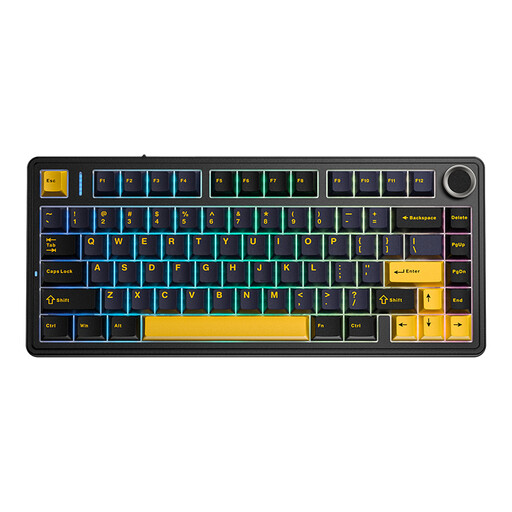 No image available
AULA F75 75% keyboard, US layout
The 75% format is worth considering when mouse and proof space are priorities. The listed variant specifies a US QWERTY layout and wired, Bluetooth and 2.4 GHz connection modes; check its key arrangement and computer compatibility for your workflow.
View on Joybuy
 No image available
HyperX Alloy Rise 75 Wireless Keyboard UK
Consider this model if you want to assess a smaller keyboard for a desk shared with design materials. Confirm its exact key layout, the keys your editing workflow needs and compatibility with your computer; the word UK in the title does not by itself establish a UK-ISO layout.
View on Joybuy
 No image available
ASUS ROG Falchion Ace HFX 65, UK layout
This compact model is worth checking if keeping room for a mouse matters more than having a numpad. Its title identifies a UK layout; confirm the selected key arrangement and support for your computer and design software.
View on Joybuy
Questions about your choice
Does home-office work require a particular mechanical keyboard?
The Health and Safety Executive’s display-screen guidance does not identify a required mechanical switch, brand or layout. For workers using display-screen equipment daily for continuous periods of an hour or more, its guidance addresses the workstation as a whole; if your employer’s assessment process applies, include your keyboard setup in it.
Should I choose full-size, TKL or a smaller layout for booklet design?
Choose full-size if you regularly need a dedicated numpad for quantities or dimensions; consider TKL if navigation keys and mouse room matter more. Before choosing a smaller layout, check whether its remaining keys support the editing commands you use.
Do I need a quiet switch in a home office?
A quieter switch is worth prioritising if key noise could disturb someone nearby or distract you. Compare the selected switch variant rather than assuming every version of a mechanical keyboard sounds alike; your preferred key feel matters too.
What should I confirm before ordering a keyboard for design work?
Confirm the selected UK-ISO or US layout, switch type, connection method and whether you need a numpad. If shortcuts are important, also check that the model’s remapping or macro method works with your computer and design application.


