Choose a keyboard for the commands you use, the space beside your mouse and the way your computers are connected—not simply for the number of screens. A full-size UK-ISO board with remapping suits designers who want dedicated keys and configurable commands; a smaller board may leave more desk space, while dedicated macro keys are useful when you have commands to assign to them. Switching between devices matters only if your workflow uses separate computers or other host devices, rather than two displays connected to one computer.
Who this choice affects
Shortcut-heavy booklet designers
If you repeatedly edit pages, objects and text in Adobe InDesign, start by identifying the commands you want within easy reach. Adobe supports custom shortcut sets, while Keychron says the V6 Max can remap keys and macro commands through VIA.
Long-session, dual-screen creators
If you move between a layout and reference material for extended periods, check how the keyboard fits the whole workstation. The Health and Safety Executive advises keeping the screen and keyboard central, placing the keyboard just below elbow height and keeping the mouse in line with the elbow.
Multi-device creative workers
If your work moves between separate computers or a tablet, device switching may matter. Logitech says its MX Mechanical can switch between up to three devices; that feature serves a different need from using two monitors with one computer.
What to check before choosing
For wedding-booklet work across two screens, identify the one need that would most influence your choice, then check the keyboard against that need and your desk arrangement.
| Concern |
What to check |
Who this matters to |
| Shortcuts and programmable controls |
List your recurring InDesign commands before choosing between application shortcuts, key remapping and dedicated macro keys. Check that the chosen keyboard supports the controls you intend to use. |
If I repeatedly change pages, objects or views, I want those commands within comfortable reach rather than extra controls I will never configure. Around 40% of consumers put shortcut access and remapping first. |
| Desk fit and typing noise |
Check keyboard width and height against mouse space and the workstation arrangement. Choose a stated switch option that suits your typing environment without assuming a particular sound level. |
During a long layout session, I need room to position the mouse and a switch choice that suits anyone sharing the space. Desk fit and typing noise come first for around 30% of consumers. |
| Separate-device switching |
Count the host devices you actually use, then check connection modes, supported device switching and operating-system compatibility. |
If my booklet work moves between a desktop and another computer or tablet, I want to change devices without reconnecting the keyboard each time. Around 30% of consumers prioritise separate-device switching. |
Common buying mistakes
-
Assuming two monitors require multi-device switching
Two displays connected to one computer still use one host device. Logitech’s Easy-Switch feature on the MX Mechanical is intended for switching between separate devices.
Check how your displays are connected. If one computer drives both, focus on layout, switches and desk fit unless you also use another host device.
-
Choosing a compact layout without checking its keys
A smaller keyboard can leave more room beside the mouse, but compact layouts may omit function, navigation or number-pad keys that you use for booklet work.
Compare the keyboard’s actual key map with your regular commands, and confirm the physical layout and legends you expect to type on.
-
Expecting the keyboard alone to fix workstation discomfort
The Health and Safety Executive’s guidance also covers screen alignment, keyboard height and mouse placement; a different keyboard does not replace those checks.
Arrange both screens and the mouse, then check whether the keyboard’s dimensions allow a central position with the keyboard just below elbow height.
-
Choosing macro keys without commands to assign
Adobe InDesign already allows custom shortcut sets. Extra keyboard controls become useful when you deliberately configure commands you will reuse.
Write down your repeated commands first, then decide whether application shortcuts, remapping or dedicated macro keys give you the access you need.
Brands to consider
Keychron
The V6 Max UK-ISO is a full-size option for designers considering key remapping and macro commands.
- Keychron states that the V6 Max supports QMK/VIA configuration, 2.4 GHz wireless and Bluetooth 5.1.
- A full-size board takes more desk width; confirm the switch and keycap configuration of the variant you choose.
Logitech
MX Mechanical offers full-size and Mini formats for desks that may also involve separate host devices.
- Logitech states that Easy-Switch supports up to three devices and offers Tactile Quiet, Clicky and Linear switch choices.
- Choose the format and switches deliberately; device switching adds little to a two-screen setup driven by one computer.
Razer
The BlackWidow V4 has dedicated controls for people prepared to configure repeatable commands.
- Razer specifies six programmable macro keys, a roller and four media keys.
- The Green switch is described as clicky; consider the stated switch variant and your typing environment before choosing.
Joybuy keyboard choices
These mechanical keyboards cover compact and full-size layouts for booklet-design work. Compare their stated physical layouts and key access with your shortcuts, typing preferences and available mouse space; a wireless connection alone does not establish that a keyboard switches between separate devices.
 No image available
HyperX Alloy Rise 75 Wireless Keyboard UK
Consider this 75-series wireless keyboard if you want a smaller layout for booklet work. Confirm its physical key layout before relying on particular legends or shortcut positions, and check whether its typing sound suits your workspace.
View on Joybuy
 No image available
AULA F75 75% Wireless Mechanical Keyboard, US QWERTY
This compact option suits a desk where keyboard footprint matters, provided its US QWERTY layout works for your typing. Its title specifies wired, Bluetooth and 2.4 GHz connection modes and PBT keycaps; check the exact key map before planning shortcuts around it.
View on Joybuy
 No image available
Ticktype DP104 108-Key Tri-Mode Mechanical Keyboard, Gecha Gray, US Layout, Silent Tactile Switches
Choose a full-size layout if dedicated keys matter more to you than conserving desk width. This variant is named with a 108-key layout, Silent Tactile switches and hot-swappable switches; its US layout needs checking against your preferred legends, and the switch name does not specify how it will sound at your desk.
View on Joybuy
 No image available
ASUS ROG Falchion Ace HFX 65 Analog Gaming Keyboard, UK Layout
This UK-layout option is worth checking if you want a compact keyboard for the design desk. Confirm that its actual keys cover your booklet shortcuts; the gaming-oriented features in its name do not establish a benefit for layout work.
View on Joybuy
 No image available
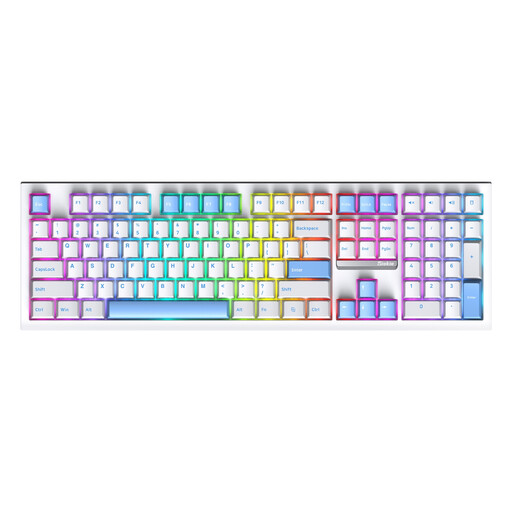
Siukie PL108W 108-Key Three-Mode Mechanical Keyboard, White
Consider this 108-key option if you prefer a larger keyboard layout for text and page work. Its name identifies detachable switches and three connection modes; check the physical key layout, desk dimensions and switch sound against your own setup.
View on Joybuy
Frequently asked questions
Do two screens mean I need a multi-device keyboard?
No: two displays connected to one computer do not require the keyboard to switch host devices. Multi-device switching becomes relevant when you also move between separate computers or a tablet; Logitech says the MX Mechanical can switch between up to three devices.
Is a full-size or compact keyboard more useful for booklet design?
Choose according to the keys you use and the room available for your mouse. Joybuy Insights notes that compact layouts can omit function, navigation or number-pad keys; a full-size layout retains more dedicated keys but takes more desk width. Check the exact key map rather than relying on the size label alone.
Will macro keys help with Adobe InDesign?
Macro keys can help if you assign commands that you use repeatedly, but extra hardware is not required to customise InDesign shortcuts. Adobe says InDesign supports user-created shortcut sets; compare those options with any keyboard remapping or dedicated macro keys you plan to configure.
How should the keyboard fit a long two-screen session?
Check keyboard height and width as part of the whole workstation arrangement. The Health and Safety Executive advises placing the keyboard just below elbow height, keeping the screen and keyboard central and positioning the mouse in line with the elbow.


