What matters when choosing
Start with the keys your yearbook tasks require, then check desk space, switch choice and device connections on the exact configuration you intend to buy.
| Concern | What to check | Who this matters to |
|---|
| Repeated editing commands |
List the shortcuts you use repeatedly and confirm that the exact keyboard and your operating system support the remapping you want. |
If I repeatedly format captions or place images, convenient access to those commands matters more to me than extra controls I will not use. Around 33% of consumers would put editing shortcuts first. |
| Numbers and UK layout |
Check for an explicit UK-ISO configuration if required, and decide whether frequent number entry calls for a dedicated numpad. |
When I enter contributor records, dates or quantities, I want familiar keys and a numpad within reach. Roughly 25% of consumers would make numerical entry and UK layout their primary concern. |
| Shared-room typing |
Check the selected switch and any stated sound-damping features; confirm the connection options if you use more than one device. |
Working beside someone else, I would rather choose a switch with a stated quieter option than assume every mechanical keyboard sounds alike. About 25% of consumers would prioritise shared-room use. |
| Desk space and positioning |
Measure the usable space and check that the keyboard can sit centrally with room for the mouse. |
If my desk also holds notes or a graphics tablet, I need space to place the mouse without pushing the keyboard off-centre. Around 17% of consumers would put desk space and positioning first. |
Joybuy product choices
These mechanical keyboards offer compact or space-conscious layouts for yearbook typing. Their listings differ on layout and connections, so check those details against your need for UK-ISO keys, a numpad or a quieter shared workspace.
 Image unavailable
ASUS ROG Falchion Ace HFX 65, UK Layout
Consider this compact option if UK-layout keys and space for a mouse matter more than a dedicated numpad.
The product name specifies a 65% analog gaming keyboard and UK Layout. Check the connection arrangement and switch sound for your workspace; its gaming features do not establish support for remapping yearbook-editing shortcuts.
Joybuy
 Image unavailable
AULA F75 75% Tri-Mode Keyboard, US QWERTY
This compact layout may suit a desk shared with notes or a mouse, provided US QWERTY keys work for you.
The product name specifies wired, Bluetooth and 2.4G modes, PBT keycaps and a 75% layout. It specifies US QWERTY, so do not choose this variant if UK-ISO keys are essential. Check shortcut-remapping support separately if you plan to assign editing commands.
Joybuy
 Image unavailable
AULA S75 Pro 75% Keyboard, Star Vektor Switch
Consider the 75% layout when room for other yearbook materials is a priority, but check whether its key arrangement suits your editing work.
The product name specifies tri-mode connectivity, a TFT display, a knob, five-layer padding and hot-swappable Star Vektor switches. Padding and sound descriptions are not measurements of typing noise. The listing identifies US QWERTY keys, so this variant is not a UK-ISO choice.
Joybuy
 Image unavailable
HyperX Alloy Rise 75 Wireless Keyboard UK
The 75% format is worth considering if you want to preserve desk space while keeping a keyboard for writing and editing.
The product name identifies a wireless model, but its UK wording does not by itself confirm UK-ISO legends. Inspect the exact key layout before ordering; also check the selected switches and remapping options if shared-room sound or custom shortcuts matter.
Joybuy
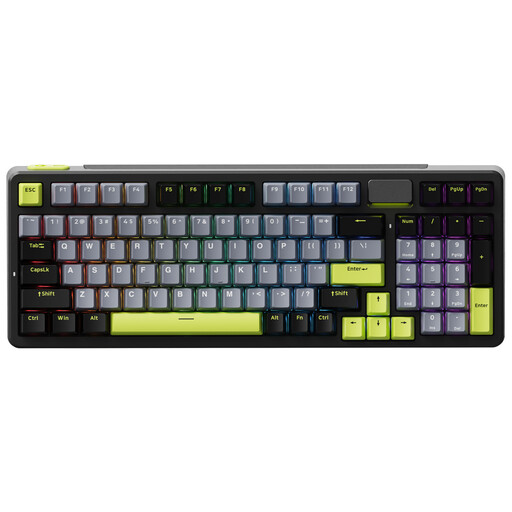 Image unavailable
Rapoo V700DIY 96% Tri-Mode, Gasket Mount-BG, US QWERTY
This 96% layout may appeal if you want a space-conscious keyboard without moving straight to a 75% format.
The product name specifies tri-mode operation, Gasket Mount-BG and US QWERTY keys. Confirm the exact key arrangement before relying on a dedicated numpad; this variant is not suitable if UK-ISO keys are required. Check switch sound and remapping options if they are central to your work.
Joybuy
Frequently asked questions
Should I choose a full-size or 75% keyboard for yearbook work?
Choose a full-size layout if a dedicated numpad is important for repeated entry of dates, quantities or other figures; choose 75% if space for a mouse, notes or a graphics tablet matters more. Check the exact key placement and UK-ISO variant before buying.
Will a quiet mechanical keyboard avoid disturbing people nearby?
A stated quiet switch or damping feature is a useful selection criterion, but it does not guarantee how unobtrusive typing will be in your room. Logitech offers a Tactile Quiet option for MX Mechanical, while Razer describes silent switches and damping foam on Pro Type Ultra; check the exact configuration you intend to buy.
Is changing the keyboard enough to improve my home-office setup?
No. The Health and Safety Executive advises considering the workstation as a whole, with the keyboard just below elbow height, the screen and keyboard central, and the mouse in line with the elbow. For prolonged laptop work, check whether a separate keyboard and mouse would allow a better screen position.
Does UK display-screen-equipment guidance automatically cover a student making a yearbook at home?
No: the Health and Safety Executive’s workstation-assessment duty concerns employers whose workers use display screen equipment daily as part of normal work for continuous periods of an hour or more. It is not a certification rule for keyboards or a duty that automatically applies to every private yearbook project. If the project forms part of employment, ask the relevant organisation about its arrangements.
How should I plan breaks during long editing sessions?
Plan short, frequent breaks or changes of activity rather than relying on one long break. The Health and Safety Executive gives 5–10 minutes every hour, rather than 20 minutes every two hours, as an example for display-screen work; adapt the routine to the work you are doing.


