Long-form yearbook editor
If you spend extended sessions writing captions, credits and feature copy, compare switch feel for the typing you do repeatedly. A gaming-oriented feature list alone will not tell you whether you like the keys.


Choose a keyboard around the keys and connections your yearbook work requires: a compact wireless board frees desk space, a UK-ISO tenkeyless board retains function keys without a number pad, and a larger wired board suits a fixed desk if you use its extra controls. Beside a bright window, check the actual key legends and finish rather than relying on RGB lighting; choose switch feel with nearby people in mind.
If you spend extended sessions writing captions, credits and feature copy, compare switch feel for the typing you do repeatedly. A gaming-oriented feature list alone will not tell you whether you like the keys.
If daylight falls across your keyboard, inspect the chosen variant’s key legends and surface. Adaptive illumination on specified Logitech MX Mechanical models is a convenience, not proof that their keys will be easy to read in strong daylight.
If you prepare pages near classmates, family or colleagues, consider how switch sound affects them as well as how the keys feel to you. Logitech’s switch guidance distinguishes audible clicky switches from less noisy tactile options.
For yearbook work beside a bright window, check the keys your workflow needs, then assess typing feel, visibility and sound on the exact configuration you would use.
| Concern | What to check | Who this matters to |
|---|---|---|
| Typing feel | Confirm the selected switch type. Try the keys if possible, or check the seller’s return terms before committing to an unfamiliar feel. | When I spend hours revising captions and credits, I want feedback I can type with comfortably; around 31% of consumers put typing feel and sustained comfort first. |
| Daylight visibility | Inspect the exact keycap finish, legend contrast and lighting controls; RGB alone does not establish readability in bright daylight. | At a window-side desk, I need to recognise keys when daylight falls across them. Around 23% of consumers place that visibility need first. |
| Shared-space sound | Check the switch variant and seek a sound demonstration of the board where possible; sound-dampening features do not establish silence. | If others work nearby, I do not want my typing to distract them; for around 23% of consumers, limiting disruption is the primary concern. |
| Keys and connections | Check for a number pad and the navigation keys you use, the physical layout, connection modes and device compatibility. | When I move between page layout, file names and lists, I need the right keys without crowding my desk. Desk and workflow fit comes first for around 23% of consumers. |
Keychron offers multiple ISO variants, and a product family can vary by switch and keycap configuration. A different physical layout can change punctuation placement, key labels and the Enter key.
Confirm that the selectable variant matches your preferred layout, such as UK-ISO, rather than relying on a family name or generic product image.
Logitech specifies adaptive illumination for its MX Mechanical models, but lighting behaviour alone does not establish how clearly you will see the legends beside a bright window.
Inspect the exact keycaps and lighting controls, and check the seller’s return terms if you need to assess visibility at your desk.
Logitech describes clicky switches as deliberately audible. Their feedback may appeal to you while distracting someone sharing the workspace.
Compare tactile and linear variants as well, and listen to or try the exact keyboard if you can.
Compact and tenkeyless layouts remove keys to save space. That trade-off matters if yearbook lists, page numbers or file management regularly call for a number pad or dedicated navigation keys.
Note which keys you use during a typical editing session before choosing a compact, tenkeyless or full-size layout.
Its MX Mechanical range offers a compact Mini and a full-size model with an integrated number pad.
Its UK-ISO range includes low-profile options for buyers comparing layouts, switches and connection methods.
Its UK-layout K70 CORE range includes wired options for a fixed desk, including a shorter tenkeyless model.
These options include compact 75% boards and keyboards with more keys for yearbook writing and layout work. Check each variant’s physical layout and key legends before choosing one for a bright-window desk.
 No image available
Consider this 75% wireless board if you want more room beside printed proofs. Confirm its physical key layout despite the UK label, and inspect the legends in the light at your desk.
 No image available
The 108-key layout is worth considering if you frequently enter page numbers or work in lists. This Gecha Gray variant specifies a US layout and Silent Tactile switches; check that the key placement suits you, and do not assume the switch name establishes its sound in your room.
 No image available
This tri-mode mechanical keyboard offers a compact format for a desk shared with yearbook materials. Its stated US layout may not match your preferred key placement; check the legends and the feel of its Gateron White switch variant.
 No image available
The 75% format may suit a smaller editing desk, while the product name specifies wired, Bluetooth and 2.4 GHz modes. Confirm the selected switch type and whether the US layout works for your writing; PBT keycaps and RGB do not establish daylight legibility.
 No image available
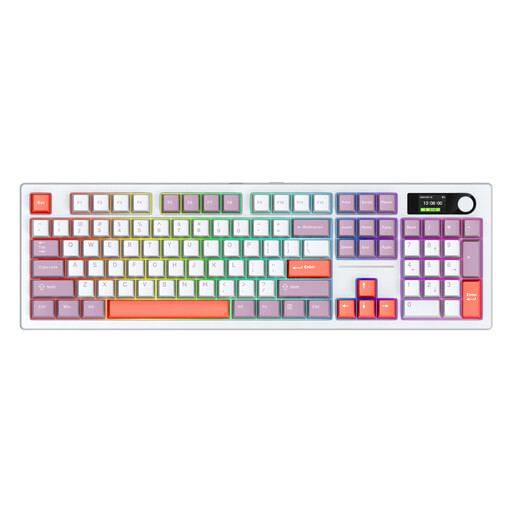
Consider its 104-key format if your yearbook workflow calls for a fuller set of keys. The product name also identifies a colour display and detachable switch; confirm the physical layout, selected switch type and legend contrast before deciding whether it suits your desk.
Not necessarily: lighting does not establish how visible the physical legends will be in strong daylight. Logitech says the backlight on its specified MX Mechanical models adjusts to ambient conditions; inspect the keycaps and controls on the exact variant you are considering.
Start by comparing tactile and linear switches if audible typing could disturb others. Logitech describes clicky switches as audible, tactile switches as providing feedback with less noise, and linear switches as smoother; try or listen to the exact board if sound matters to your choice.
GOV.UK says retailers must offer a refund when goods are faulty, not as described or do not do what they are supposed to. Contact the retailer about the problem rather than treating a change-of-mind return policy as the limit of your rights.
Check your local authority’s electrical-equipment collection arrangements or a retailer’s take-back information rather than placing the keyboard in ordinary waste. GOV.UK describes equipment dependent on electric currents or electromagnetic fields as electrical and electronic equipment, including battery-powered equipment.