For frequent entry of attendance totals, start with a mechanical keyboard that has a dedicated number pad; a full-size UK-layout model is a direct fit. A compact board can also work if it retains the number pad, while a tenkeyless model trades it away for more desk space. Check the exact layout, switch variant and connection options before choosing, particularly if typing noise or a managed work computer matters.
Who this choice affects
Frequent attendance-total entry users
If you repeatedly enter counts, hours or totals into a spreadsheet or business system, a dedicated number pad may matter more than a compact layout. Logitech distinguishes its full-size MX Mechanical, which has an integrated number pad, from the Mini.
People working in a shared home
If typing can be heard by others nearby or during calls, assess the exact switch variant as well as the keyboard. Logitech and Razer offer differently described switch options; those descriptions do not establish how quiet a particular setup will sound.
Small-desk and multi-device workers
If mouse room is limited or you move between devices, compare keyboard width and connection options before giving up a number pad. Logitech lists device switching for MX Mechanical, while Keychron lists several connection modes and remapping for the tenkeyless K8 Max.
What matters when choosing
Decide whether the number pad is essential to your attendance-entry routine, then check noise, desk fit and device compatibility on the exact variant you intend to use.
| Concern | What to check | Who this matters to |
|---|
| Numeric entry |
Confirm that the selected layout has a dedicated number pad; a model family may also include a version without one. |
If I enter long runs of attendance figures, I want the number keys ready without changing layers or reaching across the keyboard. Around 36% of consumers put that number-pad need first. |
| Typing sound and feel |
Check the fitted switch, not just the model name; manufacturer terms for quiet, clicky and linear options are not comparable noise measurements. |
When others share my workspace or can hear me on calls, I need to judge whether the particular switch is acceptable. For around 29% of consumers, that is the primary concern. |
| Desk fit and posture |
Allow room for the mouse beside the keyboard. The Health and Safety Executive advises keeping the screen and keyboard central and the keyboard just below elbow height. |
On a narrow desk, I need enough room to position both keyboard and mouse without twisting towards either. Around 21% of consumers put workstation fit first. |
| Devices and shortcuts |
Check connection modes, operating-system compatibility and whether your work device and attendance system permit the intended remapping. |
If I switch computers or repeat the same permitted actions, I want connections and shortcuts that work with my setup. That is the leading need for around 14% of consumers. |
Mistakes to avoid
-
Assuming a compact keyboard has a number pad
Keychron identifies the K8 Max as an 80% tenkeyless keyboard, so it does not have the dedicated number pad found on Logitech’s full-size MX Mechanical.
If daily total entry depends on a number pad, confirm its presence on the exact layout before choosing a smaller board.
Otherwise, you may need a separate keypad for frequent numerical entry.
-
Expecting every mechanical switch to sound alike
Logitech lists Tactile Quiet, Clicky and Linear MX Mechanical options, while Razer describes distinct quiet- and silent-oriented options for its cited UK model. The selected switch affects what you are buying.
Check the switch name on the chosen variant and the retailer’s return conditions if sound is important; do not treat a switch label as a measured noise rating.
-
Overlooking the regional key layout
Keychron lists UK-ISO variants of the K8 Max, and Corsair identifies UK and North American layout choices for the K70 CORE. A familiar model name alone does not settle which key legends you will receive.
Check the selected variant and visible key legends if you need a UK layout.
-
Expecting a keyboard to fix the whole workstation
The Health and Safety Executive’s display-screen guidance addresses keyboard and mouse placement, screen position and working height together.
Assess the desk, chair and screen position alongside keyboard size. For prolonged laptop work, the HSE advises a separate keyboard and mouse so the screen can be elevated.
Brands to consider
Logitech
The MX Mechanical range offers a full-size model with an integrated number pad and a smaller Mini, according to Logitech.
- Logitech lists three low-profile switch choices and switching among up to three compatible devices.
- Choose the full-size variant if a dedicated number pad is essential; check the selected switch and regional layout separately.
Keychron
The UK-ISO K8 Max is an 80% tenkeyless option for a desk where a built-in number pad is not essential.
- Keychron lists wired, 2.4 GHz and Bluetooth connections, along with QMK/Launcher remapping.
- It has no dedicated number pad. Keychron says Launcher configuration requires a wired connection and a current Chrome, Opera or Edge browser.
Corsair
The UK K70 CORE is a wired, full-size mechanical keyboard that may suit a fixed home desk.
- Corsair lists MLX Red v2 linear switches, a detachable palm rest and two layers of sound-dampening foam.
- Check whether its size, lighting and software suit your workspace; the stated dampening construction is not a cross-brand noise comparison.
Razer
The BlackWidow V4 Low-Profile HyperSpeed has a full-size UK-layout option with wireless and Bluetooth connectivity, according to Razer.
- Razer describes Orange switches as tactile and quiet and Yellow switches as smooth and silent.
- Confirm the exact layout and switch variant; those sound descriptions are not independent noise measurements.
Joybuy product choices
These mechanical keyboards include layouts relevant to attendance-total entry. Check the number-pad arrangement on the compact models; two of the choices specify a US layout rather than a UK layout.
 No image available
ASUS ROG Strix Scope II 96 Wireless — Black, UK layout
Consider this 96% layout if you want to enter totals while keeping keyboard width in mind; confirm that its number-pad arrangement suits your routine. The name specifies wireless operation and a UK layout. Check the fitted switch option if typing sound matters.
View on Joybuy
 No image available
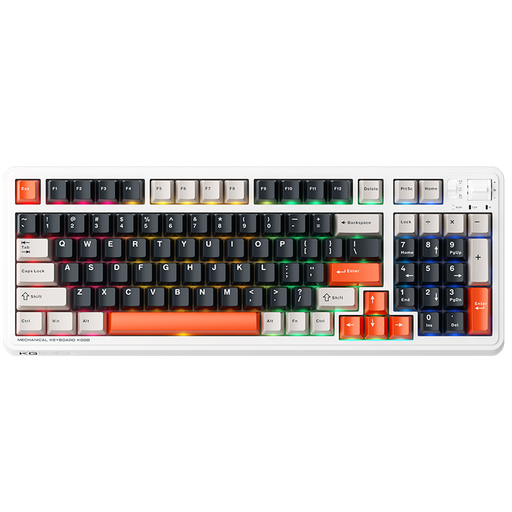
MACHENIKE KG98 96% Tri-Mode — Black White Orange, QWERTY US layout
Its 96% layout is worth checking if you want a compact arrangement for numerical work. The name specifies tri-mode connectivity and hot-swappable switches, but also a QWERTY US layout: make sure those key legends suit your work. Confirm the fitted switches and desk dimensions before choosing it for a shared or restricted workspace.
View on Joybuy
 No image available
Ticktype DP104 full-size 108-key — Gecha Gray, Silent Tactile, US layout
Consider this full-size layout for repeated number entry if US key legends are acceptable. The name specifies tri-mode wireless operation, hot-swappable switches and a Silent Tactile variant; that switch name is not a measured sound result. Check its dimensions against your desk space.
View on Joybuy
Common questions
Do I need a full-size keyboard to record attendance totals?
No, but a dedicated number pad is a useful starting requirement if you frequently enter long runs of figures. Logitech identifies its full-size MX Mechanical as having one, whereas Keychron’s tenkeyless K8 Max omits it; check a compact keyboard’s exact arrangement rather than assuming all compact layouts are alike.
Which switch should I choose for a shared home office?
Choose by the exact switch variant and your tolerance for its sound and feel, not by brand alone. Logitech lists Tactile Quiet, Clicky and Linear MX Mechanical options, while Razer describes quiet- and silent-oriented options for its cited UK model; neither set of names is an independent noise rating.
Will an external keyboard make a laptop workstation more comfortable?
An external keyboard can help as part of a suitable workstation arrangement, but keyboard choice alone does not settle screen and mouse position. For prolonged laptop work, the Health and Safety Executive advises a separate keyboard and mouse so the screen can be elevated, with the keyboard just below elbow height and the screen and keyboard central.
Can I use keyboard macros for attendance entry?
A keyboard may offer macros without your workplace permitting them for attendance entry. Keychron lists QMK/Launcher remapping and macros for the K8 Max; check your employer’s IT rules and the attendance system’s requirements before using automation.


