
24/7 Customer Support

Free returns

Same-day & Next-day Delivery

Quality Guaranteed

Unlock Your Welcome Offers: FREE Delivery | Up to 80% OFF | Free 30-day JoyPlus trial
Download the APP
Mechanical keyboards appeal to gamers, programmers, students and home-office users because they offer distinct key feedback, customisation and a wide choice of layouts. However, product pages can make similar-looking models appear interchangeable. The practical differences often become clear only after the keyboard arrives.
Before choosing, check the layout, connection type, switch design and long-term maintenance options rather than focusing only on RGB lighting or appearance.
A 60% mechanical keyboard saves substantial desk space, but it usually removes the dedicated function row, navigation keys and arrow-key cluster. These functions may still be available through shortcuts, but this can slow down spreadsheet work, programming or everyday typing.
A 75% mechanical keyboard generally keeps the arrow keys and function row in a smaller footprint. A 90%, 96% or full-size keyboard is more suitable if you regularly use a number pad. Always check the key count and product diagram rather than relying solely on phrases such as “compact” or “space-saving”.
A UK layout keyboard has differences in key shape and symbol placement compared with a US QWERTY keyboard. The Enter key, quotation marks, hash symbol and location of certain punctuation can affect typing accuracy, particularly for coding and office documents.
Some mechanical keyboards sold to UK shoppers use US keycaps. This is not automatically a problem, but you should confirm the physical key layout and your operating system settings before buying.
An RGB mechanical keyboard may offer attractive effects, but lighting does not indicate typing quality, switch durability or connection stability. Likewise, a wireless mechanical keyboard may support Bluetooth, 2.4GHz wireless or both, with different practical uses.
Bluetooth is convenient for tablets and several everyday devices. A 2.4GHz receiver is generally intended for a more direct wireless connection, while a wired mechanical keyboard avoids battery charging altogether. Check whether the cable, receiver and software are included, and note the stated battery capacity where applicable.
Mechanical switches determine the key feel and sound. Linear switches move smoothly with no pronounced bump, making them popular for gaming and fast repeated input. Tactile switches provide a noticeable bump, which some users prefer for typing. Clicky switches add an audible click and may be unsuitable for shared offices or bedrooms.
A hot-swappable keyboard allows compatible switches to be removed and replaced without soldering. This is useful if your preferences change, but confirm whether the sockets support 3-pin, 5-pin or both types. Also check whether replacement switches are readily available and whether keycap compatibility matches the stated stem and profile.
PBT keycaps generally resist surface shine better than ABS keycaps, although the overall feel also depends on thickness and profile. Foam layers, gasket mounting and stabiliser design can alter sound and bottom-out feel, but marketing descriptions should not be treated as a guarantee of silence.
A 65% or 75% model can provide a small footprint while retaining important navigation keys and leaving more room for a mouse. Full-size boards remain practical for finance, data entry and office work where the numeric keypad is used frequently.
For a wireless model, look for the exact modes: Bluetooth, 2.4GHz and USB wired. Multi-device switching can help when moving between a work computer, tablet and personal PC. A rechargeable battery adds convenience but also requires safe charging and storage away from moisture and excessive heat.
For a home-office setup, an office keyboard and mouse set may offer simpler value than buying separate devices. Confirm the connector type, operating-system support and whether the keyboard uses a UK layout.
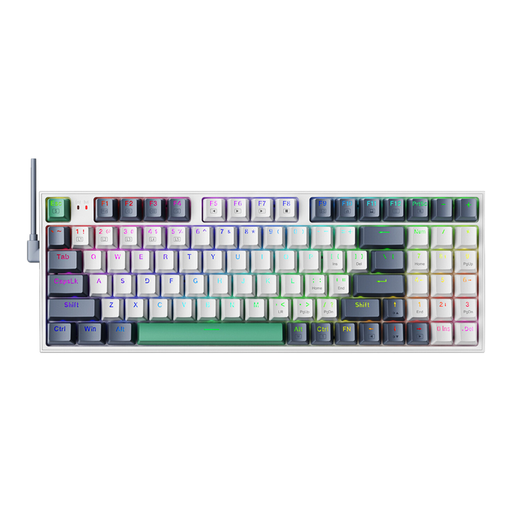
Why This Fits Their Persona: Its wired connection avoids battery management, while the 90% format retains more keys than a 60% board for study, gaming and general desktop use.
The listing identifies a US QWERTY layout and wired connection clearly, helping buyers check two commonly overlooked specifications before purchase.
90% layout, red switches, RGB lighting and USB wired connectivity.

Why This Fits Their Persona: A user seeking a smaller footprint, customisation, wireless flexibility and a more considered typing setup for work and gaming.
The tri-mode design states Bluetooth, 2.4GHz and wired USB connectivity, while full-key hot-swap support makes future switch changes more practical.
75% layout, 4000mAh battery, PBT keycaps, RGB and a volume knob.

Why This Fits Their Persona: A user who needs number-key access without the full width of a traditional board, plus multi-device connectivity for work, study and gaming.
Its stated 96% 99-key layout makes the available keys easier to assess, while tri-mode connection avoids locking the user into either wireless or cable-only use.
Hot-swappable 3-pin and 5-pin support, five-device switching, RGB and an 8000mAh battery.

Why This Fits Their Persona: A straightforward choice for home working, study rooms and shared office desks where a full-size UK layout and included mouse are useful.
The product information specifies a full-size UK layout, USB plug-and-play connection and low-profile membrane keys, so buyers can distinguish it from a mechanical keyboard.
UK full-size layout, numeric keypad, dedicated Copilot key and included optical mouse.
We have compiled a complete, real-time list of products that fully satisfy these strict selection criteria and UK safety regulations.
Yes, but switch choice matters. Linear or tactile switches may be more appropriate for shared workspaces than clicky switches, which produce a more pronounced sound. A low-profile office keyboard can be a simpler option where quiet typing and a UK layout take priority.
A wired model draws power through USB while in use. Wireless models require periodic charging, with battery use affected by RGB lighting, connection mode and standby settings. Turning off lighting can reduce charging frequency, but the actual running time varies by model and usage.
Lifespan depends on switch construction, keycap wear, dust, liquid exposure and daily use. A hot-swappable design can extend practical ownership because compatible switches can be replaced without changing the entire keyboard. The manufacturer’s stated switch rating should be treated as a specification rather than a guarantee of service life.