Frequent expense-claim enterers
If you repeatedly enter amounts, dates and codes, assess layouts with a dedicated number pad before choosing by switch feel or appearance.


For frequent expense-claim figures, start with a mechanical keyboard that has a dedicated number pad. A 75% board makes more sense when desk width and mouse room matter more than number-pad access; whichever size you choose, check the exact key layout, switch variant and connection options against your two-screen setup.
If you repeatedly enter amounts, dates and codes, assess layouts with a dedicated number pad before choosing by switch feel or appearance.
If your keyboard and mouse compete for space between two displays, a 75% board is worth considering if you can work without a dedicated number pad. The Health and Safety Executive advises keeping the screen and keyboard central rather than twisting to work.
If you process claims near colleagues or during calls, check the fitted switch variant and any sound-dampening features rather than assuming all mechanical keyboards sound alike.
Decide whether repeated number entry or a narrower desk footprint takes priority, then check whether you actually need to switch between separate devices.
| Concern | What to check | Who this matters to |
|---|---|---|
| Numeric entry | Confirm a dedicated number pad and enough room to position the keyboard centrally. | When entering amounts and cost codes repeatedly, I want familiar number-pad access rather than relying on the top row; around 33% of consumers put numeric entry first. |
| Device switching | Count separate computers or devices, then check the model’s pairing limit and switching controls. | If my screens belong to separate computers, I need to move typing between them without changing keyboards; for around 27% of consumers, device switching is the primary concern. |
| Typing noise | Check the fitted switch variant and any stated sound-dampening features. | In a shared office or on calls, I want mechanical typing without distracting people nearby; keeping noise down comes first for around 20% of consumers. |
| Desk fit | Check keyboard dimensions and space for the mouse, keeping the main screen and keyboard central. | With two displays on a crowded desk, I need room to work without reaching or twisting; around 20% of consumers prioritise workstation fit. |
Joybuy lists some mechanical keyboards explicitly as US layout, while Keychron offers separate UK-ISO variants. Key legends and physical key placement can differ.
Check the exact layout on the product page or in the variant selector; a QWERTY label alone does not establish UK-ISO.
A 75% keyboard takes up less width than a full-size board but does not provide the same set of dedicated keys. That distinction matters when claims involve repeated figures.
List the fields you enter most often and decide whether number-pad access outweighs the space a compact board would free.
Switch feel and sound vary, and manufacturers’ sound-dampening descriptions do not provide a common noise measurement across models.
Check the switch fitted to the particular variant and the seller’s returns terms if you cannot assess its sound before purchase.
The Health and Safety Executive treats display-screen work as a workstation issue, not a keyboard choice alone. Screen, mouse and keyboard positions all affect whether you must twist or reach.
Keep the main screen and keyboard central, place the keyboard just below elbow height and consider the whole workstation arrangement.
Relevant if you want to compare a compact UK-ISO option with a full-size UK-ISO mechanical keyboard.
Relevant when switching a compatible keyboard between separate work and personal devices matters more than custom mechanical features.
Relevant to shoppers considering a mechanical keyboard marketed for quieter typing and use with multiple devices.
Relevant if a UK-market 75% mechanical keyboard with a programmable dial appeals to you.
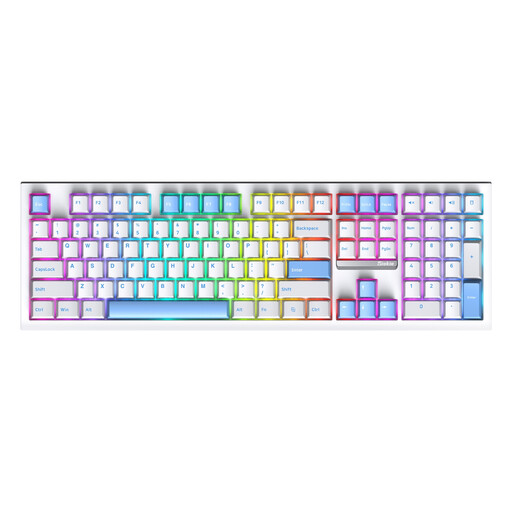
This full-size mechanical keyboard is relevant if repeated expense figures make a numeric keypad a priority. Check its layout and physical fit before choosing it for a two-screen desk.
 No image available
For repeated amounts and codes, the described numeric keypad is the feature to assess. This mechanical keyboard has RGB lighting and offers 2.4 GHz wireless, Bluetooth and USB-C wired modes. Confirm the key layout, fitted switch and dimensions before deciding whether it suits your desk and noise requirements.
No: two monitors connected to one computer do not call for keyboard device switching. If you type on separate devices, check the exact keyboard’s switching feature and pairing limit; Logitech says compatible Easy-Switch keyboards pair with up to three devices, while Razer states that the Pro Type Ultra connects to up to four.
Choose a layout with a dedicated number pad if repeated amounts and codes are your main typing task and it fits your desk. A 75% keyboard is worth considering when space for the mouse matters more and you are comfortable entering figures without that pad.
Yes, but check the particular switch variant and keyboard rather than relying on the mechanical label. Logitech describes linear switches as smoother and quieter than clicky alternatives, while manufacturers also offer models with sound-dampening features; neither description tells you exactly how a chosen board will sound in your workspace.
Keep the keyboard aligned with the screen you mainly work on rather than twisting towards it. The Health and Safety Executive advises positioning the keyboard just below elbow height and keeping the mouse in line with the elbow; assess those positions as part of the whole workstation.