
24/7 Customer Support

Free returns

Same-day & Next-day Delivery

Quality Guaranteed

Unlock Your Welcome Offers: FREE Delivery | Up to 80% OFF | Free 30-day JoyPlus trial
Download the APP
Mechanical keyboards now span compact office boards, wireless gaming models and highly customisable enthusiast designs. That choice is useful, but it also makes it easy to pay for features that do not suit your desk, typing habits or devices.
Whether you are a UK gamer, programmer, student or home-office worker, compare the practical specifications first. RGB lighting and dramatic product photography are secondary to the layout, switch behaviour, connection type and availability of replacement parts.
A 60% mechanical keyboard saves desk space by removing the function row, navigation keys and dedicated arrow keys. Those functions may still be available through Fn shortcuts, but this can slow down spreadsheet work, coding or regular navigation.
A 75% mechanical keyboard usually retains the function row and arrow keys in a smaller frame. A full-size model, such as a 104- or 108-key board, includes the number pad and is more suitable for frequent data entry. Check the actual key arrangement rather than relying only on labels such as “compact” or “gaming”.
A wireless mechanical keyboard needs charging and may require a receiver, Bluetooth pairing or both. Battery duration can also change considerably when RGB lighting is enabled. For a permanent desktop setup, a wired mechanical keyboard avoids battery management and generally offers a straightforward plug-and-play connection.
A tri-mode mechanical keyboard can combine Bluetooth, 2.4GHz wireless and USB wired use. This is useful if you move between a gaming PC, laptop and tablet, but check whether the product includes the 2.4GHz receiver and whether its layout matches your operating system.
Switch type strongly affects sound and feel. Clicky switches generate an audible click, which may be unsuitable in a shared office or a UK flat with thin walls. Linear switches have a smooth press, while tactile switches provide a noticeable bump without necessarily producing a click.
Also check stabilisers, keycap material and internal padding. RGB effects do not compensate for rattling larger keys, uncomfortable key spacing or a layout that makes your wrists and shoulders work harder.
For most UK buyers, confirm whether the keyboard is UK QWERTY, US QWERTY or another regional layout. A US layout can place the Enter, Shift and symbol keys differently from a UK ISO board. German QWERTZ models are designed for German typing and may not be a direct substitute for a UK keyboard.
Useful layout categories include:
Measure your available desk space, including room for your mouse. A compact mechanical keyboard can improve mouse clearance, but only if you are comfortable using layers or shortcuts.
Look for the switch type, actuation style and whether replacement switches can be fitted without soldering. A hot-swappable mechanical keyboard is useful for buyers who want to change from linear to tactile or quieter switches later.
Do not assume every hot-swap socket accepts every switch. Product specifications may refer to 3-pin or 5-pin compatibility, so check this before buying replacement parts. A switch puller may be included, but keycap and switch removal should be performed with the keyboard disconnected from power.
USB-C is convenient for modern wired use, while USB-A compatibility may matter if your computer has limited USB-C ports. For gaming, wired mode or 2.4GHz mode is often more practical than Bluetooth, particularly when the keyboard supports custom polling or low-latency settings.
An RGB mechanical keyboard can provide per-key effects and brightness adjustment, but software support varies. A physical volume knob is useful for calls, music and gaming, although it should be treated as a convenience feature rather than a reason to overlook layout or switch quality.
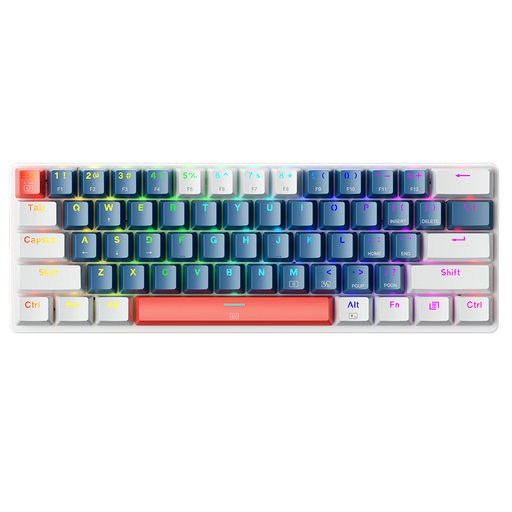
Why This Fits Their Persona: A practical entry point for students, first-time mechanical keyboard buyers and gamers who want to preserve desk space without paying for wireless hardware.
Its specifications clearly identify a 60% layout, wired USB-C connection and detachable design, so there is no battery to maintain or wireless receiver to misplace.
Hot-swappable blue switches, RGB lighting and software support for macros and key assignments.

Why This Fits Their Persona: Suits keyboard enthusiasts and desk users who value a substantial CNC aluminium build, custom controls and flexible device switching.
The product listing states the 96% US QWERTY layout and tri-mode connectivity, helping buyers check compatibility before ordering. The motorised lift also has moving-part safety warnings.
HMX Cream Taro linear switches, gasket mount, customisable IPS screen and Bluetooth, 2.4GHz and USB-C modes.

Why This Fits Their Persona: Designed around gaming controls for players who want a compact RGB board and adjustable actuation features for compatible PC setups.
The listing identifies its US layout, cable connection and Hall Effect magnetic switches. Buyers can therefore check whether adjustable actuation suits their games and typing preferences.
The product details list adjustable actuation to 0.01 mm, Rapid Trigger, an 8K polling rate and RGB backlighting.
Place the keyboard so your elbows remain relaxed and avoid raising the rear feet excessively if that bends your wrists. Take breaks during long typing or gaming sessions. Keep drinks away from the PCB, disconnect a wired board before cleaning and use a soft, dry cloth or compressed air around the keycaps.
Wireless models contain rechargeable batteries. Use a suitable certified USB power source, avoid heat and never puncture or disassemble the battery. Small switches, keycaps and pullers should be kept away from young children.
We have compiled a complete, real-time list of products that fully satisfy these strict selection criteria and UK safety regulations.
Yes, but switch choice matters. Linear or quieter tactile switches are generally more appropriate for shared spaces than clicky switches. A compact mechanical keyboard can also free desk space, while a full-size model is useful for numerical data entry.
Service life depends on switch construction, dust, liquid exposure and how the board is maintained. A hot-swappable mechanical keyboard can be easier to maintain because individual switches may be replaced without soldering. Check the manufacturer’s stated switch rating, but treat it as a specification rather than a guarantee of total keyboard lifespan.
Its main ongoing requirement is battery charging. Charging cost is typically small, but convenience depends on battery capacity, RGB brightness and how often the board is used. If you do not need portability, a wired mechanical keyboard removes this consideration and can be simpler for a fixed UK workstation.