Frequent invoice-entry home workers
If you regularly enter totals, dates, quantities and account figures, a number pad in its familiar position may matter more than a smaller keyboard footprint.


For regular invoice entry, start with a full-size or other number-pad-equipped mechanical keyboard; a compact layout may save desk space but leave out the keys you use most. Then check the selected switch variant for your household, confirm the layout matches your typing habits, and make sure the keyboard fits your workstation.
If you regularly enter totals, dates, quantities and account figures, a number pad in its familiar position may matter more than a smaller keyboard footprint.
If you work near other people or take calls at your desk, compare the sound and feel of the exact switch variant rather than relying on the keyboard family name.
If UK-ISO key positions are familiar to you, check the selected configuration. Connection choices and remapping may also matter if you move between devices or tailor your workflow.
For invoice work, settle the number-pad layout first. Then weigh switch sound against the space and connections your desk setup needs.
| Concern | What to check | Who this matters to |
|---|---|---|
| Entering figures | Confirm that the exact layout has a dedicated physical number pad; a mechanical keyboard need not include one. | If I enter numeric fields throughout the day, I want the number pad ready without changing my usual hand movements. Around 42% of consumers put figure-entry layout first. |
| Switch sound | Check the named switch variant on the selected listing and, where possible, listen to a comparable switch before choosing. | Working near others, I want mechanical feedback without making calls or quiet periods more distracting; roughly 33% of consumers prioritise switch sound. |
| Workstation fit | Check the keyboard footprint and connection method. The Health and Safety Executive advises placing the keyboard just below elbow height and keeping it central with the screen. | When the desk must accommodate prolonged work and other devices, I need room to position everything comfortably. About 25% of consumers make workstation fit their primary concern. |
A compact layout can leave out the dedicated pad used for repeated invoice figures, even though it saves desk space.
Check the exact layout image and specification before comparing lighting or other extras.
Variants within one family can have different sounds and typing feels. Logitech, for example, lists Tactile Quiet, Clicky and Linear versions of the MX Mechanical.
Confirm the switch named in the configuration you intend to buy; do not assume a quieter-labelled option is silent.
A new keyboard alone does not determine whether its height and position suit your desk arrangement.
Follow the Health and Safety Executive’s guidance to place the keyboard just below elbow height and keep it central with the screen; consider the mouse, chair and display together.
A model family may offer different layouts and switch options, so the name alone may not identify the key positions you expect.
If UK-ISO is important to you, confirm that the selected configuration has it, along with your intended switches and connection method.
The full-size MX Mechanical is an office-oriented option for buyers who want an integrated number pad and may switch between devices.
The Q6 Max UK-ISO is relevant if a full-size layout, connection choices and customisation matter to your invoice workflow.
Corsair’s UK full-size mechanical range is relevant when a conventional layout with a dedicated number pad takes priority over compactness.
These full-size mechanical keyboards are options for a desk used to enter invoice figures. Both are listed with US layouts, so check the key arrangement if you normally type on UK-ISO.
 No image available
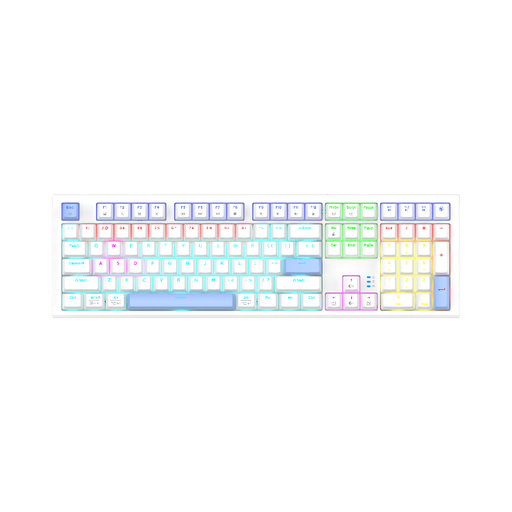
Consider this full-size option if you enter figures regularly and want a choice of connection modes.
The listed configuration has 108 keys, a US layout and Silent Tactile switches. “Silent” is a switch description, not a promise that typing will be inaudible; check its sound and key positions against your workspace needs.
 No image available
Consider this full-size option if invoice entry happens at a fixed desk and you want a wired connection.
The listed configuration has 104 keys, a USB-A connection and a US QWERTY layout. Check the switch sound if you share the room, and confirm that the US key positions suit you.
Choose a full-size or other number-pad-equipped keyboard if you regularly use a dedicated pad for figures. Corsair describes a full-size layout as including one; a compact keyboard may free up desk space but omit it.
Check the sound of the exact switch variant you plan to buy. Logitech labels one MX Mechanical variant Tactile Quiet, alongside Clicky and Linear choices, but that label does not mean the keyboard is silent.
The Health and Safety Executive guidance cited here does not prescribe a particular mechanical layout. For workers using display screen equipment daily in continuous periods of an hour or more, its guidance says the DSE regulations apply; it also advises positioning the keyboard just below elbow height and keeping it central with the screen.
Check which local-authority or retailer collection route accepts electrical equipment in your area. UK guidance from the Office for Product Safety and Standards and the Department for Environment, Food & Rural Affairs describes waste-electrical-equipment measures intended to encourage recovery, reuse and recycling.