What matters when choosing?
Decide whether your statistics workflow needs a numpad, then check how the keyboard will connect without tying up a port you need. Desk space, switch preference and charging can narrow the choice further.
| Concern |
What to check |
Who this matters to |
| Numeric entry |
Check for a physical numpad and test any numpad-specific software shortcuts. Logitech UK identifies one on its full-size MX Mechanical; Keychron UK offers full-size Q6 Max and 96% Q5 Max layouts. |
If scores and player numbers are entered repeatedly, a dedicated keypad may matter more than saving desk width. Around 36% of consumers put numpad-led entry first. |
| Sockets and USB ports |
Confirm computer Bluetooth support, or allow a USB port for a 2.4 GHz receiver. Check the exact keyboard’s charging connector and battery-life conditions. |
With few free ports beside a laptop, I want to avoid both a permanent keyboard cable and an unnecessary receiver. Roughly 29% of consumers place cable and port reduction first. |
| Desk space |
Compare the exact key diagram: Keychron UK describes the V3 Max and K1 as TKL, while its Q5 Max has a 96% layout. Check the keys your software uses. |
When a mouse, laptop and match notes share a small surface, I may accept a different key arrangement to make room. For around 21% of consumers, working space takes priority. |
| Longer sessions and shared spaces |
Consider switch sound and feel alongside keyboard placement. The Health and Safety Executive advises keeping the keyboard and screen central, wrists straight and touch light when keying. |
During sustained entry near other people, I care about a workable desk position and a switch sound that suits the space. Around 14% of consumers put these considerations first. |
Joybuy keyboards for this setup
These wireless keyboards offer different approaches to a match-statistics desk, from models identified with a 96% layout to a smaller 75-series option. Match the exact keypad, connection options and key layout to your computer and entry workflow.
 No image available
ASUS ROG Strix Scope II 96 Wireless, Black, UK Layout
Consider this wireless model if you want to check whether its key arrangement suits repeated numeric entry at a crowded desk.
The product name identifies a UK layout; confirm the exact key diagram, physical numpad, connection modes and charging method for the variant before choosing it.
View on Joybuy
 No image available
AULA F99 Mechanical Wireless, US QWERTY, Light Blue, Reaper Switch
Consider the F99 if its key arrangement fits your numeric-entry routine and you can use a US QWERTY layout.
The product name specifies wired, Bluetooth and 2.4 GHz modes, plus Reaper switches. Bluetooth requires computer support, while 2.4 GHz mode uses a receiver; check the exact keypad and charging arrangements before buying.
View on Joybuy
 No image available
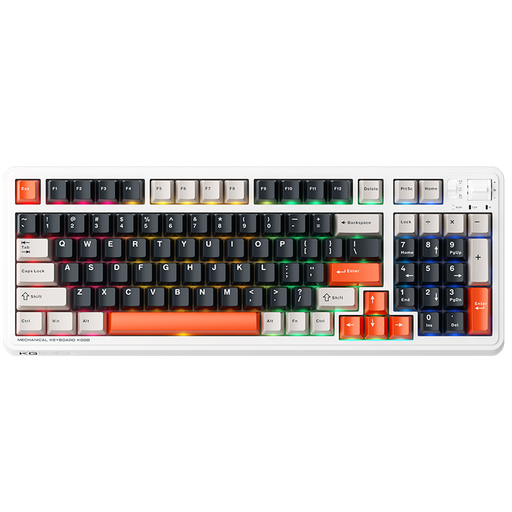
MACHENIKE KG98 96% Tri-Mode, US QWERTY, Black/White/Orange
The stated 96% layout is worth considering if desk width matters but your statistics work still calls for a physical numpad.
The product name specifies a hot-swappable mechanical keyboard and a US QWERTY layout. Check the exact key diagram, tri-mode connection options and charging arrangements against your setup.
View on Joybuy
 No image available
HyperX Alloy Rise 75 Wireless Keyboard UK
Consider this wireless model when a smaller key arrangement matters more to you than a confirmed physical numpad.
Compare the exact key diagram and UK layout with your statistics-software shortcuts, and check its connection modes and charging arrangements before choosing it.
View on Joybuy
Common questions
Will a Bluetooth mechanical keyboard free up a plug socket?
It can remove the need for a permanently attached keyboard cable, but you will still need to recharge a rechargeable model. If your computer supports Bluetooth, pairing can also avoid a USB receiver; check how and when the exact keyboard charges.
Does 2.4 GHz wireless use a USB port?
A 2.4 GHz keyboard connection normally uses a USB receiver, so allow a port for it. Logitech UK describes Logi Bolt connections through compatible USB receivers; check the receiver and available ports for the keyboard you intend to buy.
Should I choose a compact keyboard for match statistics?
Choose one if its exact key arrangement supports your usual numeric fields and shortcuts. TKL keyboards omit the numpad, whereas full-size and 96% layouts can retain it; compare the precise variant rather than relying on its size label alone.
How should I position the keyboard for a longer entry session?
The Health and Safety Executive advises keeping the screen and keyboard central, placing the keyboard just below elbow height where possible, and using straight wrists and a soft touch when keying. Consider the whole workstation as well as the keyboard’s switch feel.
How do I dispose of an old wireless keyboard in the UK?
Treat it as electrical waste rather than general rubbish. GOV.UK says waste electrical products can be taken to a local household waste recycling centre and advises that the terminals of removed lithium batteries should ideally be taped to reduce fire risk.


