Small-desk label writers
You draft and edit museum labels at a constrained workstation and want room for your work without giving up the navigation and function keys you use.


A 75% mechanical keyboard is a sensible starting point for writing museum labels on a small desk: it can retain arrow keys and a function row without the width of a separate number pad. If others work nearby, choose the switch variant with care rather than assuming every mechanical keyboard is quiet. Check the selected key layout for familiar UK punctuation, and prioritise wireless connections or replaceable switches only if you will use them.
You draft and edit museum labels at a constrained workstation and want room for your work without giving up the navigation and function keys you use.
You write near colleagues, visitors or other quiet work and want to consider switch sound as well as typing feel.
You move between a desktop, laptop or tablet and want to assess whether one compact keyboard can serve those devices.
Start with the keys and desk space your writing requires, then narrow the choice by switch variant and layout. Treat connection options as a workflow decision rather than a substitute for fit.
| Concern | What to check | Who this matters to |
|---|---|---|
| Desk space and editing keys | Compare the keyboard’s dimensions with your available space. Check for the arrows, function row and number pad you actually use. | If I edit text on a crowded desk, I want space for my work without losing familiar navigation keys. Around 33% of consumers put that balance first. |
| Noise and key feel | Check the exact switch variant; a model name alone may cover clicky, tactile and linear options. | Writing beside other people makes me wary of an intentionally clicky switch, even if I like its feel. For around 27% of consumers, limiting disturbance is the primary concern. |
| UK key layout | Look for an explicit UK-ISO or UK English variant and inspect its punctuation and symbol legends. | When I edit UK English copy, unfamiliar symbol positions could interrupt my work. Familiar key placement comes first for around 27% of consumers. |
| Connection flexibility | Check the selected model’s wired and wireless modes, device switching and charging requirements. | If I regularly move between work devices, I want to know whether one keyboard can connect to them conveniently. Around 13% of consumers make that flexibility their first priority. |
Clicky switches are intentionally audible, which may distract people sharing a quiet workspace.
If limiting disturbance matters, compare a Tactile Quiet or linear variant and confirm the switch version selected before checkout.
A smaller board may remove or relocate keys you use to edit labels, including arrows, function keys or a number pad.
Compare 75%, tenkeyless and full-size layouts against your own editing shortcuts. A 75% board is worth considering if its retained keys cover your work; choose a larger layout if you regularly need a separate number pad.
The layout belongs to the selected product variant, not the location of the shop. Different punctuation positions can be inconvenient during sustained writing.
Check for UK-ISO or UK English in the selected variant and inspect the keycap legends.
Extra connection modes and switch customisation may add little to a keyboard that stays on one desk with its supplied switches.
Prioritise multi-device wireless if you change devices regularly, or hot-swapping if you intend to replace switches. Otherwise, resolve layout, fit and switch choice first.
These examples illustrate different features to compare; the stated options and limitations apply to the named models, not every keyboard from each brand.
The K3 Max is a compact, low-profile example for writers considering a confirmed UK-ISO option.
The MX Mechanical Mini is a compact, low-profile option for writing across several devices.
The BlackWidow V4 75% is relevant if changing switch feel later is part of the plan.
These compact keyboards are options to examine when desk space matters. Their variants differ, so check the selected key legends, switch feel and suitability for nearby colleagues before choosing one for museum-label writing.
 No image available
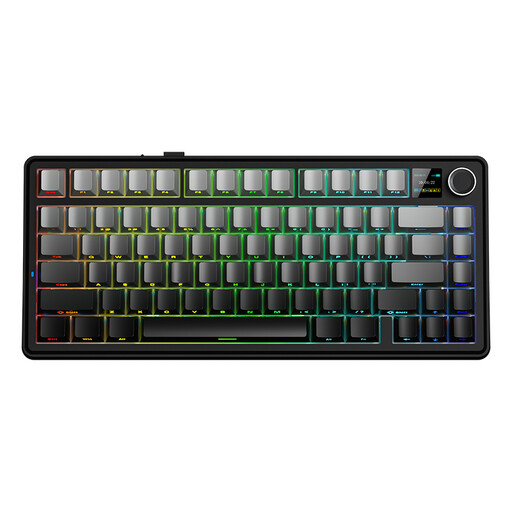
Consider this 75% model if you want a compact writing layout and a choice of connection modes.
The listed variant has a US QWERTY layout, side-engraved keycaps and wired, Bluetooth and 2.4G modes. Check its dimensions against your desk and its switch sound against your workspace; its US key positions may not suit writing that depends on familiar UK symbols.
 No image available
This 75% keyboard is worth considering if you want a compact board and expect to use its replaceable-switch feature.
The listed configuration names tri-mode connectivity, hot-swappable Star Vektor switches, a TFT display, a knob and side-printed keycaps. Inspect the selected key layout and check the sound in use before choosing it for UK copy or a quiet shared room.
 No image available
Its 75% format is relevant if your writing desk needs room beyond the keyboard.
The named black variant has a US QWERTY layout, a Gateron White switch and tri-mode connectivity. Check its dimensions and sound for your workspace; do not choose its US key layout if familiar UK punctuation positions are essential.
 No image available
Consider this compact wireless model if you want to keep editing controls within reach on a small desk.
The model name identifies the Alloy Rise 75 wireless variant. Check the selected key legends rather than treating ‘UK’ in the title as confirmation of a UK-ISO layout, and assess its switch sound if other people work nearby.
 No image available
This 75% model suits consideration if compact size and a choice of wired or wireless connections matter to your setup.
The listed configuration names wired, Bluetooth and 2.4G modes, PBT keycaps and a US QWERTY layout. Check the selected switch type and sound before using it in a shared space; its US symbols may not match familiar UK key positions.
Yes, if you need to reduce keyboard width while keeping arrows and a function row for editing. Check the keys on the particular model, and choose a larger layout if you use a separate number pad regularly.
Avoid an intentionally clicky variant if limiting disturbance is important. Logitech UK offers a Tactile Quiet version of the MX Mechanical Mini as well as Clicky and Linear versions, but the sound and feel you prefer still depend on the selected keyboard and workspace.
Choose a confirmed UK-ISO or UK English variant if familiar punctuation and symbol positions matter to your writing. Check the selected variation and keycap images; a UK-facing shop or ‘UK’ in a general product title is not enough to establish the key layout.
No. Wireless can reduce cable clutter or help when you switch devices, while a wired connection may be simpler at one fixed workstation. Check the exact keyboard’s connection modes and charging requirements before deciding.
Check your local authority or retailer for a suitable small-electricals collection or take-back route. UK Office for Product Safety and Standards and Department for Environment, Food & Rural Affairs guidance describes measures that encourage the recovery, reuse and recycling of electrical equipment; collection arrangements vary by area.